

How to Delete iCloud Calendar Spam Without Alerting Spammers - MacRumorsOpen MenuShow RoundupsShow Forums menuVisit ForumsOpen Sidebar
Skip to Content

How to Delete iCloud Calendar Spam Without Alerting Spammers

by

A large number of iCloud users have reportedly received spam in the form of unsolicited Calendar event invitations over the last week.

Suspect Black Friday offers for cheap goods have been appearing in personal iCloud calendars, with the default options to "Accept", "Maybe" or "Decline" appearing at first to be the only way to respond to them.

calendar spam
Unfortunately choosing any of these options simply notifies the spammer that the account is active and ready for more unsolicited offers. Instead, users are advised to try the following alternative method for removing the spam events on their iOS devices.

  1. Open the Calendar app and tap the "Calendars" button at the bottom of the screen.
  2. Tap the Edit button and on the next screen, select the "Add Calendars" option.
  3. Give the calendar an easily recognizable throwaway name, like "Spam", and tap "Done" at the top of the screen until you're back on the Calendar screen.
  4. Select the spam invitation and move it to the "Spam" calendar you just made.
  5. Tap the "Calendars" button at the top of the screen, tap the "i" button next to the Spam calendar, and on the next screen, tap "Delete Calendar" at the very bottom of the screen menu.
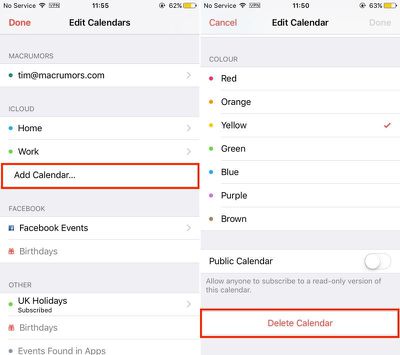
calendar-spam
That should rid you of the unwanted spam event, leaving spammers none the wiser.

Update: Some readers have noted another option is to change iCloud calendar settings to receive event notifications by email rather than as in-app notifications. Logging into iCloud via a web browser, open the Calendar, click the cog in the bottom left corner to go to Preferences -> Advanced and then select "Receive event invitations as: Email". This lets users delete the spam calendar events as emails instead.

(Thanks, Jeff!)

Tag: Spam

Top Rated Comments

124 months ago
I don't understand why Apple allows total strangers to add events to your calendar just because they have your email address. What a huge oversight.
Score: 33 Votes (Like | Disagree)
AtheistP3ace Avatar
124 months ago
Ugh. This has happened to me long long before Black Friday. And I've never been able to get rid of it. Only it's in my reminders. The minute I delete it. It comes back. Trying to sell ray bans. Drives me crazy.
Score: 18 Votes (Like | Disagree)
decimortis Avatar
124 months ago
But what if I WANT a buy one get one free breast enlargement? It comes with free Raybans after all.
Score: 17 Votes (Like | Disagree)
maflynn Avatar
124 months ago
I wish Apple would address this, so we don't have to use this kludgy work arounds
Score: 16 Votes (Like | Disagree)
Phil A. Avatar
124 months ago
I don't understand why Apple allows total strangers to add events to your calendar just because they have your email address. What a huge oversight.
It's not just Apple - Google, Microsoft and every other "groupware" provider has exactly the same functionality: It's not adding them to your calendar, but sending you an invitation to an event that shows in your calendar as tentative until it's accepted or declined. Technically, it's no different than sending an email to someone (the invitations are sent via email)

What Apple can do to improve the situation though is to provide an easy way of deleting an invitation without sending a reply and also improve their spam filtering to block out the worst of the senders. Maybe another option would be to allow people to restrict invitations to people only on your contact list but that could be too restrictive for some people

You can also disable in-app notifications about invitations and receive them via email which would stop them automatically appearing in your calendar
Score: 14 Votes (Like | Disagree)
hlevolve Avatar
124 months ago
I have gotten like 4 of these since last Wednesday... hope Apple is doing something because this could get extremely annoying fast.
Score: 10 Votes (Like | Disagree)

Popular Stories

Apple Card iPhone 16 Pro Feature

Apple Card Promo to Offer Free AirPods Pro 3

Friday May 15, 2026 8:59 am PDT by
Starting as early as next week, customers who sign up for an Apple Card at Apple's retail stores in the U.S. will receive $249 cash back when they purchase AirPods Pro 3, according to Bloomberg's Mark Gurman. The promotion has yet to be officially announced by Apple, so exact terms and conditions are not available at this time. AirPods Pro 3 are priced at $249 in the U.S., so customers who...
airpods pro 3 pink

New Apple Card Holders Can Get Free AirPods Pro 3, But There's a Catch

Monday May 18, 2026 8:11 am PDT by
Apple today launched a new promotion offering new Apple Card holders the chance to earn back the cost of AirPods Pro 3 through monthly cash rebates, but there is a recurring spend requirement attached. Customers who open a new Apple Card account and purchase AirPods Pro 3 directly from Apple by June 15 will qualify. Starting July 1 and running through April 30, 2027, cardholders can earn $25 ...
Apple WWDC25 iOS 26 CarPlay Light mode 250609

Six Popular iPhone Apps Now Available on CarPlay

Thursday May 14, 2026 9:10 am PDT by
Apple's CarPlay system for accessing iPhone apps on a vehicle's dashboard screen has received six popular apps in recent weeks: ChatGPT, Perplexity, Grok, Google Meet, WhatsApp, and the indie artist streaming platform Audiomack. Make sure you have the latest version of each app and they will automatically appear on CarPlay. ChatGPT Starting with iOS 26.4, CarPlay supports voice-based...














