Ulysses 2.7 Brings Touch Bar Support, macOS Sierra Tabs and More to Popular Writing App - MacRumorsOpen MenuShow RoundupsShow Forums menuVisit ForumsOpen Sidebar
Skip to Content

Ulysses 2.7 Brings Touch Bar Support, macOS Sierra Tabs and More to Popular Writing App

by

German developers The Soulmen today released a new version of popular writing app Ulysses, bringing Touch Bar support, Tabs in macOS Sierra, and a host of other new features and performance improvements.

From Wednesday, users launching version 2.7 of the award-winning app on Touch Bar equipped MacBook Pros will see new contextual functions for Ulysses in the OLED strip, bringing the ability to assign markup tags directly while they write.
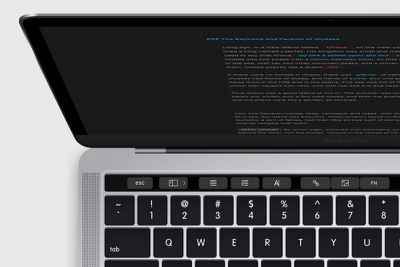
macbook_touchbar ulysses
Ulysses 2.7 now also includes tabbed windows in macOS Sierra, making it possible to switch between multiple open texts within the same window.

Elsewhere, Ulysses now offers full support for the TextBundle format outside its iCloud library. TextBundle combines Markdown text and all referenced images into a single file for convenience, and Ulysses now allows writers to use images when working from Dropbox or other storage providers.

The latest update also makes it easier to switch from Evernote to Ulysses, by allowing users to import ENEX Evernote export files containing multiple notes, upon which individual sheets are created for each note.

In addition, a new Reading Time writing goal has been added to the existing options (number of characters, words, or pages), while a number of more general improvements, bug fixes, and stability enhancements have also been implemented in the latest version of the app.

Ulysses 2.7 is available for MacOS and iOS on the Mac App Store and App Store respectively, and is a free update for existing users. The Mac app costs $44.99, while the universal iOS app costs $24.99.


Top Rated Comments

123 months ago
Fantastic app - and no, I didn't get it for free, I purchased both the Mac and iOS versions myself.

Despite being aimed at writers, I primarily use Ulysses to write lecture notes for my Law degree. It's a beautiful and simple interface for holding all of my lecture notes which can then be keyword-searched easily. If I'm in a seminar / tutorial / whatever people call them, and someone mentions a case, I can pop the name into the keyword search and instantly be taken back to the exact spot in the lecture where the case was introduced.

It also provides a complete library of my three years of lecture notes, all backed up to the cloud, and easily exported to PDF and so on.

Not to mention I can access my lecture notes on all my devices thanks to iCloud sync and brilliant Mac-iOS interplay.
Score: 4 Votes (Like | Disagree)
AppleInLVX Avatar
123 months ago
These guys are seriously among the cream of the crop for app development. I've been using Ulysses for two years now, and it's all I need. Beautiful, bullet-proof, cross-platform functionality. There's simply nothing better. Worth every last penny. I've used it for two novels, all my journal writing, and more and more just for miscellaneous thoughts and notes. The dev are super-responsive, too. This one's a no-brainer if you're looking for something that'll handle writing.
Score: 3 Votes (Like | Disagree)
123 months ago
Fantastic app - and no, I didn't get it for free, I purchased both the Mac and iOS versions myself.

Despite being aimed at writers, I primarily use Ulysses to write lecture notes for my Law degree. It's a beautiful and simple interface for holding all of my lecture notes which can then be keyword-searched easily. If I'm in a seminar / tutorial / whatever people call them, and someone mentions a case, I can pop the name into the keyword search and instantly be taken back to the exact spot in the lecture where the case was introduced.

It also provides a complete library of my three years of lecture notes, all backed up to the cloud, and easily exported to PDF and so on.

Not to mention I can access my lecture notes on all my devices thanks to iCloud sync and brilliant Mac-iOS interplay.
I second that. Worth every $. Uses this every day for meeting notes. Exports to word or publish to wordpress. This does it all.
Score: 3 Votes (Like | Disagree)
goomba478 Avatar
123 months ago
I LOVE their apps. I found out about them 2 years ago and use Ulysses for iPad and Mac almost exclusively for writing now. They constantly are improving things and the developers are super awesome people too. I wish them all the best.
Score: 2 Votes (Like | Disagree)
Lisat78 Avatar
123 months ago
I'm another fan. I started using Ulysses purely and simply because Scrivener was not then available on iOS. Now it is, but I find that Ulysses is still my writing (and reading) app of choice. I can echo what's said about about developer responsiveness; I have emailed them so many times, often about things relating to readability rather than writing and they've given me pretty much everything I've asked for. Brilliant, brilliant app, on both iOS and Mac OS. So much so that I'd now think a million times before going android or windows because I can't bear to lose the simplicity, elegance, and all round functionality of Ulyssses.
Score: 2 Votes (Like | Disagree)
123 months ago
I love Ulysses, it's my favorite app for both, iOS and Mac.
The simple design, and perfect usability... extremely nice.
Score: 1 Votes (Like | Disagree)

Popular Stories

Apple Card iPhone 16 Pro Feature

Apple Card Promo to Offer Free AirPods Pro 3

Friday May 15, 2026 8:59 am PDT by
Starting as early as next week, customers who sign up for an Apple Card at Apple's retail stores in the U.S. will receive $249 cash back when they purchase AirPods Pro 3, according to Bloomberg's Mark Gurman. The promotion has yet to be officially announced by Apple, so exact terms and conditions are not available at this time. AirPods Pro 3 are priced at $249 in the U.S., so customers who...
Apple WWDC25 iOS 26 CarPlay Light mode 250609

Six Popular iPhone Apps Now Available on CarPlay

Thursday May 14, 2026 9:10 am PDT by
Apple's CarPlay system for accessing iPhone apps on a vehicle's dashboard screen has received six popular apps in recent weeks: ChatGPT, Perplexity, Grok, Google Meet, WhatsApp, and the indie artist streaming platform Audiomack. Make sure you have the latest version of each app and they will automatically appear on CarPlay. ChatGPT Starting with iOS 26.4, CarPlay supports voice-based...
ipad mini 7 blue

OLED iPad Mini: Release Date, Pricing, and What to Expect

Thursday May 14, 2026 5:08 am PDT by
According to the latest rumors, Apple is close to launching its next-generation iPad mini. So what should we expect from the successor to the iPad mini 7 that Apple released over a year ago? Read on to find out. Processor and Performance Apple is working on a next-generation version of the iPad mini (codename J510/J511) that features the A19 Pro chip, according to information found in code...