LG and Dell to Showcase Latest USB-C Displays for New MacBook Pro at CES This Week - MacRumorsOpen MenuShow RoundupsShow Forums menuVisit ForumsOpen Sidebar
Skip to Content

LG and Dell to Showcase Latest USB-C Displays for New MacBook Pro at CES This Week

CES 2017 kicks off in Las Vegas this week, and a handful of USB-C displays compatible with the new MacBook Pro will be unveiled at the show. USB-C displays display up to 4K video, transfer data, and charge the new MacBook Pro over a single cable connected between the display and notebook.

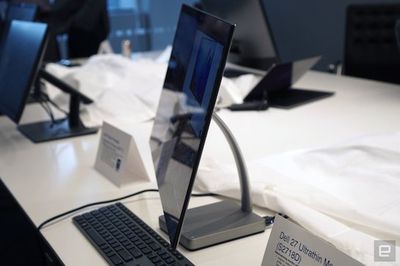
Dell today introduced the S2718D Ultrathin Monitor, a 27-inch IPS display which it claims is the "world"s overall thinnest monitor" with HDR10 support for vibrant colors. The display has a glossy finish with Dell's ultra-thin InfinityEdge bezels, but its base is bulkier than average to accommodate for the internal components.
dell-27-ultrathin

Dell's new S2718D display is indeed very thin (Image: Engadget)

While the display is indeed very thin, its other specs fall short of some existing USB-C and Thunderbolt 3 displays on the market. It is not 4K, for instance, but rather Quad HD with a resolution of 2,560×1,440 for 108 PPI. And while it covers over 99% of the sRGB color gamut, it does not support the wider DCI-P3 color gamut.

The display has a 60Hz refresh rate, peak brightness of 400 nits, 1000:1 contrast ratio, 6ms response time, and 178⁰ wide viewing angle, per Tom's Hardware. It can connect to a new MacBook Pro or 12-inch MacBook over a single cable, but with only 45W of power delivery. There is also one HDMI 2.0 port and an audio line out.

The S2718D Ultrathin Monitor will start at a rather expensive $700 on Dell.com, with U.S. availability expected on March 23.

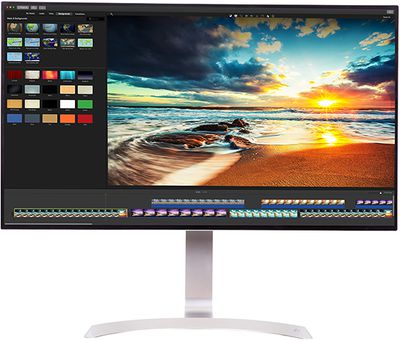
LG will be showcasing more attractive options at CES this week, including the 32UD99, a new 32-inch IPS display with HDR10 support and 4K Ultra HD resolution of 3,840×2,160 for 137 PPI. In addition to HDR, the 32UD99 covers over 95% of the DCI-P3 color gamut for wider and more immersive colors.
lg-monitor-32ud99
The 32UD99 can connect to the new MacBook Pro or 12-inch MacBook over a single cable, but LG did not specify the wattage for pass-through charging. The display also features built-in speakers with "Rich Bass" technology and a "True Color Pro" setting for "color reproduction accuracy unmatched in the industry," according to LG.

While it does not have USB-C input, LG will also be showcasing the 34-inch 21:9 UltraWide Mobile+ Monitor at CES 2017. The new 34UM79M model is "the world's first Chromecast-enabled multimedia monitor," enabling users to stream movies, music, games, and more from mobile devices directly to the monitor.

Also on display in Las Vegas alongside LG's UltraFine 4K and 5K displays will be its new 34-inch 21:9 UltraWide gaming monitor. The 34UC99 model is equipped with AMD's FreeSync technology, 1ms Motion Blur Reduction, Dynamic Action Sync, Black Stabilizer, and other gamer-friendly features. No word yet on USB-C input.

LG did not confirm pricing or availability, but those details should become known once CES gets underway later this week.

Dell's and LG's new USB-C displays provide new MacBook Pro owners with a couple of additional choices after Apple discontinued its Thunderbolt Display. LG's UltraFine 5K Display remains one of the best options, but those looking for alternatives should read our USB-C and Thunderbolt 3 Display Buyer's Guide.


Related Roundup: Studio Display
Buyer's Guide: Displays (Buy Now)
Related Forum: Mac Accessories

Popular Stories

iOS 27 Next to iPhone

Here's When iOS 27 Rolls Out Today in Every Time Zone [Update: It's Out]

Sunday September 13, 2026 3:00 am PDT by
Update 10:04 a.m.: iOS 27 is rolling out now, though it may take a bit for all users to see it, so keep checking! Apple is about to release iOS 27, which will finally deliver more advanced Siri AI capabilities as well as a variety of other refinements, improvements, and new features to iPhones. It's Apple's biggest software update of the year, and Apple announced at Wednesday's iPhone event...
iOS 27 Icon iPhone

iOS 27 Available Now With These 8 New Features

Monday September 14, 2026 9:00 am PDT by
Update — 10 a.m. Pacific Time: Apple has released iOS 27. During its iPhone 18 Pro and iPhone Duo event last week, Apple announced that iOS 27 will be released widely on Monday, September 14. iOS 27 should be available around 10 a.m. Pacific Time / 1 p.m. Eastern Time today via the Settings app, under General → Software Update. Below, we have highlighted eight new features and...
Apple iCloud Plus expansion hero

iCloud+ Now Includes Apple TV, Apple Arcade, and Curated Apple Music Stations in Over 100 Countries

Tuesday September 15, 2026 1:43 am PDT by
Apple today announced a new subscription initiative that turns paid iCloud+ subscriptions into a broader services bundle in more than 100 countries. In select countries, Apple says every paid iCloud+ plan, including the cheapest 50GB tier, now includes Apple TV and Apple Arcade "at no additional cost," while family sharing extends the storage, TV and Arcade access to up to five people....

Top Rated Comments

AngerDanger Avatar
127 months ago
You know, I just miss Apple displays already.

None of these have the aesthetics the ACD and TB's I still own.
Simple workaround:
[LIST=1]
* Print out picture of Apple Cinema Display
* Cut out stand
* Tape it below the screen so it hangs down


Attachment Image
Score: 69 Votes (Like | Disagree)
jonnysods Avatar
127 months ago
You know, I just miss Apple displays already.

None of these have the aesthetics the ACD and TB's I still own.
Score: 34 Votes (Like | Disagree)
ctyrider Avatar
127 months ago
That Dell monitor is gorgeous. Apple should be ashamed of itself.
Gorgeous? It's a 1440p display for chrissakes. If anyone should be "ashamed" here, it's Dell for shipping 8 year old technology in 2017!
Score: 22 Votes (Like | Disagree)
MakeAppleAwesomeAgain Avatar
127 months ago
That Dell monitor is gorgeous. Apple should be ashamed of itself.
Score: 22 Votes (Like | Disagree)
127 months ago

Could you please explain what you were meaning, why would a low or high resolution be ok for a 27" monitor but a high resolution only be good for a small screen?

Resolution is all about how far you sit from a screen.
Ok -- it took me half an hour to find the link that I wanted to share but I now have it. (I'll save it this time!)

What I meant is simply that Mac OS is designed to look best at about 100-110 pixels-per-inch or at twice that much 200-220 ppi, in 'retina' mode, with perfect pixel doubling. This translates to an 'ideal' resolution of either 1080p (or 4K for retina) for a monitor in the 22" range or else a resolution of 1440p (or 5K for retina). This is the "correct" mode of displaying MacOS, but of course, as you say, one could just sit closer or further from the display. That's a different topic, Apple designs based on what it understands to be typical usage.
As you can see from this chart, a 4K 27" monitor is "wrong", because OS elements appear too small if used natively as 4K, and too large if used as "retina" 1080p (which is what the OS defaults to, by the way). Many people will go into the settings and run a 27" 4K monitor scaled to 1440p because, as most people would tell you, that just "looks" like the right size for Mac OS on a panel that size. But if you do that you are wasting money: you should have just bought a 1440p monitor instead of a 4K.
This is also why Apple never released an iMac 27" 4K, but waited until they could release a 5K 27" iMac, and a 4K 21.5" iMac. Ditto for the LG UltraFine. You will never see Apple officially endorsing a 4K 27" panel because its OS just looks bad on it.

This link ('https://bjango.com/articles/macexternaldisplays/') is very helpful, and it contains this great chart, which I think every one shopping for an external display should take note of, and that MacRumors staff should understand before they claim that higher resolution is always better.
I have become convinced that this is an industry problem: they find it easy to manufacture 27" 4K panels right now, so this is what they are pushing. But for Mac users, 22" 4K or 27" 5K are more appropriate.
I personally don't have very strong eyesight (almost wrote iSight there), so maybe I would be content with a 24" 4K and things looking a bit big. But I had a 27" 4K and had to send it back, the OS elements were so big as to be goofy.
MacRumors content image
Score: 13 Votes (Like | Disagree)
btrach144 Avatar
127 months ago
Way better looking than the Apple/LG monitor but still not as appealing as previous Apple monitors.
Score: 11 Votes (Like | Disagree)