Apple Explores Smart Keyboard With Siri, Share, and Emoji Keys - MacRumorsOpen MenuShow RoundupsShow Forums menuVisit ForumsOpen Sidebar
Skip to Content

Apple Explores Smart Keyboard With Siri, Share, and Emoji Keys

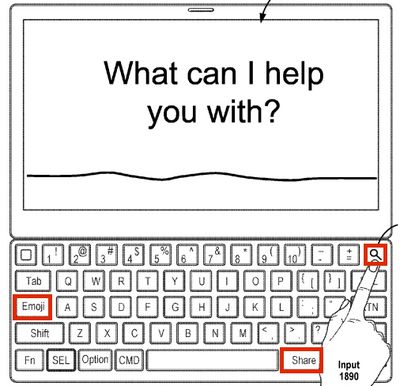
Apple recently filed a patent application containing drawings of a Smart Keyboard with "Share" and "Emoji" keys, and a key that can be used to both search and invoke Siri, suggesting it may be exploring a new version of the iPad Pro accessory to be sold alongside next-generation models.
smart keyboard patent
The drawings show that pressing the "Share" key would bring up a share sheet on the iPad Pro with options to share through apps such as Facebook, Mail, and Messages. There is no description of how the "Emoji" key would function, but pressing it would presumably bring up the on-screen Emoji keyboard on the iPad Pro.

The current Smart Keyboard already has a globe key in the bottom left corner that can bring up the on-screen Emoji keyboard, but this key is not visualized in the patent drawings. There is a non-existent "Fn" key in its place.

The third key, labeled with a magnifying glass, would serve multiple purposes. A single press, for example, could bring up a search field for searching within apps. A double press could bring up shortcuts for Messages, Photos, Calendar, Camera, Notes, Settings, and other apps. Long-pressing the key would invoke Siri.

Since this is not a design patent, Apple's drawings are not entirely accurate, but rather just basic visualizations. The "Share" key is located where the right-side Command and Option keys would normally be, for example, while the "Emoji" key is included in lieu of Caps Lock, which is an essential key.

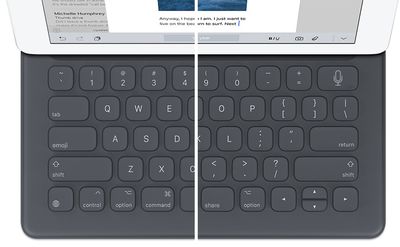
Nevertheless, we roughed up a quick mockup of what the new Smart Keyboard could look like based on the same layout of the new keys as Apple's drawings.
smart keyboard mockup
Apple is rumored to launch a trio of new iPads as early as March, but possibly not until later this year, including an all-new 10-inch range iPad Pro with an edge-to-edge display. The other models are expected to be updated 9.7-inch and 12.9-inch iPad Pro models with faster A10X processors.

A so-called "Smart Keyboard 2" could accompany the new iPads and perhaps the so-called "Apple Pencil 2" rumored to launch this year.

The current Smart Keyboard was released in November 2015 and costs $149 and $169 for the 9.7-inch iPad Pro and 12.9-inch iPad Pro respectively. International versions such as British English, Dutch, Korean, Spanish, Italian, German, Swedish, French, and Arabic were released in August 2016.


Popular Stories

iCloud iPhone 17 Pro

iPhone Users Who Pay for iCloud Storage Get Two New Perks on iOS 27

Thursday July 2, 2026 6:10 am PDT by
If you pay for certain iCloud+ storage plans beyond the 5GB that Apple offers for free, you will receive two more perks on iOS 27 at no additional cost. A summary of the two new iCloud+ perks on iOS 27:Increased daily usage limits for some new Apple Intelligence features, including image generation in the revamped Image Playground app. HomeKit Secure Video cameras receive generated video...
iPhone 4 on Black Feature

Apple Facing One of Its Worst Leaks Since the iPhone 4

Thursday July 2, 2026 9:53 am PDT by
Apple supplier Tata Electronics recently suffered a cyberattack that resulted in thousands of confidential files being published on the dark web, and this reportedly included some photos and documents related to the upcoming iPhone 18 Pro. We have elected not to share any of the leaked photos in this story due to the illegal nature in which they were obtained, but they can easily be found...
American Express Gold Apple Pay Feature

American Express Announces New Apple Pay Feature

Tuesday June 30, 2026 10:27 am PDT by
American Express today announced that you can now redeem Membership Rewards points when checking out with Apple Pay on the web and in apps on the iPhone and iPad. When checking out with Apple Pay on iOS 18 or iPadOS 18 or later, tap on your eligible American Express card (Platinum, Gold, Green, and others) and select the Membership Rewards points option. You can use points to cover all or...

Top Rated Comments

MrGimper Avatar
122 months ago
Our future ....

MacRumors content image
Score: 42 Votes (Like | Disagree)
LordQ Avatar
122 months ago
Emoji? Oh, this thread is gonna be good.

MacRumors content image
Score: 41 Votes (Like | Disagree)
122 months ago
A dedicated Emoji button. Dedicated. Emoji. DEDICATED.

FOR ****S SAKE APPLE.
Score: 35 Votes (Like | Disagree)
007 Junior Avatar
122 months ago
Sad to see the letter 'E' go, as I use it quite often.
Score: 22 Votes (Like | Disagree)
122 months ago
Sad to see the letter 'E' go, as I use it quite often.
"e" is ovrratd.
Thn us anothr lttr instad

For that mattr, who nds vowls 2 bgin wth

autocorrct just had a hartattack
Score: 17 Votes (Like | Disagree)
122 months ago

... There is no description of how the "Emoji" key would function, but pressing it would presumably bring up the on-screen Emoji keyboard on the iPad Pro.
Nothing says "I'm a serious professional doing important work on my iPad Pro" better than a dedicated emoji button.
Score: 17 Votes (Like | Disagree)