Touch Bar Support in Microsoft Office for Mac Rolls Out to All Users - MacRumorsOpen MenuShow RoundupsShow Forums menuVisit ForumsOpen Sidebar
Skip to Content

Touch Bar Support in Microsoft Office for Mac Rolls Out to All Users

by

Starting today, Microsoft Office users who own one of Apple's new 2016 MacBook Pro models can update their Word, Excel, and PowerPoint software to gain new Touch Bar integrations.

Touch Bar support for Microsoft Office was first announced at Apple's October keynote event where the updated MacBook Pro with Touch Bar debuted. At that time, Microsoft outlined the Touch Bar's capabilities, highlighting unique capabilities for Word, Excel, PowerPoint, and Outlook.

In Microsoft Word, the Touch Bar can be used with Word Focus Mode, which hides all on-screen ribbons and commands to put the focus on your work. The Touch Bar puts "the most relevant Word features" at a user's fingertips, allowing for quick style changes.
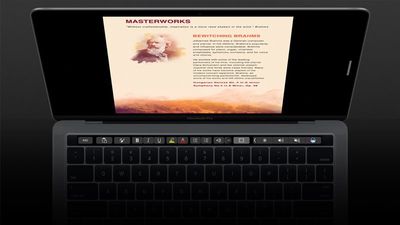
wordtouchbar
In PowerPoint, the Touch Bar makes it easier to manipulate graphic elements. A Reorder Objects button creates a graphical map of all the layers, so users can quickly find an object and move its position. There are also special controls that are available in Slideshow View.
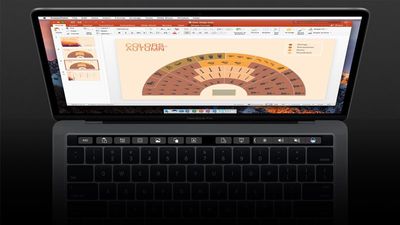
powerpointtouchbar
With Excel, the Touch Bar displays the most recently used functions when the equals sign is typed into a cell, so it's quicker to do things like sum a range of numbers. The Touch Bar also provides access to borders, cell colors, and recommended charts.
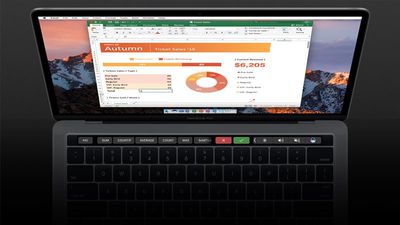
exceltouchbar
Microsoft has also added new capabilities to the Touch Bar during its testing period. The Touch Bar can also be used to insert comments, photos, and hyperlinks into Word, it includes view-specific controls in PowerPoint, and there's an object rotation slider for Word, Excel, and PowerPoint.

Last week, Microsoft previewed Touch Bar support, providing it to its "Office Insider" beta testers, but now the service is ready to roll out to all Office users.

Touch Bar support is currently only available for Word, Excel, and PowerPoint, but Microsoft also plans expand it to Outlook and Skype for Business in the near future.


Top Rated Comments

Mascots Avatar
122 months ago
I'm probably one of the few people thrilled to have contextual controls brought to the Mac's hardware.
Score: 7 Votes (Like | Disagree)
122 months ago
It's good to see a major developer support Touch Bar.
Score: 4 Votes (Like | Disagree)
122 months ago
Really, office 355? :)
Mac version, the missing 10 represents the difference in features that MS gives Windows and not us ;) :D
Score: 3 Votes (Like | Disagree)
122 months ago
I'm probably one of the few people thrilled to have contextual controls brought to the Mac's hardware.
I love the touchbar. Some applications are so so in their use, but others Make the user experience incredible.

I usually get chastised on here when I say that. Will wait a year till everyone catches up to realising how good it really is.
[doublepost=1487278792][/doublepost]
Glad to hear people are finding the Touch Bar implementations are useful. I have Office 365, now I'm just waiting on the 2017 MBP to be released! (really hoping they can cram in a larger battery this year, otherwise I'll keep my 2014 which is still going strong)
Tall guy the 2016 MacBook Pro is awesome !
Score: 2 Votes (Like | Disagree)
MartiNZ Avatar
122 months ago
Wow really good to see MS doing this, would never before have described them as quick with the Mac office products.
Score: 2 Votes (Like | Disagree)
122 months ago
umm.. nothing. Really, nothing. Please send a screen grab if you are getting something! I may just reinstall the entire suite, then.
On my Touch Bar Mac with yesterdays update installed, when I click on either the To or CC field (and only these two fields) the Touch Bar shows the emoji icon directly to the right of the Esc. Then on the far right of the Touch Bar next to the Screen Brightness is the <keyboard that does the word fill in. Both of these are totally useless in those two fields since you only are going to be entering an email address or part of a name to before clicking on the Check Names toolbar icon. The Subject field loses the emoji icon, keeps the <keyboard and in the message body the Touch Bar is empty other than Esc and Screen Brightness, Volume and Siri. Outlook is the application I use the most in Office so I'm looking forward to a future update so it matches Apple Mail & Calendar.
Score: 1 Votes (Like | Disagree)

Popular Stories

iCloud iPhone 17 Pro

iPhone Users Who Pay for iCloud Storage Get Two New Perks on iOS 27

Thursday July 2, 2026 6:10 am PDT by
If you pay for certain iCloud+ storage plans beyond the 5GB that Apple offers for free, you will receive two more perks on iOS 27 at no additional cost. A summary of the two new iCloud+ perks on iOS 27:Increased daily usage limits for some new Apple Intelligence features, including image generation in the revamped Image Playground app. HomeKit Secure Video cameras receive generated video...
iPhone 4 on Black Feature

Apple Facing One of Its Worst Leaks Since the iPhone 4

Thursday July 2, 2026 9:53 am PDT by
Apple supplier Tata Electronics recently suffered a cyberattack that resulted in thousands of confidential files being published on the dark web, and this reportedly included some photos and documents related to the upcoming iPhone 18 Pro. We have elected not to share any of the leaked photos in this story due to the illegal nature in which they were obtained, but they can easily be found...
American Express Gold Apple Pay Feature

American Express Announces New Apple Pay Feature

Tuesday June 30, 2026 10:27 am PDT by
American Express today announced that you can now redeem Membership Rewards points when checking out with Apple Pay on the web and in apps on the iPhone and iPad. When checking out with Apple Pay on iOS 18 or iPadOS 18 or later, tap on your eligible American Express card (Platinum, Gold, Green, and others) and select the Membership Rewards points option. You can use points to cover all or...