Apple Updates Numbers, Pages and Keynote for iOS and Mac With New Features - MacRumorsOpen MenuShow RoundupsShow Forums menuVisit ForumsOpen Sidebar
Skip to Content

Apple Updates Numbers, Pages and Keynote for iOS and Mac With New Features

by

Apple today updated its iWork apps for iOS devices, Numbers, Pages, and Keynote, to version 3.1, introducing a range of new features and improvements in each app.

iworkiosapp
Pages, Apple's word processing app, has gained new text formatting options, bookmarks to link sections of a document, support for equations, Touch ID support for password protected documents, and more. A full list of changes for Pages is below:

What's New
-Format text as superscript or subscript, use ligatures, and change text background color
-Add bookmarks to easily link from one part of your document to another
-Add elegant mathematical equations using LaTeX or MathML notation
-Quickly open password-protected documents using Touch ID
-Import and export documents in Rich Text Format (RTF)
-Easily replace missing fonts in your document
-New leader lines make pie charts easier to read
-Customize dates, times, and currencies for your language or region

Numbers, Apple's app for creating spreadsheets, has new options to add new or historical stock information to documents, a revamped editing experience, a new action menu that makes it easier to get to the most common tasks, Touch ID support, and more. A full list of changes is below:

What's New
-Easily add current or historical stock information to spreadsheets
-Use the new My Stocks template to easily track your portfolio
-A powerful new editing experience makes entering data and formulas fast and easy
-New action menu keeps most common tasks one tap away
-Quickly open password-protected spreadsheets using Touch ID
-Format text as superscript or subscript, use ligatures, and change text background color
-New leader lines make pie charts easier to read
-Easily replace missing fonts in your spreadsheet
-While collaborating on a spreadsheet, you can now cut, copy, paste, and duplicate sheets
-Customize dates, times, and currencies for your language or region
-Edit rich text within table cells

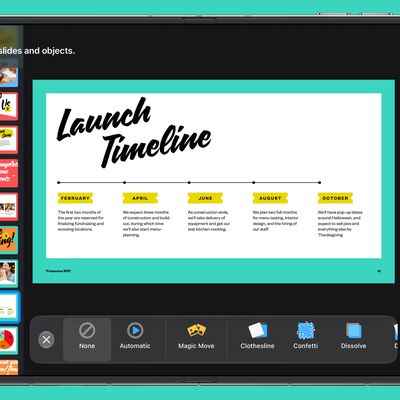
Keynote, Apple's presentation app, includes an improved rehearsal feature with slide, presenter notes, and timer in one view, new options for customizing slide backgrounds, Touch ID support for opening password protected documents, and more. A full list is below:

What's New
-Change slide master and customize slide background
-Rehearse a presentation with current slide, presenter notes, and timer all in one view
-Quickly open password-protected presentations using Touch ID
-Format text as superscript or subscript, use ligatures, and change text background color
-Easily replace missing fonts in your presentation
-New leader lines make pie charts easier to read
-Import Keynote 1 presentations
-Post interactive presentations on Medium, WordPress, and other websites
-Customize dates, times, and currencies for your language or region

All three of the new updates are available for download immediately. Customers who already own Apple's iWork apps will be able to obtain the new updates at no cost.

Many of the same changes have also been introduced in Keynote, Pages, and Numbers for Mac, all of which also have updates available this morning.

Pages for iOS - [App Store]
Keynote for iOS - [App Store]
Numbers for iOS - [App Store]

Pages for Mac - [Mac App Store]
Keynote for Mac - [Mac App Store]
Numbers for Mac - [Mac App Store]

Top Rated Comments

126 months ago
YES... Keynote finally has an OBJECTS LIST... call it layers if you are into Photoshop... FINALLY...


Attachment Image
Score: 9 Votes (Like | Disagree)
sracer Avatar
126 months ago
Nice features to add, but THE key feature missing from this version (that iWork 09 has, linked text boxes) continues to be MIA. :(
Score: 8 Votes (Like | Disagree)
LordQ Avatar
126 months ago
Wait, we could not add sup and sub characters before? WAIT, it took them 7 years to add that feature!?
Score: 7 Votes (Like | Disagree)
PBG4 Dude Avatar
126 months ago
Cool to see these apps continuing to get Apple's attention.
Score: 5 Votes (Like | Disagree)
sudo1996 Avatar
126 months ago
Pages and Keynote replaced Word and PowerPoint for me, but Numbers has always been slow and weak compared to Excel, not even suitable for school lab reports.
Score: 4 Votes (Like | Disagree)
126 months ago
Glad to see a nice update.
Score: 3 Votes (Like | Disagree)

Popular Stories

iphone duo keynote

Apple's iWork Apps Get 'Intelligent Assistant' and iPhone Duo Support

Thursday October 22, 2026 1:02 pm PDT by
Apple today added an "Intelligent Assistant" to Keynote, Numbers, and Pages. The feature is available in beta for Apple Creator Studio subscribers. The update is available again following the temporary removal of the apps from the App Store. In Numbers, Intelligent Assistant can build formulas, visualize data, help generate formulas with natural language, and generate tables. The Pages...
apple pro tell logo

Apple Launching Five New Products Today

Thursday November 5, 2026 12:59 am PST by
Apple is launching five new products on Friday, November 6, following pre-orders that opened last week, including its first touchscreen MacBook Pro models. The following new products will be available from today: iPad mini with OLED display and A20 Pro chip iMac with M6 chip 14-inch MacBook Pro with M6 chip 14-inch MacBook Pro with OLED touchscreen 16-inch MacBook Pro with OLED...
duo aquarium

More Fun iPhone Duo Apps: 30 New Picks to Try

Friday November 6, 2026 3:27 pm PST by
When the iPhone Duo launched, we shared a list of some of the fun apps developers created for the new form factor. Two weeks out, developers are continuing to come up with fresh ideas, so we thought we'd share some of our favorites. Games Marbles Unhinged ($2.99) - Marbles Unhinged is a marble maze designed for the Duo. When you fold it, the floor turns into a ramp. If you stand the top...
Latest Stories
Early Apple Black Friday Deals on Apple Watch, MacBook Air, and More
13 hours ago
'Backglow' Lets You Customize New MacBook Pro's Glowing Apple Logo
13 hours ago
Top Stories: Apple Product Launches, iOS 27.3 Beta, and More
20 hours ago
More Fun iPhone Duo Apps: 30 New Picks to Try
1 day ago
Hands-On With Apple's New OLED Touchscreen MacBook Pro
1 day ago
Apple Store With All-New Design Opening Soon in Southern California
2 days ago
Control the Glowing Apple Logo on Your New MacBook Pro
2 days ago
Apple Shares New 'Apple Card: Apply and Use in Minutes' Ad
2 days ago
Apple Says More Than 100,000 Apps Optimized for iPhone Duo, Here's What's Still Missing
2 days ago
Early Black Friday Deals Kickoff With Steep Discounts on Apple Watch Ultras and More
2 days ago
The MacRumors Show: iOS 27.3 Looks Like a Huge Update
2 days ago
Best Buy's Black Friday Event Begins With Sitewide Savings on Apple, TVs, More
2 days ago
Apple Releasing Yet Another Two New Products Next Week
2 days ago
MacBook Air Drops to Lowest Price in Months With Amazon's $250 Discount
2 days ago
Apple Rumored to Drop the iPhone's Action Button Next Year
2 days ago
Apple's Extended Return Policy Now in Effect for 2026 Holiday Season
2 days ago
Apple Music Classical Updated With New Icon and Refreshed Design
2 days ago
OLED iPad Mini, M6 iMac, and New MacBook Pros Available From Today
2 days ago
Apple Surveys iPhone Duo Buyers About Crease and Camera
2 days ago
Apple's First Touchscreen Mac is Now Arriving to Customers
2 days ago
Claude Gets Personal Finance Feature With Bank Account Linking
2 days ago
Apple Arcade Adds Crossy Road Rush and NBA 2K27
2 days ago
Apple's New HomeView Smart Home Hub: Here's How Much RAM It Has
3 days ago
iPad Mini vs. iPad Air Buyer's Guide: Now Just $50 Apart
3 days ago
First iOS 27.3 and macOS Golden Gate 27.3 Public Betas Now Available
3 days ago
Apple Announces a New Mac Sales Record
3 days ago
Paid $200 for Logic Pro? Apple Says You Won't Get This New Feature
3 days ago
Instagram's Edits Video Editor is Now Available on Mac
3 days ago
Prevent Siri and Search From Accessing Specific iPhone Apps
3 days ago
Best Early Black Friday Deals on iPhone 18 Pro and iPhone Duo
3 days ago










































