Wi-Fi Calling and VoLTE Expand to O2 and Other Carriers on iOS 10.3 - MacRumorsOpen MenuShow RoundupsShow Forums menuVisit ForumsOpen Sidebar
Skip to Content

Wi-Fi Calling and VoLTE Expand to O2 and Other Carriers on iOS 10.3

by

Following yesterday's iOS 10.3 release, several carriers around the world have enabled support for native Wi-Fi calling and VoLTE on iPhone.
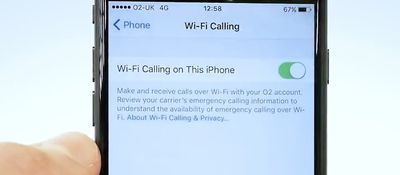
wifi calling o2
In addition to updating to iOS 10.3, the features require installing a carrier settings update to be enabled. Your device should prompt you to install the carrier settings update in Settings > General > Software Update.

Features may be limited to certain iPhone models, so check with your carrier. British carrier O2, for example, has only enabled support on iPhone 7 and iPhone 7 Plus right now, with plans to add other devices soon.

The full list of carriers that have just enabled native Wi-Fi calling on iOS 10.3:

  • Australia: Optus

  • Austria: A1 Telekom

  • Belgium: Telenet

  • Greece: Cosmote

  • Hong Kong: 1010

  • Norway: Telia

  • Poland: Orange, Play

  • Switzerland: Sunrise

  • United Kingdom: O2

The full list of carriers that have just enabled VoLTE on iOS 10.3:

  • Denmark: 3

  • Greece: Cosmote

  • Peru: Movistar

  • Poland: Orange

  • Russia: MegaFon

  • Turkey: Turk Telecom

  • United Kingdom: O2

To enable Wi-Fi calling, open the Settings app, tap on General > Wi-Fi Calling, and toggle on Wi-Fi Calling on This iPhone.

To enable VoLTE, open the Settings app and tap on Mobile Data > Mobile Data Options > Enable 4G > Voice & Data.

Meanwhile, Verizon customers with an iPhone running iOS 10.3 can now make and receive Wi-Fi calls on other iCloud-connected devices, including the iPad, iPod touch, Apple Watch, and most 2012 or later Macs, even if the iPhone is turned off. The devices must be signed into the same Apple ID used on the iPhone.

Update: Slovenia's Telekom also officially announced VoLTE support today, although the carrier was already included on Apple's list.


Related Forum: iOS 10

Top Rated Comments

RDowson Avatar
121 months ago
Glad I'm on EE. We've had WiFi Calling, VoLTE and 90Mbps 4G for ages now!
Score: 2 Votes (Like | Disagree)
121 months ago
When you toggle the switch in the Settings/Phone/Wi-Fi Calling to on, you should get a pop-up asking you to enable on o2 website. There you are instructed to log in to my O2. Once there you need to select the relevant device (if you have more than one number) and look at the 'Device Details' on the bottom right of the page for that device/phone number. In there you can turn on Wi-Fi calling.
Score: 1 Votes (Like | Disagree)
121 months ago
Happy with o2's addition. Before you HAD to download one of their apps, TU Go, and do it all through that. That's no longer the case.
The only positive about this Wifi/4G calling is that you get to see 'O2WiFiCall' on your iPhone, Apple Watch/macOS integration and you can seamlessly switch from Wifi to 4G while on call...

From what I read everything else is a negative against TUGo. I don't know if they did this on purpose so they can say "Ok we do have native WiFi calling you can shut up now!" but it is so limited.

* You can't have TUGo and WiFi/4G Calling on the same time, so you have to choose one or the other.
* You can't use native WiFi calling abroad, even when you're on WiFi (but you can with TUGo, surprise!)
* You can't receive any new Visual Voicemails if you have no network signal (but with TUGo you can)
* No SMS or MMS without any network signal (TUGo does this!)
* And of course you can link different devices for the same mobile number in TUGo (O2 can't do anything about that though, not their fault)
* Oh, and you have to be on 10.3 or above. Bad luck, jailbreakers!

I don't want to continue using TUGo, but if you want better features you're still stuck with it I'm afraid.
Score: 1 Votes (Like | Disagree)
121 months ago
Happy with o2's addition. Before you HAD to download one of their apps, TU Go, and do it all through that. That's no longer the case.
Yes, but Tu Go can be used abroad (without extra charge) and also when another network sim card is installed.

Wifi-call is not possible in the above scenario's
Score: 1 Votes (Like | Disagree)
121 months ago
Here in Canada, I've had nothing but a poor experience with Wi-Fi calling. Callers always saying that my voice drops out, when I'm not noticing any problems at my end. Just easier to turn the feature off. Not seeing the benefit when we have Unlimited calling. I guess inside office buildings or other structures where there's wifi, but no LTE, it makes sense.
Score: 1 Votes (Like | Disagree)
121 months ago
Why is Three UK missing? https://www.macrumors.com/2017/01/29/three-uk-native-wifi-calling-iphone/
Because Three had native WiFi calling before 10.3.
Score: 1 Votes (Like | Disagree)

Popular Stories

iCloud iPhone 17 Pro

iPhone Users Who Pay for iCloud Storage Get Two New Perks on iOS 27

Thursday July 2, 2026 6:10 am PDT by
If you pay for certain iCloud+ storage plans beyond the 5GB that Apple offers for free, you will receive two more perks on iOS 27 at no additional cost. A summary of the two new iCloud+ perks on iOS 27:Increased daily usage limits for some new Apple Intelligence features, including image generation in the revamped Image Playground app. HomeKit Secure Video cameras receive generated video...
iPhone 4 on Black Feature

Apple Facing One of Its Worst Leaks Since the iPhone 4

Thursday July 2, 2026 9:53 am PDT by
Apple supplier Tata Electronics recently suffered a cyberattack that resulted in thousands of confidential files being published on the dark web, and this reportedly included some photos and documents related to the upcoming iPhone 18 Pro. We have elected not to share any of the leaked photos in this story due to the illegal nature in which they were obtained, but they can easily be found...
American Express Gold Apple Pay Feature

American Express Announces New Apple Pay Feature

Tuesday June 30, 2026 10:27 am PDT by
American Express today announced that you can now redeem Membership Rewards points when checking out with Apple Pay on the web and in apps on the iPhone and iPad. When checking out with Apple Pay on iOS 18 or iPadOS 18 or later, tap on your eligible American Express card (Platinum, Gold, Green, and others) and select the Membership Rewards points option. You can use points to cover all or...