YouTube Dark Mode Surfaces in Latest Desktop Chrome Browser Update - MacRumorsOpen MenuShow RoundupsShow Forums menuVisit ForumsOpen Sidebar
Skip to Content

YouTube Dark Mode Surfaces in Latest Desktop Chrome Browser Update

by

Google appears to be testing a Dark Mode feature for YouTube in the latest version of its Chrome 57 desktop browser.

The built-in mode was discovered on Thursday and shared in a Reddit post, and while the setting doesn't appear by default, a quick command in the developer console is all that's required to enable it.
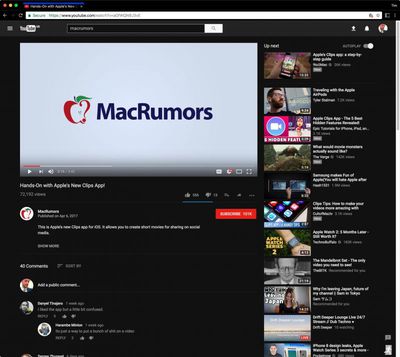
Screen Shot 1 2

YouTube Dark Mode in Chrome with black theme enabled

Follow these steps to enable the YouTube dark mode in Chrome on Mac. Make sure you're signed in to YouTube before performing the steps.

  1. Press the keyboard combination shortcut Option + Command + I to open the developer tools sidebar.
  2. Click the Console tab.
  3. Paste document.cookie="VISITOR_INFO1_LIVE=fPQ4jCL6EiE" into the console and press enter.
  4. Close the developer tools sidebar and refresh the YouTube page.
  5. Click your YouTube profile picture, select Dark Mode from the dropdown, and toggle the switch to enable the mode.

Google Chrome is available to download for free on the Chrome website. [Direct Link]

Tag: Chrome

Top Rated Comments

Rychiar Avatar
120 months ago
I wish all websites and OSS were dark. Sick of burning my eyes on white screens
Score: 10 Votes (Like | Disagree)
120 months ago
Netflix decided to go the other way on this one with insanely bright ads that wake you up if you fall asleep while Netflix is playing. I guess it may motivate people to turn their tv off though. But if not at least it'll make us groggy and grumpy.
You're trolling, right?

Netflix doesn't have ads.
Score: 5 Votes (Like | Disagree)
Dilster3k Avatar
120 months ago
Wow guys big news eh? I've literally been using dark mode and the new layout for 8 weeks now on Safari, even though it's been available for months now.

Just look up the code and give it into the java console...

Edit: Tada!


Attachment Image
Score: 5 Votes (Like | Disagree)
120 months ago
Dude, how? I'd really appreciate it if you could tell me
It's part of YouTube's new interface.
I wish I could be more of more help but I seriously just logged in one day and the interface was different (like when Twitter updates). There's an option there:

MacRumors content image
Score: 3 Votes (Like | Disagree)
teidon Avatar
120 months ago
That cookie lasts until 2085. After that your browser will revert back to normal YouTube theme. ;)

But it's per browser. You need to do that with every browser you use.
Score: 1 Votes (Like | Disagree)
teidon Avatar
120 months ago
Here's how to enable it in Safari (MacOS):

You need to have Developer menu enabled. Go to Safari -> Preferences -> Advanced tab, and enable Developer menu.

* Go to www.youtube.com ('//www.youtube.com') and from the Developer menu select Show error console (or press: option + command + I)
* In the error console open Storage tab
* In the left panel select "Cookies - www.youtube.com ('//www.youtube.com')"
* Look through the cookies and see if there is one called "VISITOR_INFO1_LIVE". If there is, delete it.
* Then enter the following command to the error console at the bottom where it reads ">"

document.cookie='VISITOR_INFO1_LIVE=fPQ4jCL6EiE;domain=.youtube.com;path=/;max-age='+100000000000+';';

After that refresh the youtube page and press on the profile icon. That profile menu should now look completely different than how it was before. You should find the Dark Mode from there.
Score: 1 Votes (Like | Disagree)

Popular Stories

Chrome Feature 22

Chrome Sets Browser Speed Records on M5 MacBook Pro

Friday June 5, 2026 10:38 am PDT by
Google's Chrome browser hit new records on browser benchmarking tools Speedometer 3.1 and JetStream 3, Google said today. Chrome earned a score of 61 on Speedometer, a five percent improvement since last year. It earned a 469 on JetStream 3, a 10 percent improvement since the beginning of 2026. Tests were done on an M5 MacBook Pro running macOS 26.0.1. Google says it holds a dual record...
iCloud iPhone 17 Pro

iPhone Users Who Pay for iCloud Storage Get Two New Perks on iOS 27

Thursday July 2, 2026 6:10 am PDT by
If you pay for certain iCloud+ storage plans beyond the 5GB that Apple offers for free, you will receive two more perks on iOS 27 at no additional cost. A summary of the two new iCloud+ perks on iOS 27:Increased daily usage limits for some new Apple Intelligence features, including image generation in the revamped Image Playground app. HomeKit Secure Video cameras receive generated video...
Apple Event Logo

Apple Just Released a New Product

Thursday July 2, 2026 8:04 am PDT by
Apple's first product release of summer 2026 occurred this week, but do not get too excited, as it is merely the Beats Solo Buds in a new color. Beats Solo Buds are now offered in orange through Best Buy in the U.S., with availability set to expand to 7-Eleven stores in Japan on July 4. Apple already offered orange Solo Buds in India for free with the purchase of an iPhone 15 or iPhone 15 ...