

Logitech Announces HomeKit-Compatible POP Smart Button For Controlling Smart Devices - MacRumorsOpen MenuShow RoundupsShow Forums menuVisit ForumsOpen Sidebar
Skip to Content

Logitech Announces HomeKit-Compatible POP Smart Button For Controlling Smart Devices

by

Logitech today announced a new POP Smart Button, its first Apple HomeKit compatible programmable smart button for controlling connected devices around the home.

The idea behind the original POP is to free up control of smart devices so that anyone in the home can operate them regardless of whether they have a smartphone and the associated app for each device. The latest POP builds on that premise by introducing HomeKit support, enabling it to be customized through the Apple Home app and integrate with other iOS smart home accessories.
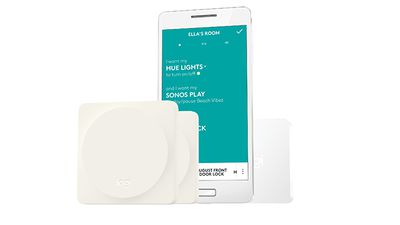
JPG 300 dpi RGB Pop FamilyThe Logitech POP Smart Button Kit includes one smart button with three customizable gestures and a POP bridge to connect the button onto a WiFi network. Users can then extend control throughout their home with additional POP Add-on Smart Buttons, which are available in four colors. Each POP bridge can connect to an unlimited number of buttons.

Using POP Smart Button with Apple HomeKit is easy when paired with Apple’s Home app—POP already comes pre-paired, so discovering the device with the Home app is simple and secure. Just configure the scenes you want and let POP do the rest. Whether turning down the lights to get ready for bed or opening your smart blinds to expose some daylight, POP gives easy control to the whole family.

The POP Smart Button can also be used with non-HomeKit devices, like Sonos wireless music systems, or Logitech Harmony hub-based remote controls by using the companion Logitech POP app. In addition to compatibility with Apple HomeKit, the Logitech POP Smart Button offers the ability to control Osram lighting, Hunter Douglas and Lutron blinds, and more, extending interoperability beyond existing integrations including August, Philips Hue, and Logitech Harmony.

The POP Smart Button will be sold in four colors: White, Alloy, Coral, and Teal. According to Logitech, the POP Smart Button Kit ($59.95) and POP Add-on Smart Button ($39.95) will be available exclusively at Apple stores and Apple.com soon, while availability in other retailers will come later this year. Owners of first generation POP Home Switches can update their software to take advantage of the new integrations, but not the HomeKit support.


Top Rated Comments

gsmornot Avatar
119 months ago
No HomeKit, no deal.
"Using POP Smart Button with Apple HomeKit is easy when paired with Apple's Home app--POP already comes pre-paired, so discovering the device with the Home app is simple and secure."
Score: 3 Votes (Like | Disagree)
ryanwarsaw Avatar
119 months ago
I don't understand exactly what these things do? I read the explanation in the article and still not sure what function they achieve? Is it meant so your kids who don't have smart phones can activate devices or something?
Score: 3 Votes (Like | Disagree)
CarlJ Avatar
119 months ago
No HomeKit, no deal.
The article title and the first two paragraphs all say HomeKit-Compatible. Has the article changed that much since you commented? Or are you just guessing the article relates to home automation somehow and complaining without reading?
Score: 2 Votes (Like | Disagree)
gsmornot Avatar
119 months ago
I don't understand exactly what these things do? I read the explanation in the article and still not sure what function they achieve? Is it meant so your kids who don't have smart phones can activate devices or something?
It appears it is meant for anyone that is near a smart device without a smartphone. I have two Hue dimmers that I use with a pair of lamps which makes it easy. I don't see how I would use this device here though since the examples named each have something already and for about the same price, like the Lutron shades control.
Score: 2 Votes (Like | Disagree)
gsmornot Avatar
119 months ago
Is it just an on/off button? How does it physically work?
If you're asking about the subject of the article I'm not sure. It looks like it would be a CR battery powered single function button that does whatever you trigger it to do. If its like the Hue Tap then each button can be one of many different functions like a scene or an action or just on/off. I don't see myself with one.
Score: 1 Votes (Like | Disagree)
119 months ago
Is it just an on/off button? How does it physically work?
I know, eh? $40 for a button. This world is getting crazy.
Score: 1 Votes (Like | Disagree)

Popular Stories

Apple Card iPhone 16 Pro Feature

Apple Card Promo to Offer Free AirPods Pro 3

Friday May 15, 2026 8:59 am PDT by
Starting as early as next week, customers who sign up for an Apple Card at Apple's retail stores in the U.S. will receive $249 cash back when they purchase AirPods Pro 3, according to Bloomberg's Mark Gurman. The promotion has yet to be officially announced by Apple, so exact terms and conditions are not available at this time. AirPods Pro 3 are priced at $249 in the U.S., so customers who...
Apple WWDC25 iOS 26 CarPlay Light mode 250609

Six Popular iPhone Apps Now Available on CarPlay

Thursday May 14, 2026 9:10 am PDT by
Apple's CarPlay system for accessing iPhone apps on a vehicle's dashboard screen has received six popular apps in recent weeks: ChatGPT, Perplexity, Grok, Google Meet, WhatsApp, and the indie artist streaming platform Audiomack. Make sure you have the latest version of each app and they will automatically appear on CarPlay. ChatGPT Starting with iOS 26.4, CarPlay supports voice-based...
ipad mini 7 blue

OLED iPad Mini: Release Date, Pricing, and What to Expect

Thursday May 14, 2026 5:08 am PDT by
According to the latest rumors, Apple is close to launching its next-generation iPad mini. So what should we expect from the successor to the iPad mini 7 that Apple released over a year ago? Read on to find out. Processor and Performance Apple is working on a next-generation version of the iPad mini (codename J510/J511) that features the A19 Pro chip, according to information found in code...














