

Siri Bug Allows Cellular Data to be Disabled From Lock Screen Without a Passcode - MacRumorsOpen MenuShow RoundupsShow Forums menuVisit ForumsOpen Sidebar
Skip to Content

Siri Bug Allows Cellular Data to be Disabled From Lock Screen Without a Passcode

by

A reddit user has discovered what appears to be a Siri-related bug that allows access to a locked iPhone's Cellular Data options without a passcode.

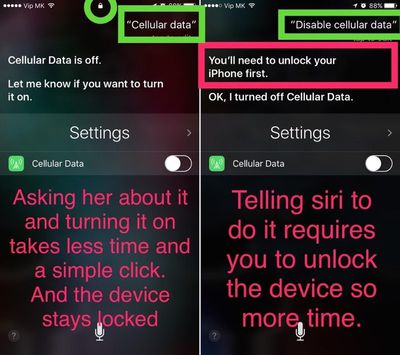
As shown in the screenshot below, when Siri is asked to bring up Cellular Data settings (or if Cellular Data is on), an option to toggle the feature off appears on the lock screen, with no passcode required. When Siri is specifically asked to turn off Cellular Data, the personal assistant asks for a passcode first.
siricellulardatabug
Given that a passcode is required when asking Siri to disable Cellular Data, it seems that this is meant to be the default behavior and that it's not a setting meant to be controlled from a locked iPhone.

It's questionable if this bug has any real impact, though, as there are other ways to disable cellular service on an iPhone that's been stolen, including turning on Airplane Mode from Control Center or simply turning the iPhone off.

MacRumors tested the Siri command and found that it worked on iOS 9 and all versions of iOS 10, including the most recent iOS 10.3.3 beta.

For iPhone owners worried about unauthorized access to their iPhones, both Siri and the Control Center can be disabled on the lock screen.

Top Rated Comments

jclo Avatar
122 months ago
There is a lock icon circled in green in the first image, and it isn't visible in the second. Seems likely to be a non-issue. The phone was unlocked by Touch ID when Siri was invoked.
I tested it with multiple locked iPhones. It can be disabled without unlocking the iPhone.

Attachment Image
Score: 10 Votes (Like | Disagree)
122 months ago
not a big deal. you could just remove the sim card. or the fact that if it's on AT&T wouldn't make a difference.
Score: 9 Votes (Like | Disagree)
122 months ago
Or, like the article states you can just turn it on airplane mode via control center... sounds like a "who cares"
I care, because that's exactly why i disabled Control Center on the lockscreen.
Score: 8 Votes (Like | Disagree)
Apple_Robert Avatar
122 months ago
Not working for me. If I ask Siri, it tells that I need to unlock my phone first. I do not get the toggle option on the lock screen.
Score: 6 Votes (Like | Disagree)
122 months ago
Just say to Siri, "Cellular Data" that's all. 2 words.

It's a big deal because people can turn off cell data without the phone owner knowing. Imagine in a emergency trying to use your phone and not having cell data or whatever. It's an issue even if it's not for you. And most people don't easily know to to re-enable the cell data to be on, unlike airplane mode which shows a airplane icon.
Score: 5 Votes (Like | Disagree)
Mad Mac Maniac Avatar
122 months ago
Or, like the article states you can just turn it on airplane mode via control center... sounds like a "who cares"
Score: 5 Votes (Like | Disagree)

Popular Stories

macOS iOS 27 Siri App Feature

Apple's Siri AI Can Be Swapped Out for Claude, ChatGPT, Code Shows

Monday September 14, 2026 4:37 am PDT by
Code sleuth "pdfu" has uncovered iOS 27 and macOS Golden Gate private frameworks that show Apple has designed its new Siri architecture to work with third-party AI models at what appears to be a surprisingly deep level. One mechanism called Model Delegation allows Claude to appear as a Siri extension in the same way as the existing built-in ChatGPT extension. In pdfu's video, shared on X,...
macOS iOS 27 Siri App Feature

Reminder: iOS 27's All-New Siri AI Has a Waitlist, Here's How to Sign Up

Tuesday September 15, 2026 8:54 am PDT by
Apple this week released iOS 27 following around three months of beta testing. If you just installed the software update on your iPhone, you might be wondering where the new-and-improved Siri AI and dedicated Siri app are. In case you missed it, you must join Apple's waitlist in order to gain access to these new features. Keep in mind that while iOS 27 is compatible with the iPhone 11 and...
iOS 27 Out Now Thumb

Apple Releases iOS 27 and iPadOS 27 With Siri AI and Liquid Glass Update

Monday September 14, 2026 10:04 am PDT by
Apple today released iOS 27 and iPadOS 27, the newest operating system updates for the iPhone and iPad. The software is available for free on all compatible devices, and can be downloaded over the air by going to Settings > General > Software Update. Subscribe to the MacRumors YouTube channel for more videos. It can take several minutes for the updates to propagate to all users due to high...













