

Feedback App Lists iPad 'Drag and Drop' Feature Ahead of WWDC iOS 11 Preview - MacRumorsOpen MenuShow RoundupsShow Forums menuVisit ForumsOpen Sidebar
Skip to Content

Feedback App Lists iPad 'Drag and Drop' Feature Ahead of WWDC iOS 11 Preview

A Drag and Drop capability looks set to be coming to iPads in iOS 11, after a reference to the feature was spotted on Monday in Apple's own Feedback app for iOS beta testers.

An entry alluding to "Split View/Drag and Drop" now appears in the app's list of preset options that beta testers use to report issues. Since no such feature currently exists in iOS, it's highly likely we can expect one to be unveiled in iOS 11, which Apple is set to preview in its keynote later today at the Worldwide Developers Conference.
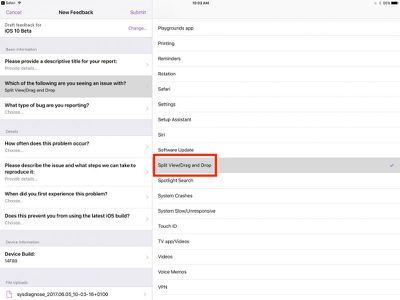
DBi9HnEXoAANSAr


A Drag and Drop feature in Split View on iPads would presumably allow users to easily move content between apps, in a more seamless way than the current method of copying/pasting, which is cumbersome in comparison. Coming on the back of the appearance of an iOS Files app reference earlier today, it looks as if iOS 11 could be about to introduce workflow features many users would benefit from.

Several MacRumors readers have mentioned a desire for a better file management system to make it easier to transfer content between apps. MacStories' Federico Vittici recently made a mockup featuring a drag and drop interface and a file storage shelf on the iPad. Today's leak appears to indicate a similar feature is indeed on the way.

During Monday's WWDC keynote, MacRumors will provide a live blog both here on MacRumors.com and on our MacRumorsLive Twitter account, with continuing detailed coverage of everything Apple announces during the week.


Related Forum: iOS 11

Popular Stories

Aston Martin CarPlay Ultra Screen

Apple Says CarPlay Ultra is Coming to These Vehicle Brands

Thursday May 21, 2026 11:53 am PDT by
Last year, Apple launched CarPlay Ultra, the long-awaited next-generation version of its CarPlay software system for vehicles. Nearly a year later, CarPlay Ultra is still limited to Aston Martin's latest luxury vehicles, but that should change fairly soon. In May 2025, Apple said many other vehicle brands planned to offer CarPlay Ultra, including Hyundai, Kia, and Genesis. CarPlay Ultra...
iphone 18 pro blue%402x

iPhone 18 Pro: Dark Cherry, Light Blue, and Dark Gray Chassis Leaked [Update]

Thursday June 4, 2026 5:18 am PDT by
Update: Since publication, new information has come to light suggesting the images have been AI-manipulated and are not in fact iPhone 18 Pro chassis parts. The original article follows. The color options Apple is reportedly planning for the upcoming iPhone 18 Pro and ‌iPhone 18 Pro‌ Max have appeared online today in the form of images of chassis parts of unknown authenticity....
iOS 27 All the New App Features

iOS 27: All the Rumored App Features

Wednesday June 3, 2026 3:48 pm PDT by
Siri is getting a major overhaul in iOS 27, but Apple also has some big updates planned for apps like Camera, Photos, and Wallet. There are multiple new AI features in the works, plus some non-AI upgrades. Camera Apple is moving Visual Intelligence from the Camera Control button to the Camera app in iOS 27, according to Bloomberg. There will be a Siri mode that will be available alongside...

Top Rated Comments

nfilg Avatar
118 months ago
Damn!! hmm I wish this had Finder and I could drag and drop files


Attachment Image
Score: 19 Votes (Like | Disagree)
Gorms Avatar
118 months ago
It sure won't be a drag if this drops today.
Score: 18 Votes (Like | Disagree)
entropys Avatar
118 months ago
These kinds of feature are needed to make ipad a laptop replacement.

next up wish: adding multiple files to an email, and "open with".

i might actually enjoy this keynote.
Score: 10 Votes (Like | Disagree)
118 months ago
How about plain old mouse support for the iPad Pro lineup? Without a mouse, it will never be a laptop replacement. This is the reason that the Surface Pro is successful. Full Win app support with Mouse/Keyboard functionality. iOS apps are of high enough quality, that they can function quite well in a mobile environment, but a mouse is essential for extended work periods. There's just too much lost in a professional workflow that requires stopping work to point and maneuver a (comparatively) small screen with a finger or pencil.
I haven't used a mouse in years...
Score: 9 Votes (Like | Disagree)
BigDaddyChops Avatar
118 months ago
How about plain old mouse support for the iPad Pro lineup? Without a mouse, it will never be a laptop replacement. This is the reason that the Surface Pro is successful. Full Win app support with Mouse/Keyboard functionality. iOS apps are of high enough quality, that they can function quite well in a mobile environment, but a mouse is essential for extended work periods. There's just too much lost in a professional workflow that requires stopping work to point and maneuver a (comparatively) small screen with a finger or pencil.
Score: 9 Votes (Like | Disagree)
118 months ago
How about plain old mouse support for the iPad Pro lineup? Without a mouse, it will never be a laptop replacement. This is the reason that the Surface Pro is successful. Full Win app support with Mouse/Keyboard functionality. iOS apps are of high enough quality, that they can function quite well in a mobile environment, but a mouse is essential for extended work periods. There's just too much lost in a professional workflow that requires stopping work to point and maneuver a (comparatively) small screen with a finger or pencil.
Microsoft sells like 12 Surfaces a year.
Score: 8 Votes (Like | Disagree)













