iOS 11 Tidbits: Customizable Control Center, One-Handed Keyboard, Type to Siri and More - MacRumorsOpen MenuShow RoundupsShow Forums menuVisit ForumsOpen Sidebar
Skip to Content

iOS 11 Tidbits: Customizable Control Center, One-Handed Keyboard, Type to Siri and More

iOS 11 introduces a huge number of major changes to the operating system, ranging from a redesigned Control Center experience to a host of new features specific to the iPad, but along with all of these major changes, outlined in our iOS 11 announcement post, there are also dozens of smaller changes that have been added to the beta.

Below, we've outlined some of the smaller but still significant tweaks that went unmentioned during Apple's whirlwind keynote announcement.

- Lock Screen - The Lock screen has a new look with a bolder font for the passcode numbers and lighter circles that don't feature a white outline.

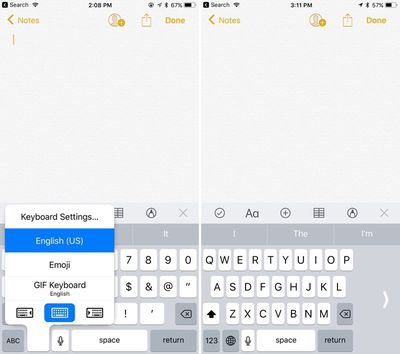
- One-handed keyboard - On the iPhone, there's a new option for a one-sided keyboard that can be enabled by pressing down on the globe keyboard button. It moves the keyboard to either the left or right side of the device.
onehandedkeyboard
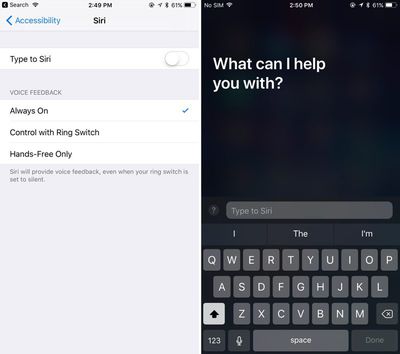
- Type to Siri - There's an Accessibility feature that enables Type to Siri. With this option toggled on, when Siri is accessed via a Home button press, it brings up a keyboard where you can type something to Siri.
typetosiri
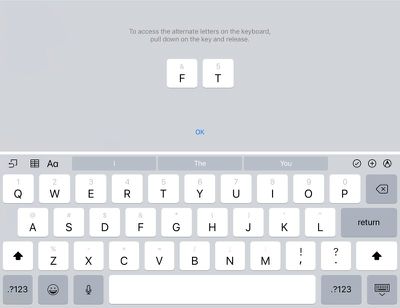
- iPad keyboard changes - On the iPad, symbols and numbers accessible via the shift key are visible on the keys themselves. The alternate symbols and numbers are accessed by pulling down on the key and releasing.
ipadkeyboard
- Customizable Control Center - Apple showed off the new single-page revamped Control Center on stage during the keynote, but what wasn't mentioned is that the Control Center is customizable. Users can select what's displayed in Control Center using the Settings app, and there are a huge range of options including Low Power Mode, Notes, Text Size, Wallet, Screen Recording, and more. There's even a new option to add Apple TV Remote controls to Control Center. Layout can't be changed, though.
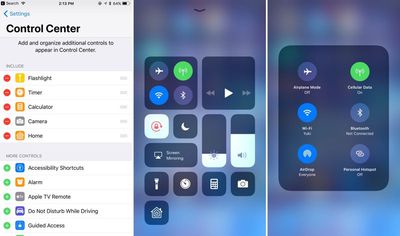
customizablecontrolcenter
- Offload Unused Apps - In the Settings app, there's a new option that will automatically uninstall apps that haven't been used in a while. Documents and data for uninstalled apps will remain available in case the app is re-installed.

- Bolder text - Throughout the operating system, there are bolder text labels and starker, bolder looks for many apps like Phone, Contacts, and FaceTime. Many apps have received design changes ranging from subtle to more significant, such as the revamped Calculator app.
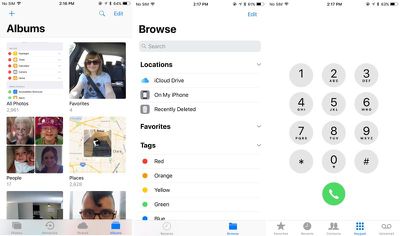
ios11redesignedelements
- Unified Siri and search settings - In the Settings app, there's now a single tab for Siri and Search, which is a more logical layout. There are also options for toggling on Siri suggestions for each individual app that's downloaded on a device.
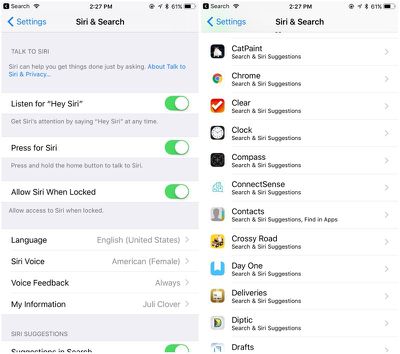
sirisandsearchsettings
- Revamped storage management - The "Storage and iCloud Usage" tab is now just "iPhone Storage" and it features at at-a-glance view of the storage space available on a device along with recommendations for improving storage space like auto deleting old conversations, clearing large Messages attachments, and storing Messages in iCloud, a new feature that syncs Messages across all of your devices.
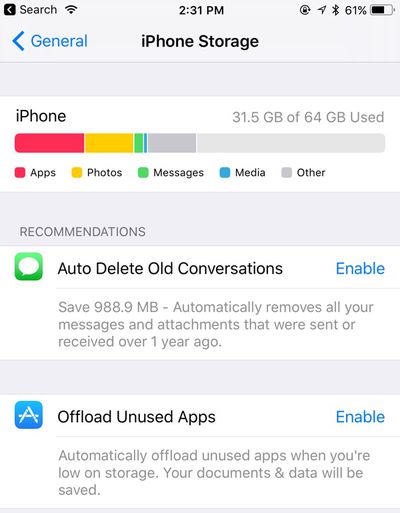
iphonestorageupdate
- Accounts and passwords - There's a new "Accounts & Passwords" section in Settings that provides access to all iCloud and Mail accounts along with app and website passwords stored in Keychain, accessible only after authenticating with Touch ID. Passwords are also available in the Safari section of the Settings app.

- Safari Settings - Additional privacy options are available for Safari in the Settings app. There's an option to "Try to Prevent Cross-Site Tracking," a new iOS 11 feature, and there are options for Camera and Microphone Access.

- Emergency SOS - There's an Emergency SOS option in the Settings app that allows users to turn on an "Auto Call" feature that will immediately dial 911 when the Sleep/Wake button is pressed five times.
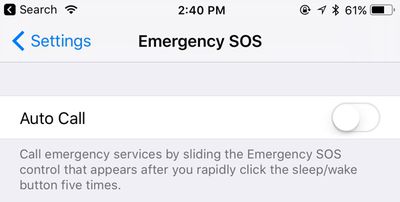
emergencysosautocall
- Drag and drop - Drag and Drop was announced as an iPad feature, but in apps like Files, drag and drop is available for moving files around on the iPhone. Drag and Drop is a feature that's limited to use within apps on the iPhone and it isn't system-wide like on the iPad.

- Camera QR code scanning - The Camera app automatically detects QR codes and will respond appropriately, doing things like opening up Safari to a specific website.

- Password Autofill - Password autofilling options are now available for third-party apps.

- AirPods settings - AirPods can now be customized with separate double tap gestures for the left and right AirPod. One can be set to access Siri, for example, while another can be set to play the next track. In iOS 10, double tap settings are applied to both AirPods.
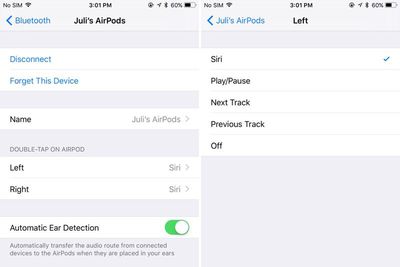
airpodsoptions
- Auto-pausing for uploads - Photo syncing and other such updates are automatically paused in iOS 11 when battery life is low.
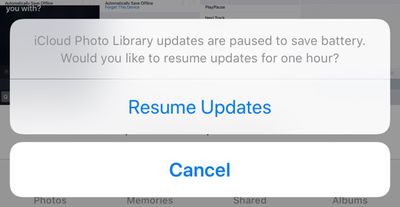
icloudupdatesbattery
- Automatic setup - When setting up a new iOS device, there's now an option to hold it near an existing device to automatically copy over settings, preferences, and iCloud Keychain.

- Screen recording - There's a Control Center option that will automatically capture a screen recording of what you're doing on an iPhone or iPad.

- Smart Invert - In the Accessibility section of the Settings app, under Accessibility > Display Accommodations > Invert Colors, there's a new option for "Smart Invert." Smart Invert reverses the colors of the display except for images, media, and some apps. It's quite similar to the Dark Mode that users have been hoping for, but it doesn't extend to all UI elements.

- GIFs In the Photos app, GIFs saved in the Camera roll now animate when opened. In the main album view, they are still, but will work properly when tapped.

There are many, many more undocumented tweaks and changes in iOS 11, and additional features will be added and updated throughout the beta testing process. For now, iOS 11 is limited to developers, but Apple plans to make a version available for public beta testers in late June.

Devices compatible with iOS 11 include the iPhone 5s, SE, 6 Plus, 6, 6s Plus, 6s, 7 Plus, and 7, along with the new fifth-generation iPad, the iPad Air, the iPad Air 2, all iPad Pro models, and the iPad mini 2 and later. iOS 11 essentially works with all devices that include an A7 or newer chip.


Related Forum: iOS 11

Popular Stories

apple pro tell logo

Apple Launching Five New Products Today

Thursday November 5, 2026 12:59 am PST by
Apple is launching five new products on Friday, November 6, following pre-orders that opened last week, including its first touchscreen MacBook Pro models. The following new products will be available from today: iPad mini with OLED display and A20 Pro chip iMac with M6 chip 14-inch MacBook Pro with M6 chip 14-inch MacBook Pro with OLED touchscreen 16-inch MacBook Pro with OLED...
duo aquarium

More Fun iPhone Duo Apps: 30 New Picks to Try

Friday November 6, 2026 3:27 pm PST by
When the iPhone Duo launched, we shared a list of some of the fun apps developers created for the new form factor. Two weeks out, developers are continuing to come up with fresh ideas, so we thought we'd share some of our favorites. Games Marbles Unhinged ($2.99) - Marbles Unhinged is a marble maze designed for the Duo. When you fold it, the floor turns into a ramp. If you stand the top...


silver iphone 18 pro

Apple Rumored to Drop the iPhone's Action Button Next Year

Friday November 6, 2026 6:07 am PST by
Apple plans to merge the iPhone's Action button with the Camera Control starting next year, according to the leaker known as "Instant Digital." In a new post on Weibo, the leaker claimed that a single press of the combined button would open the camera, while a long press would trigger the function assigned to the Action button. They explicitly clarified that the dedicated Action button would ...

Top Rated Comments

supremedesigner Avatar
123 months ago
- Type to Siri - There's an Accessibility feature that enables Type to Siri. With this option toggled on, when Siri is accessed via a Home button press, it brings up a keyboard where you can type something to Siri.
It is about time! #Deaf #Accessibility
Score: 21 Votes (Like | Disagree)
gaximus Avatar
123 months ago
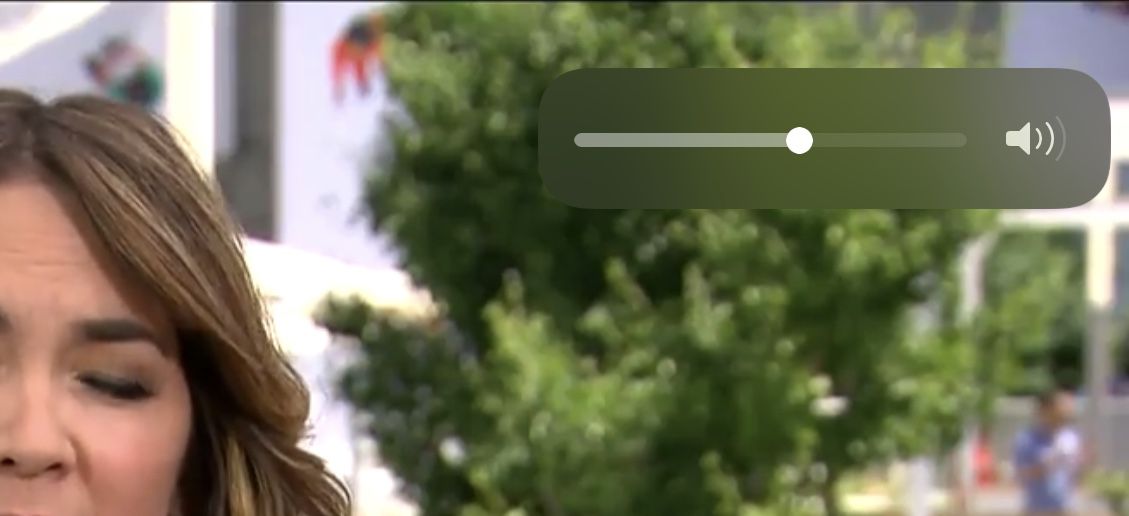
LOOK AT THE NEW VOLUME INDICATER. Yes it deserves all caps

Attachment Image
Score: 18 Votes (Like | Disagree)
braddick Avatar
123 months ago
What does the calculator look like ?
Still using every single digit, 1 through 9 (including 0!).
Score: 14 Votes (Like | Disagree)
penajmz Avatar
123 months ago
AirPods customization VERY welcomed
Score: 12 Votes (Like | Disagree)
123 months ago
The dragfest is real. Seriously, that's some good coding right there
Indeed. Apple is back.
Score: 11 Votes (Like | Disagree)
123 months ago
More here. https://twitter.com/stroughtonsmith/status/871857521979527169/video/1
The dragfest is real. Seriously, that's some good coding right there
Score: 11 Votes (Like | Disagree)
Latest Stories
Early Apple Black Friday Deals on Apple Watch, MacBook Air, and More
13 hours ago
'Backglow' Lets You Customize New MacBook Pro's Glowing Apple Logo
13 hours ago
Top Stories: Apple Product Launches, iOS 27.3 Beta, and More
19 hours ago
More Fun iPhone Duo Apps: 30 New Picks to Try
1 day ago
Hands-On With Apple's New OLED Touchscreen MacBook Pro
1 day ago
Apple Store With All-New Design Opening Soon in Southern California
2 days ago
Control the Glowing Apple Logo on Your New MacBook Pro
2 days ago
Apple Shares New 'Apple Card: Apply and Use in Minutes' Ad
2 days ago
Apple Says More Than 100,000 Apps Optimized for iPhone Duo, Here's What's Still Missing
2 days ago
Early Black Friday Deals Kickoff With Steep Discounts on Apple Watch Ultras and More
2 days ago
The MacRumors Show: iOS 27.3 Looks Like a Huge Update
2 days ago
Best Buy's Black Friday Event Begins With Sitewide Savings on Apple, TVs, More
2 days ago
Apple Releasing Yet Another Two New Products Next Week
2 days ago
MacBook Air Drops to Lowest Price in Months With Amazon's $250 Discount
2 days ago
Apple Rumored to Drop the iPhone's Action Button Next Year
2 days ago
Apple's Extended Return Policy Now in Effect for 2026 Holiday Season
2 days ago
Apple Music Classical Updated With New Icon and Refreshed Design
2 days ago
OLED iPad Mini, M6 iMac, and New MacBook Pros Available From Today
2 days ago
Apple Surveys iPhone Duo Buyers About Crease and Camera
2 days ago
Apple's First Touchscreen Mac is Now Arriving to Customers
2 days ago
Claude Gets Personal Finance Feature With Bank Account Linking
2 days ago
Apple Arcade Adds Crossy Road Rush and NBA 2K27
2 days ago
Apple's New HomeView Smart Home Hub: Here's How Much RAM It Has
3 days ago
iPad Mini vs. iPad Air Buyer's Guide: Now Just $50 Apart
3 days ago
First iOS 27.3 and macOS Golden Gate 27.3 Public Betas Now Available
3 days ago
Apple Announces a New Mac Sales Record
3 days ago
Paid $200 for Logic Pro? Apple Says You Won't Get This New Feature
3 days ago
Instagram's Edits Video Editor is Now Available on Mac
3 days ago
Prevent Siri and Search From Accessing Specific iPhone Apps
3 days ago
Best Early Black Friday Deals on iPhone 18 Pro and iPhone Duo
3 days ago