Apple Releases Updates for Pages, Numbers, and Keynote on iOS and Mac - MacRumorsOpen MenuShow RoundupsShow Forums menuVisit ForumsOpen Sidebar
Skip to Content

Apple Releases Updates for Pages, Numbers, and Keynote on iOS and Mac

by

Apple today released updates for its suite of iWork apps on iOS and Mac, introducing new features for Pages, Keynote, and Numbers. All of the apps have access to a new library that includes more than 500 professionally drawn shapes, and there's a new feature that allows users to reply to comments and join threaded conversations.

Apple is also introducing new auto-correction and text replacement options that are designed to save users time when typing, and these new features are available in Keynote, Pages, and Numbers across both iOS and Mac.

iwork for mac
Pages for iOS and Mac now support linked text boxes, and there's a feature allowing users to export documents as fixed layout ePub books. When collaborating with other users on a document, there are new options for changing margins, headers, footers, and paper size in both apps, and in Pages for iOS specifically, there's a new page thumbnail view for better navigation.

In Pages for Mac, Stock and Currency functions will now return data from the previous market day's close.

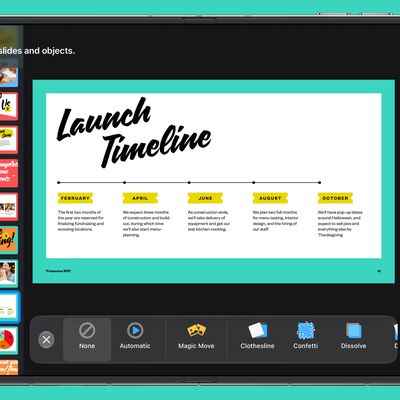
The same Stock and Currency update is coming to Keynote for Mac, and there's also a new option to edit notes while displaying slides in Light Table view. Also new to the Mac version of Keynote are new pan and zoom options. Light Table view is expanding to Keynote for iOS, and there's an option to edit presenter notes when viewing slides.

Both versions of Numbers are being updated with support for print preview when working on collaborative spreadsheets, and the Insert Stock Quote feature and the Stock and Currency functions now use data from the previous market day's close.

All of Apple's iWork apps are available from the iOS App Store and Mac App Store for free. The apps have been fully free for download since April of 2017.

- Pages for Mac - [Mac App Store]
- Keynote for Mac - [Mac App Store]
- Numbers for Mac - [Mac App Store]

- Pages for iOS - [App Store]
- Keynote for iOS - [App Store]
- Numbers for iOS - [App Store]
Top Rated Comments

tethead Avatar
123 months ago
OMG, they actually added back in linked text boxes!! Their removal of this feature with the "new" iWork suite several years ago caused me to stop using these for work - and now we're happy with another solution - but at least I can finally open and edit my older documents. I wonder if all my feedback submitted on that finally got read??
Score: 14 Votes (Like | Disagree)
123 months ago
I never used Pages '09, what are linked text boxes actually?
They allow you to link two separate text boxes, so when text does not fit in the first, it overflows in the next. It's all explained on this new help document on Apple: https://support.apple.com/nl-be/HT207731
Score: 10 Votes (Like | Disagree)
123 months ago
Is there actually an advantage to using this applications when Office seems so much more superior?

I'm not trying to be a jerk or anything I'm sincerely curious as to what the benefit would be to using them vs office.
Pages is miles ahead of Word in:
- Responsiveness
- Font rendering
- Making tables
- Graphic heavy documents
- Generating equations (since last update)

Add that to a simpler user interface, and Pages becomes a really good app.
Score: 9 Votes (Like | Disagree)
HobeSoundDarryl Avatar
123 months ago
Wait.... Apple's word processor didn't let you type directly on the page?

o_O
More accurately, Pages '09 was basically 2 programs in one:

* a "skinny" Word Processor
* a "skinny" DTP (Page Layout) Program

The Word Processor side worked pretty similar to how Pages has worked in the last few years (and yes, you could just type into a page).

The DTP side gave people who wanted to make something that looked like magazines, fancy newsletters, etc extraordinarily good control over where text could be placed... and flowed page to page. It seemed to have many of the best features of "fat" DTP software via a relatively easy-to-use Apple UI.

When Apple decided to feature-sync Pages between Macs & iDevices, the DTP side features that separated it from being "just a word processor" were many of the popular features that were dropped. And this one- linked text boxes- was one of the biggies that was dropped. Glad to see it's finally come back again. I hope it works as well as it did 8 years ago.

Many of the gripes about missing Pages '09 revolve around missing the DTP-side features of Pages '09. It was a really good "skinny" DTP program (and still is).
Score: 6 Votes (Like | Disagree)
123 months ago
Is there actually an advantage to using this applications when Office seems so much more superior?

I'm not trying to be a jerk or anything I'm sincerely curious as to what the benefit would be to using them vs office.
I hate word. How does backspace suddenly change the font, the font size, color and paragraph justification for the text BEYOND the cursor?!?!

Move a text box by 5 pixels and it shifts four pages down, inside out and upside down.

Grrrrrrrr.
Score: 5 Votes (Like | Disagree)
Glassed Silver Avatar
123 months ago
95% of people use Excel to display data and generally only use some very basic functions. For this crowd, Numbers is superior. The fact that you can have multiple, independent tables on the same sheet is really nice.

But yes, Numbers needs better conditional formatting, and for many, pivot tables.
This, it's rather close to perfect home office software.

And one cannot underestimate the utility and design advantage of multiple, independent tables per sheet.

It may sound crazy, but it's absolutely ridiculous nobody else seems to adopt this concept, because it gives you so much freedom through a very simply concept. Probably one of Number's best features.

Also makes your documents look a lot lighter and they become easier on the eyes.

Glassed Silver:mac
Score: 4 Votes (Like | Disagree)

Popular Stories

iphone duo keynote

Apple's iWork Apps Get 'Intelligent Assistant' and iPhone Duo Support

Thursday October 22, 2026 1:02 pm PDT by
Apple today added an "Intelligent Assistant" to Keynote, Numbers, and Pages. The feature is available in beta for Apple Creator Studio subscribers. The update is available again following the temporary removal of the apps from the App Store. In Numbers, Intelligent Assistant can build formulas, visualize data, help generate formulas with natural language, and generate tables. The Pages...
apple pro tell logo

Apple Launching Five New Products Today

Thursday November 5, 2026 12:59 am PST by
Apple is launching five new products on Friday, November 6, following pre-orders that opened last week, including its first touchscreen MacBook Pro models. The following new products will be available from today: iPad mini with OLED display and A20 Pro chip iMac with M6 chip 14-inch MacBook Pro with M6 chip 14-inch MacBook Pro with OLED touchscreen 16-inch MacBook Pro with OLED...
duo aquarium

More Fun iPhone Duo Apps: 30 New Picks to Try

Friday November 6, 2026 3:27 pm PST by
When the iPhone Duo launched, we shared a list of some of the fun apps developers created for the new form factor. Two weeks out, developers are continuing to come up with fresh ideas, so we thought we'd share some of our favorites. Games Marbles Unhinged ($2.99) - Marbles Unhinged is a marble maze designed for the Duo. When you fold it, the floor turns into a ramp. If you stand the top...
Latest Stories
Early Apple Black Friday Deals on Apple Watch, MacBook Air, and More
13 hours ago
'Backglow' Lets You Customize New MacBook Pro's Glowing Apple Logo
13 hours ago
Top Stories: Apple Product Launches, iOS 27.3 Beta, and More
19 hours ago
More Fun iPhone Duo Apps: 30 New Picks to Try
1 day ago
Hands-On With Apple's New OLED Touchscreen MacBook Pro
1 day ago
Apple Store With All-New Design Opening Soon in Southern California
2 days ago
Control the Glowing Apple Logo on Your New MacBook Pro
2 days ago
Apple Shares New 'Apple Card: Apply and Use in Minutes' Ad
2 days ago
Apple Says More Than 100,000 Apps Optimized for iPhone Duo, Here's What's Still Missing
2 days ago
Early Black Friday Deals Kickoff With Steep Discounts on Apple Watch Ultras and More
2 days ago
The MacRumors Show: iOS 27.3 Looks Like a Huge Update
2 days ago
Best Buy's Black Friday Event Begins With Sitewide Savings on Apple, TVs, More
2 days ago
Apple Releasing Yet Another Two New Products Next Week
2 days ago
MacBook Air Drops to Lowest Price in Months With Amazon's $250 Discount
2 days ago
Apple Rumored to Drop the iPhone's Action Button Next Year
2 days ago
Apple's Extended Return Policy Now in Effect for 2026 Holiday Season
2 days ago
Apple Music Classical Updated With New Icon and Refreshed Design
2 days ago
OLED iPad Mini, M6 iMac, and New MacBook Pros Available From Today
2 days ago
Apple Surveys iPhone Duo Buyers About Crease and Camera
2 days ago
Apple's First Touchscreen Mac is Now Arriving to Customers
2 days ago
Claude Gets Personal Finance Feature With Bank Account Linking
2 days ago
Apple Arcade Adds Crossy Road Rush and NBA 2K27
2 days ago
Apple's New HomeView Smart Home Hub: Here's How Much RAM It Has
3 days ago
iPad Mini vs. iPad Air Buyer's Guide: Now Just $50 Apart
3 days ago
First iOS 27.3 and macOS Golden Gate 27.3 Public Betas Now Available
3 days ago
Apple Announces a New Mac Sales Record
3 days ago
Paid $200 for Logic Pro? Apple Says You Won't Get This New Feature
3 days ago
Instagram's Edits Video Editor is Now Available on Mac
3 days ago
Prevent Siri and Search From Accessing Specific iPhone Apps
3 days ago
Best Early Black Friday Deals on iPhone 18 Pro and iPhone Duo
3 days ago











































