

What's New in iOS 11 Beta 4: Lock Screen and Notification Center Changes, New App Icons and More - MacRumorsOpen MenuShow RoundupsShow Forums menuVisit ForumsOpen Sidebar
Skip to Content

What's New in iOS 11 Beta 4: Lock Screen and Notification Center Changes, New App Icons and More

Apple seeded the fourth beta of iOS 11 to developers this morning, bringing some of the most significant changes we've seen yet in an iOS 11 beta.

A much-desired swipe feature for clearing Notifications on the Lock screen has been added, and there are also several visual tweaks to icons throughout the operating system. We've outlined all of the changes in both the video and the post below.


- New icons - Apple has introduced new icons for the Contacts, Notes, and Reminders app. Some of the app icons may be bugged for some people, showing certain details, like bullets for Reminders, on the wrong side of the icon. This is because Apple inverts the icons for languages that read right to left instead of left to right, and it should be fixed in a later beta.
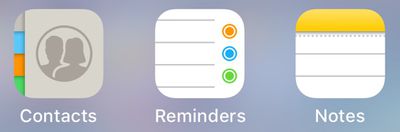
newappicons
There's also a new icon for Contacts in the Settings app, while the Notes and Reminders icons in Settings remain the same.

- Notification Center - You can now swipe to the left on a Notification on the Lock screen to bring up options to clear it or view it. Tapping on view or tapping on the Notification itself also brings up a new screen that instructs you to use Touch ID to unlock your device to open the associated app.
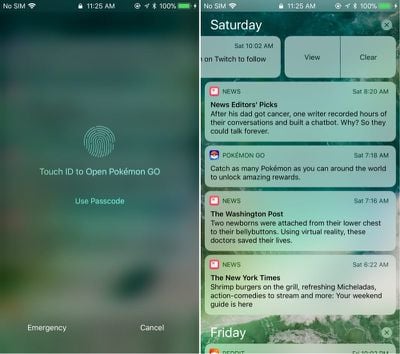
ios11b4notifications
In addition to tapping on an icon or using the view option to open it, a Notification will also open if you slide to the right. A full slide to the left automatically clears a Notification without having to tap the clear button.

- Settings (Capacity) - In the General section of the Settings app, when you choose "About," the Capacity listing now shows the total amount of storage a device possesses rather than the amount of storage available minus the size of iOS.
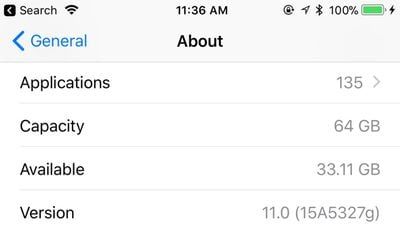
capacityios11
- Settings (AirDrop) - In the Settings app under General, there's now a dedicated section for AirDrop that allows it to be toggled off, set to everyone, or limited to contacts. Previously, only the Control Center could be used to change these settings.
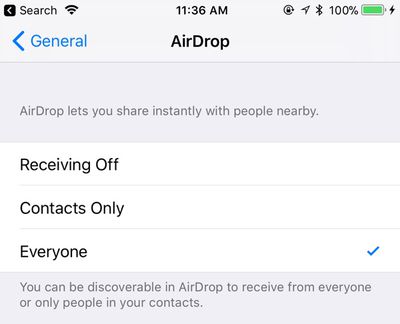
airdropios11
- Settings (Accounts & Passwords) - In the Accounts & Passwords section of the Settings app, the key icon is now vertically oriented instead of displayed horizontally.
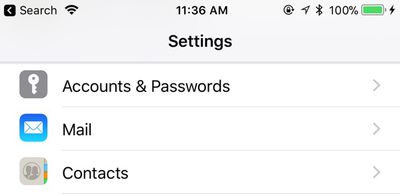
accountsandpasswordsios11
- WiFi icon - The WiFi icon in the upper left hand of the display that shows when you're connected to a WiFi network has been slightly tweaked with thicker, more uniform lines.
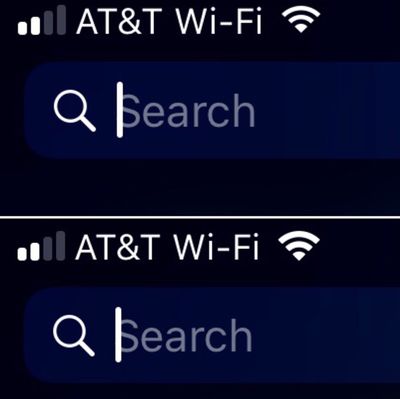
ios11wifiicon

- App Store - There's now an option to pull downwards to refresh the App Store's Updates tab.
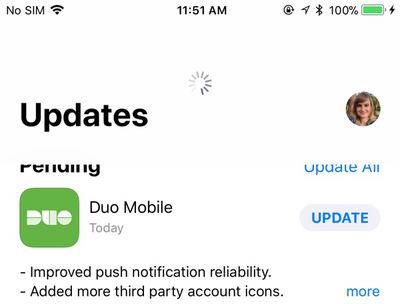
ios11appstoreupdatespulltorefresh
iOS 11 beta 4 is currently limited to developers, but Apple will likely introduce the changes in a third public beta that we expect to see later this week.


Related Forum: iOS 11

Popular Stories

iOS 27 Next to iPhone

Here's When iOS 27 Rolls Out Today in Every Time Zone [Update: It's Out]

Sunday September 13, 2026 3:00 am PDT by
Update 10:04 a.m.: iOS 27 is rolling out now, though it may take a bit for all users to see it, so keep checking! Apple is about to release iOS 27, which will finally deliver more advanced Siri AI capabilities as well as a variety of other refinements, improvements, and new features to iPhones. It's Apple's biggest software update of the year, and Apple announced at Wednesday's iPhone event...
iOS 27 Icon iPhone

iOS 27 Available Now With These 8 New Features

Monday September 14, 2026 9:00 am PDT by
Update — 10 a.m. Pacific Time: Apple has released iOS 27. During its iPhone 18 Pro and iPhone Duo event last week, Apple announced that iOS 27 will be released widely on Monday, September 14. iOS 27 should be available around 10 a.m. Pacific Time / 1 p.m. Eastern Time today via the Settings app, under General → Software Update. Below, we have highlighted eight new features and...
Apple iCloud Plus expansion hero

iCloud+ Now Includes Apple TV, Apple Arcade, and Curated Apple Music Stations in Over 100 Countries

Tuesday September 15, 2026 1:43 am PDT by
Apple today announced a new subscription initiative that turns paid iCloud+ subscriptions into a broader services bundle in more than 100 countries. In select countries, Apple says every paid iCloud+ plan, including the cheapest 50GB tier, now includes Apple TV and Apple Arcade "at no additional cost," while family sharing extends the storage, TV and Arcade access to up to five people....

Top Rated Comments

inscrewtable Avatar
119 months ago
I am bitterly disappointed that having changed the Accounts & Passwords key icon from horizontal to vertical that they did not take this golden opportunity to have it at a more jaunty 45 degree angle.
Score: 20 Votes (Like | Disagree)
JeffyTheQuik Avatar
119 months ago
Love my iPhone, but lately it has become so boring and iOS 11 doesn't do anything new.

I just had a bad experience at an Apple Store, so I'm really angry right now, but that aside, yeah, nothing really new in iOS 11.
I'll take boring:

* iOS versions
* Airplane rides
* "Talks" with my Boss
* Babysitting jobs
* Hotel room stays (I had an exciting one once on Orange Blossom Trail in Orlando where the adjacent rooms were opened with Orange County Deputies hauling out girls and their clients...)
Score: 8 Votes (Like | Disagree)
Westside guy Avatar
119 months ago
Love my iPhone, but lately it has become so boring and iOS 11 doesn't do anything new.
Given how much I depend on my phone for keeping in touch, paying bills, managing accounts, etc... I'll take "boring" any day.
Score: 8 Votes (Like | Disagree)
tliede20 Avatar
119 months ago
SWEET JESUS... ADD 3D Touch TO Wi-Fi and Bluetooth so we can change network or device connection! >.<
Score: 7 Votes (Like | Disagree)
gsmornot Avatar
119 months ago
Not a big deal but I would like to see the update size return to the updates.
Score: 7 Votes (Like | Disagree)
119 months ago
Glad they're finally copying Android's notifications management. Notifications on iOS have been subpar for too long.
Score: 7 Votes (Like | Disagree)














