iPhone 8 Virtual Home Button Can Likely Resize and Hide Completely As Needed - MacRumorsOpen MenuShow RoundupsShow Forums menuVisit ForumsOpen Sidebar
Skip to Content

iPhone 8 Virtual Home Button Can Likely Resize and Hide Completely As Needed

Yesterday, HomePod firmware revealed that the iPhone 8's facial recognition software will seemingly support Apple Pay, multiple facial profiles, and third-party apps. Now, as the uncovering of Apple secrets within HomePod firmware continues apace, developer Steven Troughton-Smith has revealed details on Twitter about the iPhone 8's virtual home button, stating that it "resizes" as needed to fit certain tasks on the smartphone.

Specifically, Troughton-Smith described a "periphery" area of the system user interface that expands/minimizes and shows/hides the iPhone 8's virtual home button as it's needed. There will be tab bars that extend under this periphery area, and no evidence was discovered of an ability for this part of the UI to change color. According to Troughton-Smith, this means that the indicator Apple is building for the virtual home button area "will have to contrast well" with any background and colors displayed on the rest of the display.
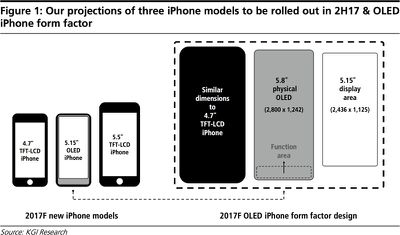
kuoiphone8size

Proposed iPhone 8 "function area" by Ming-Chi Kuo

There was also no evidence found that suggests any piece of app UI will be part of the home button area in any form, meaning Apple plans to keep the bottom home button piece of UI clean and uniform whenever it's brought up. Troughton-Smith did mention that whenever a user plays a fullscreen video, the content will hide the home button controls.

The idea of a virtual "function area" on the iPhone 8 was detailed earlier this year in a report written by KGI Securities analyst Ming-Chi Kuo, who stated the the 5.8-inch screen on the device would have a 5.15-inch usable display. The remaining area of the screen would be reserved for an area of virtual buttons, including a home button, but Kuo's report never hinted that the function area might resize or be "hidden" completely whenever the UI allows it, as Troughton-Smith has discovered.

In addition, Troughton-Smith tweeted out the metrics for the upper status bar on the iPhone 8. The code further confirmed previous HomePod firmware findings that related to a "split" status bar on the device, with what's expected to be camera and sensor hardware sitting between two virtual pieces of UI. Designer Olivier Charavel has already used the metrics to create a mockup of what this status bar should look like on the real iPhone 8, including connection strength and a battery indicator.

iphone 8 sensors area


Previously, Troughton-Smith said the new status bar seemed "more complex and powerful" in its design, and even said that it could be "interactive" in some way.

In regards to the iPhone 8's bottom area and virtual home button findings, Troughton-Smith tweeted that, "all of these things are supported by API evidence, so this is the clearest picture of its functionality we have to work from." HomePod firmware is building up a good indicator of what we can expect from the iPhone 8 when Apple announces the device next month, including advanced facial recognition features likely replacing Touch ID completely, 4K video recording, "SmartCamera" functionality, and more.


Related Forum: iPhone

Popular Stories

iOS 27 Next to iPhone

Here's When iOS 27 Rolls Out Today in Every Time Zone [Update: It's Out]

Sunday September 13, 2026 3:00 am PDT by
Update 10:04 a.m.: iOS 27 is rolling out now, though it may take a bit for all users to see it, so keep checking! Apple is about to release iOS 27, which will finally deliver more advanced Siri AI capabilities as well as a variety of other refinements, improvements, and new features to iPhones. It's Apple's biggest software update of the year, and Apple announced at Wednesday's iPhone event...
iOS 27 Icon iPhone

iOS 27 Available Now With These 8 New Features

Monday September 14, 2026 9:00 am PDT by
Update — 10 a.m. Pacific Time: Apple has released iOS 27. During its iPhone 18 Pro and iPhone Duo event last week, Apple announced that iOS 27 will be released widely on Monday, September 14. iOS 27 should be available around 10 a.m. Pacific Time / 1 p.m. Eastern Time today via the Settings app, under General → Software Update. Below, we have highlighted eight new features and...
Apple iCloud Plus expansion hero

iCloud+ Now Includes Apple TV, Apple Arcade, and Curated Apple Music Stations in Over 100 Countries

Tuesday September 15, 2026 1:43 am PDT by
Apple today announced a new subscription initiative that turns paid iCloud+ subscriptions into a broader services bundle in more than 100 countries. In select countries, Apple says every paid iCloud+ plan, including the cheapest 50GB tier, now includes Apple TV and Apple Arcade "at no additional cost," while family sharing extends the storage, TV and Arcade access to up to five people....

Top Rated Comments

Centris 650 Avatar
119 months ago
MacRumors needs to put the HomePod on it's payroll.
Score: 18 Votes (Like | Disagree)
119 months ago
The gift that keeps giving....
Score: 18 Votes (Like | Disagree)
HobeSoundDarryl Avatar
119 months ago
With a virtual home button, I wonder what the sequence of buttons will be for a "hard reboot" and screen shot...
[LIST=1]
* Post the issue on a forum to first learn that whatever the cause of the need to reboot, it is YOUR and only your (user error) fault.
* Offer counterpoint that implies a bug and risk being called a troll or paid Android shill.
* Watch others chime in with the same issue, only to be summarily lumped into the .0001% of users that have such issues.
* Read 5+ posts that basically say "My phone is working perfectly" (so yours can't be having any such issue). Feel free to privately roll your eyes to that one. Really. They won't know. Then,
* Visit an Apple Store
* Insert phone in Recycle bin
* Buy new phone.
* Cheer on "record profits"
* Sling around "...but who makes the most profitable phone" in website forums.


;)
Score: 8 Votes (Like | Disagree)
aaronhead14 Avatar
119 months ago
I just wanna know where the dang clock is going to be.
Score: 7 Votes (Like | Disagree)
Berti10 Avatar
119 months ago
Let me guess, it can be swiped up together with the dock and control center like on the iPad with iOS 11
Score: 7 Votes (Like | Disagree)
meaning-matters Avatar
119 months ago
Rumor: On-screen button can hide.
Score: 7 Votes (Like | Disagree)