

Vivaldi Web Browser 1.11 Brings Enhanced Reader Mode and Accessibility Features - MacRumorsOpen MenuShow RoundupsShow Forums menuVisit ForumsOpen Sidebar
Skip to Content

Vivaldi Web Browser 1.11 Brings Enhanced Reader Mode and Accessibility Features

by

Vivaldi web browser, the spiritual successor to Opera 12, reached version 1.11 on Thursday, bringing an improved Reader Mode, animation controls, and advanced accessibility features to the highly configurable Mac app.

vivaldi 1
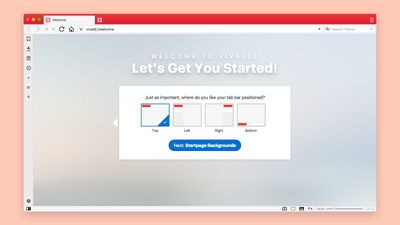
Vivaldi, which claims to be the most customizable browser for power users, has quietly been carving its own niche in the desktop web browser market and now boasts over 1 million users. The browser is aimed at staunch technologists, heavy internet users, and previous Opera web browser users disgruntled by Opera's transition to the Blink layout engine, which removed many popular features.
vivaldi welcome
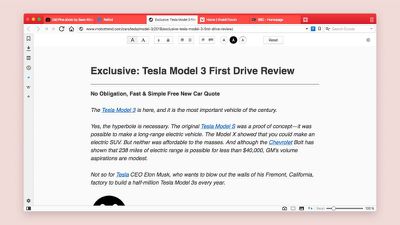
First up in v1.11, there are tweaks to Vivaldi's existing Reader Mode, which offers a clutter-free reading environment by stripping off unwanted advertisements, videos and other distractions. Users can now adjust the settings at the top of the page they're currently viewing in the Reader Mode, including the ability to choose the font type and size of the text, set the column width and line height, as well as select either dark or light background.
vivaldi readermode
On top of those changes, Vivaldi's custom Themes add another dimension, allowing users to choose their custom Theme and apply it to the Reader Mode. Custom Themes in Vivaldi also have programmatic support to enforce minimal contrast, which aims to make the browser more comfortable for people with visual impairments.

Elsewhere, Vivaldi now offers a simple way of turning off GIF animations, for people who react to flashing images and want to avoid them. Clicking on the Toggle Images icon in the Status Bar at the bottom of the screen reveals three options for loading animations – always, once or never.

vivaldi notes
There's also an improvement to Editable Mouse Gestures in Vivaldi that let users execute a command with a simple movement of the mouse. In version 1.11, users have increased control over this feature with the ability to set the minimum stroke length for the gesture they want to register. Additional accessibility options in this version also include quick commands and keyboard shortcuts, and the ability to zoom on selected pages and set a zoom level on a per tab basis.

Vivaldi browser is a free download for Mac available directly from the Vivaldi website.

Top Rated Comments

Te0SX Avatar
116 months ago
I am using Vivaldi for months now. I just love it more and more with every update. Its Start Page is stunning, with speed dial, it's unique look and features that will put your browsing life in order with the best possible way, with these not huge, not small thumbnails that can be shown the loaded page or a custom picture. It's working smoother, better, is more organized, more beautiful. It's far better than its competition. Again, everything is customizable! I love how tabs work and all these features like Tile etc. History view became sick and works smoother and smoother with every update. Panel just works perfect. It's also really lightweight and fast. Congrats to dev team.

Give it a chance and I am sure most of you won't look back for a long time!
Score: 4 Votes (Like | Disagree)
jonnysods Avatar
116 months ago
I'm always open to move to a lightweight browser. I'll check this one out and see how she stacks up.

I use chrome for browsing and safari for dev work.
Score: 1 Votes (Like | Disagree)

Popular Stories

Paste Protect opera

Opera Browser Gains Protection Against Malicious Clipboard Commands

Thursday July 2, 2026 5:40 am PDT by
Opera browser has announced a new security feature called Paste Protect that aims to stop clipboard-based cyberattacks before their malicious commands can be accidentally executed. Opera says it's the first major browser to offer native protection against ClickFix attacks – a growing form of social engineering that tricks users into copying and pasting malicious commands into a computer's...
iCloud iPhone 17 Pro

iPhone Users Who Pay for iCloud Storage Get Two New Perks on iOS 27

Thursday July 2, 2026 6:10 am PDT by
If you pay for certain iCloud+ storage plans beyond the 5GB that Apple offers for free, you will receive two more perks on iOS 27 at no additional cost. A summary of the two new iCloud+ perks on iOS 27:Increased daily usage limits for some new Apple Intelligence features, including image generation in the revamped Image Playground app. HomeKit Secure Video cameras receive generated video...
iPhone 4 on Black Feature

Apple Facing One of Its Worst Leaks Since the iPhone 4

Thursday July 2, 2026 9:53 am PDT by
Apple supplier Tata Electronics recently suffered a cyberattack that resulted in thousands of confidential files being published on the dark web, and this reportedly included some photos and documents related to the upcoming iPhone 18 Pro. We have elected not to share any of the leaked photos in this story due to the illegal nature in which they were obtained, but they can easily be found...














