

iOS 11's SOS Feature Allows You to Temporarily Disable Touch ID and Require Passcode - MacRumorsOpen MenuShow RoundupsShow Forums menuVisit ForumsOpen Sidebar
Skip to Content

iOS 11's SOS Feature Allows You to Temporarily Disable Touch ID and Require Passcode

In iOS 11, Apple has added an "Emergency SOS" feature that's designed to give users a quick and easy way to summon emergency services should the need arise. As it turns out, there's a secondary benefit to Emergency SOS - it's also a way to quickly and discreetly disable Touch ID.

Emergency SOS is activated by pressing on the sleep/wake button of an iPhone five times in rapid succession. When the requisite number of presses is complete, it brings up a screen that offers buttons to power off the iPhone, bring up your Medical ID (if filled out) and make an emergency 911 call.
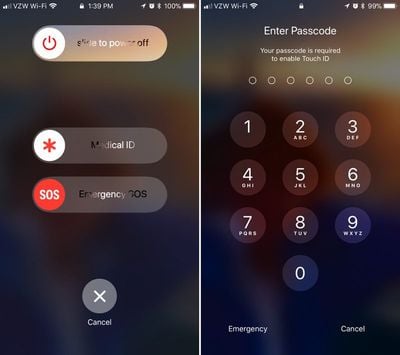
touchiddisabled
Along with these options, there's also a cancel button. If you hit the sleep/wake button five times and then hit cancel, it disables Touch ID and requires a passcode before Touch ID can be re-enabled. Touch ID is also disabled if you actually make an emergency call.

This is a handy hidden feature because it allows Touch ID to be disabled discreetly in situations where someone might be able to force a phone to be unlocked with a fingerprint, such as a robbery or an arrest. With Touch ID disabled in this way, there is no way to physically unlock an iPhone with a finger without the device's passcode.

It's also worth noting that there's no real way to tell that Touch ID has been disabled in this manner. Once you hit the sleep/wake button and then tap cancel, it's locked in the same way and with the same message that the iPhone uses when it's been more than 48 hours since a device was last unlocked with a fingerprint.

Apple's Emergency SOS feature will be available on all iPhones that run iOS 11. Along with disabling Touch ID, SOS can also be used to summon emergency services and alert your emergency contacts when an accident occurs.

iOS 11 is available to developers and public beta testers at the current time and will be released to the public in September alongside new iPhones.


Related Forum: iOS 11

Popular Stories

macOS 27 on MacBook Pro

Apple Says macOS 27 Won't Be Compatible With These Macs

Wednesday June 3, 2026 8:29 am PDT by
During WWDC 2025, Apple revealed that macOS 26 Tahoe would be the final major macOS version for Intel-based Macs. macOS 27 will be compatible with Apple silicon Macs only, meaning that you will need a Mac with an M-series chip or a MacBook Neo with an A18 Pro chip in order to install the software update. Apple will unveil macOS 27 during its WWDC 2026 keynote this Monday, June 8, and the...
MacBook Neo on Yellow Feature

MacBook Neo is So Popular That Apple Reportedly Doubled Production

Wednesday June 3, 2026 9:24 am PDT by
On an earnings call in late April, Apple's CEO Tim Cook said that customer response to the MacBook Neo was "off the charts," and the popularity of the laptop has reportedly led the company to significantly boost production. Apple supply chain analyst Ming-Chi Kuo this week said he believes that MacBook Neo shipments to Apple were doubled from an initial target of 5 million units to 10...
iphone 18 pro blue%402x

iPhone 18 Pro: Dark Cherry, Light Blue, and Dark Gray Chassis Leaked [Update]

Thursday June 4, 2026 5:18 am PDT by
Update: Since publication, new information has come to light suggesting the images have been AI-manipulated and are not in fact iPhone 18 Pro chassis parts. The original article follows. The color options Apple is reportedly planning for the upcoming iPhone 18 Pro and ‌iPhone 18 Pro‌ Max have appeared online today in the form of images of chassis parts of unknown authenticity....

Top Rated Comments

happydude Avatar
115 months ago
not that i plan on getting arrested any time soon, but good to know you can disable touch id. with the courts having ruled the police can compel a finger print but not you to give your passcode, it's a level of privacy that i like to see in there.
Score: 20 Votes (Like | Disagree)
fokmik Avatar
115 months ago
This is a great idea, but why pressing 5 times?
Surely 3 times would have been more than sufficient while making this action quicker and ultimately more usable.
in an emergency situation, believe me, you dont count, you will press that button 10 times in 3-4 seconds
So this is great 5 times allows us not to bring this by mistake
Score: 20 Votes (Like | Disagree)
btrach144 Avatar
115 months ago
keeps the cops out :cool:
Score: 18 Votes (Like | Disagree)
115 months ago
This is a great idea, but why pressing 5 times?
Surely 3 times would have been more than sufficient while making this action quicker and ultimately more usable.
I think the five times is to prevent any inadvertent actions. It's a rather fast Motion pressing five times to toggle the function if you think about it.
Score: 14 Votes (Like | Disagree)
115 months ago
ZERO people will recall this feature exists, or how to activate it, when a situation arises. Utterly convoluted.
Score: 12 Votes (Like | Disagree)
Wando64 Avatar
115 months ago
This is a great idea, but why pressing 5 times?
Surely 3 times would have been more than sufficient while making this action quicker and ultimately more usable.
Score: 12 Votes (Like | Disagree)













