

Parallels Desktop 13 for Mac Comes With High Sierra Support and Touch Bar Integration - MacRumorsOpen MenuShow RoundupsShow Forums menuVisit ForumsOpen Sidebar
Skip to Content

Parallels Desktop 13 for Mac Comes With High Sierra Support and Touch Bar Integration

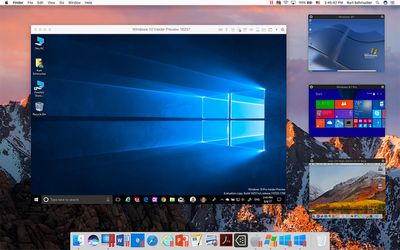
Parallels Desktop 13 for Mac got its official release on Tuesday. The thirteenth version of the Windows virtualization software comes with numerous new features including support for macOS High Sierra and the Windows 10 Fall Creators Update.
upgrade beauty picture in picture
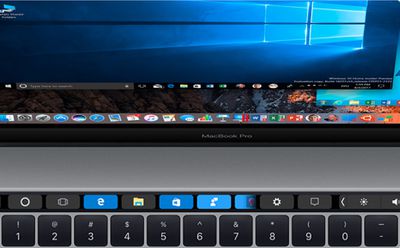
Top of the features list is Touch Bar support, enabling owners of compatible MacBook Pros to use the OLED strip with Microsoft Outlook, Excel, and PowerPoint, as well as additional integration for the Windows Start Menu and Desktop, including Cortana, Task View, and Taskbar pinned elements. A Touch Bar Wizard also allows users to customize the Touch Bar and add their favorite Windows applications.

New dynamic resolution support mean users can change the window size of their Windows session, with booting and rebooting speed said to be faster and smoother as a result. Meanwhile, enhanced support for Retina displays should see better scaling of Windows applications on Mac screens.
Screen Shot 4
A new Picture-in-Picture mode aims to let users monitor their virtual machine with ease, while support for the upcoming Windows 10 People Bar promises to allow users to view recent contacts in the Windows Taskbar or Mac Dock.

More generally, Parallels claims over 47 percent faster access to Windows files and documents compared to the previous version, faster file transfers over USB 3.0 and Thunderbolt SSD devices, and up to 32 vCPU and 128GB vRAM per virtual machine with Parallels Desktop for Mac Pro Edition, with code for all new versions optimized for macOS High Sierra (10.13) and Windows 10 Fall Creators Update.


Elsewhere, Parallels claims over 30 new additional tools can be found in version 13 that simplify everyday tasks on Mac and Windows. They include a drive cleaner, video conversion, a file archiver, a GIF creator, a video downloader, Do Not Sleep and Do Not Disturb modes, a Lock Screen, and the ability to temporarily hide files on the desktop, amongst many others.

Parallels Desktop 13 for Mac costs $79.99 for a new license. Existing users of Parallels Desktop for Home and Student can upgrade to V13 for $49.99, with a time-limited offer enabling users of the Desktop Pro Edition to upgrade for the same price (usually $99.99). For more pricing details, see the Parallels website.

(Thanks, Ulric!)

Related Forum: macOS High Sierra

Popular Stories

MacBook Neo and Lenovo IdeaPad Slim 3x Feature

New Study Highlights Advantages of $549 Windows Laptop Over MacBook Neo

Wednesday May 13, 2026 10:38 am PDT by
Microsoft has responded to the MacBook Neo by commissioning a study that highlights advantages of some Windows laptops. Market research firm Signal65 evaluated four Windows laptops:Lenovo's IdeaPad Slim 3x Lenovo's Yoga 7i HP's OmniBook 5 HP's OmniBook X FlipWith a starting price of $549.99 on Best Buy's online store in the U.S. at the time of this writing, the IdeaPad Slim 3x is the only ...
Apple Card iPhone 16 Pro Feature

Apple Card Promo to Offer Free AirPods Pro 3

Friday May 15, 2026 8:59 am PDT by
Starting as early as next week, customers who sign up for an Apple Card at Apple's retail stores in the U.S. will receive $249 cash back when they purchase AirPods Pro 3, according to Bloomberg's Mark Gurman. The promotion has yet to be officially announced by Apple, so exact terms and conditions are not available at this time. AirPods Pro 3 are priced at $249 in the U.S., so customers who...
Apple WWDC25 iOS 26 CarPlay Light mode 250609

Six Popular iPhone Apps Now Available on CarPlay

Thursday May 14, 2026 9:10 am PDT by
Apple's CarPlay system for accessing iPhone apps on a vehicle's dashboard screen has received six popular apps in recent weeks: ChatGPT, Perplexity, Grok, Google Meet, WhatsApp, and the indie artist streaming platform Audiomack. Make sure you have the latest version of each app and they will automatically appear on CarPlay. ChatGPT Starting with iOS 26.4, CarPlay supports voice-based...

Top Rated Comments

114 months ago
Not a fan of the hidden subscription model.
Score: 11 Votes (Like | Disagree)
paris18m Avatar
114 months ago
That moment you look at the Mac UI with the windows UI nested inside of it and realise you'd rather look at windows
you are joking right? so much inconsistencies and misalignments in windows 10 to even like anything about its interface!
Score: 8 Votes (Like | Disagree)
114 months ago
Parallels and Vmware have become the Mac's yearly tax.
Well, goodbye to them - Virtualbox is fine for my needs, the only reason left for Parallels/Vmware was the ability to use the Bootcamp install but the Win10 licensing is broken and they never fixed it. This time I'll just stick to Bootcamp or VB. I could even buy a second Win10 license and have both, it will repay itself in a couple of years anyway, but I don't really need it atm.
Score: 7 Votes (Like | Disagree)
114 months ago
Sometimes I wish Apple would slow down the new version releases so these companies didn't have an excuse for the annual upgrade shakedown.
Score: 7 Votes (Like | Disagree)
ivan86 Avatar
114 months ago
Video conversion, file archiver, GIF creator, video downloader... I just wish my Parallels Windows 10 VM would not flicker all the time.
Score: 6 Votes (Like | Disagree)
deany Avatar
114 months ago
Unfortunately for me, I still have to use Windows sometimes. I've never liked the aesthetic, going back to Windows 2.0.

My favorite UI was NeXT, and there is a poor copy available to layer over Linux if you want, but that's not for getting stuff done in the real world.

OS X, or whatever it's called now, is OK. I wish they'd get rid of the title bars though at the top of the screen and put everything back into the dock and program spaces. The bar at the top was great in 1984. Now, not so much, especially on a big screen.
Bar at the top can be hidden in macOS.
Score: 4 Votes (Like | Disagree)














