

Here's What the Status Bar and iPad-Style Dock Could Look Like on 'iPhone 8' - MacRumorsOpen MenuShow RoundupsShow Forums menuVisit ForumsOpen Sidebar
Skip to Content

Here's What the Status Bar and iPad-Style Dock Could Look Like on 'iPhone 8'

Earlier today, well-connected Apple reporter Mark Gurman said the so-called "iPhone 8" will have a thin software-based bar along the bottom of the home screen, controlled by gestures, in lieu of a physical home button.

Gurman also said the Dock, which houses up to four commonly used apps, will be redesigned with a new interface similar to the one on the iPad version of iOS 11. Above it, there will still be six rows of apps, with up to 24 apps per page.

The status bar is said to be split into left and right sides, which some Apple employees supposedly call "ears" internally. By default, the left side shows the time, while the right side displays Wi-Fi, signal bars, and battery life.

With those details in mind, graphic designer Olivier Charavel created a mockup of what the Home screen could look like on the iPhone 8.
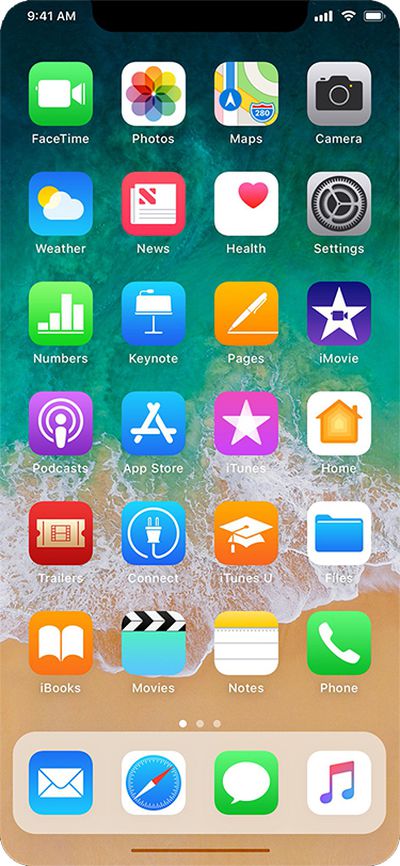
iphone 8 mockup with dock and gesture bar
Charavel also shared a mockup of Apple's Health app as an example of what apps could look like on the iPhone 8 accordingly.
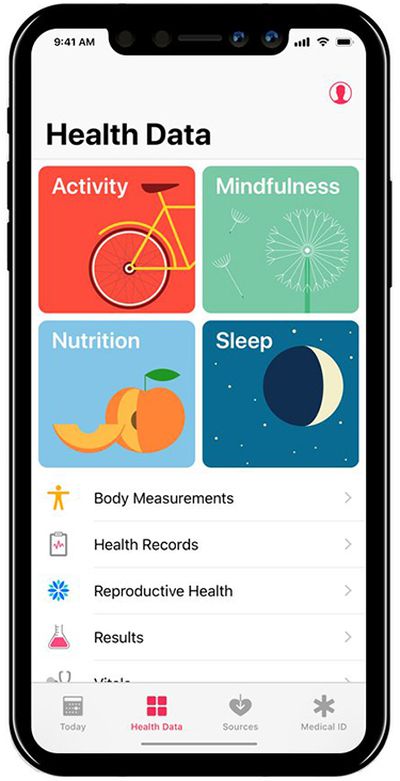
iphone 8 health
Gurman said users can drag the gesture bar up to the middle of the screen to unlock the device. When inside an app, a similar gesture starts multitasking, and users can continue to flick upwards to close the app and go back to the home screen.

Guilherme Rambo shared a video that demonstrates how it could look once the Dock has been summoned, based on Apple's iOS simulator for developers.

More Coverage: iOS 11 Dock and Gesture Controls to Replace "iPhone 8" Home Button Entirely by Tim Hardwick

Related Forum: iPhone

Popular Stories

Apple Card iPhone 16 Pro Feature

Apple Card Promo to Offer Free AirPods Pro 3

Friday May 15, 2026 8:59 am PDT by
Starting as early as next week, customers who sign up for an Apple Card at Apple's retail stores in the U.S. will receive $249 cash back when they purchase AirPods Pro 3, according to Bloomberg's Mark Gurman. The promotion has yet to be officially announced by Apple, so exact terms and conditions are not available at this time. AirPods Pro 3 are priced at $249 in the U.S., so customers who...
Apple WWDC25 iOS 26 CarPlay Light mode 250609

Six Popular iPhone Apps Now Available on CarPlay

Thursday May 14, 2026 9:10 am PDT by
Apple's CarPlay system for accessing iPhone apps on a vehicle's dashboard screen has received six popular apps in recent weeks: ChatGPT, Perplexity, Grok, Google Meet, WhatsApp, and the indie artist streaming platform Audiomack. Make sure you have the latest version of each app and they will automatically appear on CarPlay. ChatGPT Starting with iOS 26.4, CarPlay supports voice-based...
ipad mini 7 blue

OLED iPad Mini: Release Date, Pricing, and What to Expect

Thursday May 14, 2026 5:08 am PDT by
According to the latest rumors, Apple is close to launching its next-generation iPad mini. So what should we expect from the successor to the iPad mini 7 that Apple released over a year ago? Read on to find out. Processor and Performance Apple is working on a next-generation version of the iPad mini (codename J510/J511) that features the A19 Pro chip, according to information found in code...

Top Rated Comments

Dwalls90 Avatar
114 months ago
Okay, but really hope app "cards" look like this instead of the Health app picture in the article.

MacRumors content image
Score: 20 Votes (Like | Disagree)
redscull Avatar
114 months ago
Really hoping there is still some sort of "home button" in software. I can't see any kind of usability at all with some hidden idea of "gestures" to get things done. I just can't see my mother (or any older person) being comfortable with an iPhone that doesn't have an obvious "home" button, even if it's a virtual one drawn in the same place on the screen as the hardware one.
Strongly agree. Apple has been reducing usability steadily ever since they shed skeumohism, which is when a hardware design expert started pretending he was skilled at software user experience design. Getting rid of the home button is that final step in eliminating what made the iPhone so approachable to so many. It's a sad day if true.
Score: 15 Votes (Like | Disagree)
drinkingtea Avatar
114 months ago
Ugly, honestly.
Score: 15 Votes (Like | Disagree)
MareLuce Avatar
114 months ago
This I'm okay with. Show carrier name when swiping down like Android and it'll be fine. Just don't get rid of the clock!
Excellent point - the carrier name won't be visible.

Yay! Be gone, extraneous data.
Score: 13 Votes (Like | Disagree)
114 months ago
Really hoping there is still some sort of "home button" in software. I can't see any kind of usability at all with some hidden idea of "gestures" to get things done. I just can't see my mother (or any older person) being comfortable with an iPhone that doesn't have an obvious "home" button, even if it's a virtual one drawn in the same place on the screen as the hardware one.

My expectation is the virtual home button will automatically appear "on raise", based on the motion and proximity sensors.
Score: 11 Votes (Like | Disagree)
114 months ago
I want to reserve judgement but I'm not gonna. Hate the notch. Hate it. My brain will never accept the visual distraction.
Score: 9 Votes (Like | Disagree)















