Logitech Resurrects the Trackball Device With the Wireless MX ERGO - MacRumorsOpen MenuShow RoundupsShow Forums menuVisit ForumsOpen Sidebar
Skip to Content

Logitech Resurrects the Trackball Device With the Wireless MX ERGO

by

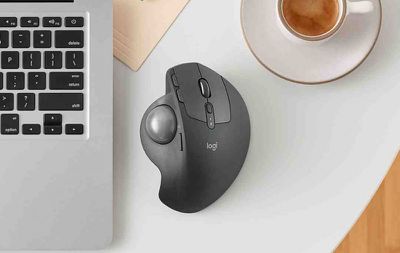
Logitech resurrected the trackball device today with its announcement of the MX ERGO, which the company is calling its "first new innovative trackball in nearly a decade".

Pitched to consumers looking for alternatives to mice and touchpads, the Bluetooth-based MX ERGO features an adjustable metal hinge with angle options at either zero or 20 degrees for personalizing the comfort level, which improves wrist posture and pronation, according to Logitech.
mx ergo instagram

"We are so excited by this new trackball. It is back, better than ever and the idea for this trackball innovation was inspired by our users, who invented creative ways to achieve their desired level of comfort, sometimes adding additional wedges under their trackball for elevated angles," said Anatoliy Polyanker, global portfolio and brand director at Logitech. "The MX ERGO is our first adjustable trackball that delivers on the need for elevated comfort in a beautiful design."

The sculpted shape is designed to offer full palm and finger support, with a soft rubber on top for a comfortable grip over many hours of work. An LED light indicates when "precision mode" is activated using the dedicated button on the side of the MX ERGO. This special mode is said to allow the user to instantly change cursor speed and accuracy.

The device also supports multi-device connectivity through Logitech's Easy-Switch and Logitech Flow software, which allows users to seamlessly switch between two computers with one mouse, as well as copy and paste content, images and documents between them.


The rechargeable battery lasts up to four months on a full charge, depending on usage, and Logitech reckons the MX ERGO can give a complete day of work with just one minute of charge if the device is low on power.

The Logitech MX ERGO is priced at $99.99 and should be available to buy on the Logitech website and select retail stores throughout the U.S. in September.


Top Rated Comments

120 months ago
I had one of those about 20 years ago.

It was really fantastic. It was so much better compared to a mouse! So comfortable to use and precision was great.

I had to remove the ball once every couple of weeks to clean it up, and to clean up the sensors, but it then went back to being buttery smooth and extremely precise.

If it weren't for the multitouch gestures that I have grown accustomed to using a trackpad, I would buy one of these without hesitation.
Score: 5 Votes (Like | Disagree)
120 months ago
This is awesome news. Trackballs oblivates my RSI/CTS issues and Logitech m570 was the first one I bought. I’ve switched to CST’s L-Trac 2545w trackball and it’s the best one so far with an actual smooth wheel that no trackball had.
Score: 4 Votes (Like | Disagree)
pdaholic Avatar
120 months ago
This makes me wanna play a game of Missle Command. Or centipede.
Score: 4 Votes (Like | Disagree)
120 months ago
I LOVE my Logitech M570 and when the scroll wheel button dies (again) I will upgrade to this.

For those who don't know, here's what's awesome about this beloved device, which I hope the new controller lives up to:
[LIST=1]
* Superior ergonomics. Vastly better than mice or trackpads. It's the only thing that keeps my right-hand RSI at bay. Once you learn to use a thumb trackball, you will not go back to anything else.
* Amazing connectivity. At least in the M570, it uses a custom Logitech dongle that is far better than Bluetooth. Connects instantly, stays connected. (Incidentally the same dongle also connects to my Logitech solar-powered Mac keyboard, with its number keypad. Never needs charging, always a full battery even in part shade.)
* Amazing battery life. One AA is good for many months' use.
* Flexibility: I map the forward & back buttons to Mission Control & Dashboard, with BetterTouchTool. For good measure I keep an older Apple trackpad for my left hand to use for gestures.

Logitech's keyboards & controllers are the best on the market, bar none. Looking forward to this!
Score: 3 Votes (Like | Disagree)
120 months ago
I know plenty of creatives that swear by trackballs. I don't get it, either, but choice is a great thing. ‍♂️
For a good reason, creatives like trackballs due to precision when creating paths on Adobe Illustrator ( or any other vector app ), page layout, image editing, etc. You can't do that with a Magic Trackpad from Apple which feels weird. With a trackball mouse, you have analog control using your fingers and can program any custom buttons on it ( if any ) to your whim for shortcuts. And trackball mice keeps your hand rested while using your thumb as you use the other finger for 'right click' functions, or scrolling.

I had the original Magic Mouse when it came with my iMac and it broke down eventually. I stopped using it after getting hand cramps trying to do page layout and design-related projects. I switched to a full trackball mice and it was a godsend. My cramps and RSI went away since then.

I will never, ever touch an Apple produced mice or trackpad again unless they get their act together and go back to proper ergonomic design. They may look nice in appearance but how they function isn't really practical. It may be a lot of fun to use multi-touch on the trackpad for iMac but in the end, using, say, Photoshop with it doesn't seem effective at all. You have to use an ergonomic mice/trackball and/or a Wacom tablet for precision work.
Score: 3 Votes (Like | Disagree)
kycophpd Avatar
120 months ago
Yup!

I still use an M570 after switching to trackballs due to the start of wrist issues. None since.
The only complaint is that the bluetooth connectivity is wonky. I have stuttering issues or a real connection loss for a few seconds. I'm on Yosemite so maybe that's the problem. I do notice more after my Mac goes to sleep.

I keep wanting to switch to my trackpad which I rarely use, but i don't like how my wrist sits with it. I should give it a shot.

Cheers,
Brian

The M570 is exactly what I am using for my office PC. I switched to this when I had carpal tunnel and even after the surgery I find it much easier to use than a mouse. I still prefer my trackpad on my Mac but for my PC the M570 is still my favorite option.
Score: 3 Votes (Like | Disagree)

Popular Stories

apple pro tell logo

Apple Launching Five New Products Today

Thursday November 5, 2026 12:59 am PST by
Apple is launching five new products on Friday, November 6, following pre-orders that opened last week, including its first touchscreen MacBook Pro models. The following new products will be available from today: iPad mini with OLED display and A20 Pro chip iMac with M6 chip 14-inch MacBook Pro with M6 chip 14-inch MacBook Pro with OLED touchscreen 16-inch MacBook Pro with OLED...
duo aquarium

More Fun iPhone Duo Apps: 30 New Picks to Try

Friday November 6, 2026 3:27 pm PST by
When the iPhone Duo launched, we shared a list of some of the fun apps developers created for the new form factor. Two weeks out, developers are continuing to come up with fresh ideas, so we thought we'd share some of our favorites. Games Marbles Unhinged ($2.99) - Marbles Unhinged is a marble maze designed for the Duo. When you fold it, the floor turns into a ramp. If you stand the top...


silver iphone 18 pro

Apple Rumored to Drop the iPhone's Action Button Next Year

Friday November 6, 2026 6:07 am PST by
Apple plans to merge the iPhone's Action button with the Camera Control starting next year, according to the leaker known as "Instant Digital." In a new post on Weibo, the leaker claimed that a single press of the combined button would open the camera, while a long press would trigger the function assigned to the Action button. They explicitly clarified that the dedicated Action button would ...
Latest Stories
Siri AI Rumored to Become 'More Like an Agent' as Early as Next Year
4 hours ago
Apple Taking New Approach to Developing iOS 28 and macOS 28
6 hours ago
Early Apple Black Friday Deals on Apple Watch, MacBook Air, and More
1 day ago
'Backglow' Lets You Customize New MacBook Pro's Glowing Apple Logo
1 day ago
Top Stories: Apple Product Launches, iOS 27.3 Beta, and More
1 day ago
More Fun iPhone Duo Apps: 30 New Picks to Try
2 days ago
Hands-On With Apple's New OLED Touchscreen MacBook Pro
2 days ago
Apple Store With All-New Design Opening Soon in Southern California
2 days ago
Control the Glowing Apple Logo on Your New MacBook Pro
2 days ago
Apple Shares New 'Apple Card: Apply and Use in Minutes' Ad
2 days ago
Apple Says More Than 100,000 Apps Optimized for iPhone Duo, Here's What's Still Missing
2 days ago
Early Black Friday Deals Kickoff With Steep Discounts on Apple Watch Ultras and More
2 days ago
The MacRumors Show: iOS 27.3 Looks Like a Huge Update
2 days ago
Best Buy's Black Friday Event Begins With Sitewide Savings on Apple, TVs, More
2 days ago
Apple Releasing Yet Another Two New Products Next Week
2 days ago
MacBook Air Drops to Lowest Price in Months With Amazon's $250 Discount
2 days ago
Apple Rumored to Drop the iPhone's Action Button Next Year
2 days ago
Apple's Extended Return Policy Now in Effect for 2026 Holiday Season
2 days ago
Apple Music Classical Updated With New Icon and Refreshed Design
2 days ago
OLED iPad Mini, M6 iMac, and New MacBook Pros Available From Today
2 days ago
Apple Surveys iPhone Duo Buyers About Crease and Camera
3 days ago
Apple's First Touchscreen Mac is Now Arriving to Customers
3 days ago
Claude Gets Personal Finance Feature With Bank Account Linking
3 days ago
Apple Arcade Adds Crossy Road Rush and NBA 2K27
3 days ago
Apple's New HomeView Smart Home Hub: Here's How Much RAM It Has
3 days ago
iPad Mini vs. iPad Air Buyer's Guide: Now Just $50 Apart
3 days ago
First iOS 27.3 and macOS Golden Gate 27.3 Public Betas Now Available
3 days ago
Apple Announces a New Mac Sales Record
3 days ago
Paid $200 for Logic Pro? Apple Says You Won't Get This New Feature
3 days ago
Instagram's Edits Video Editor is Now Available on Mac
3 days ago








































