

Bluetooth and Wi-Fi Aren't Fully Disabled When Toggled Off in Control Center on iOS 11 - MacRumorsOpen MenuShow RoundupsShow Forums menuVisit ForumsOpen Sidebar
Skip to Content

Bluetooth and Wi-Fi Aren't Fully Disabled When Toggled Off in Control Center on iOS 11

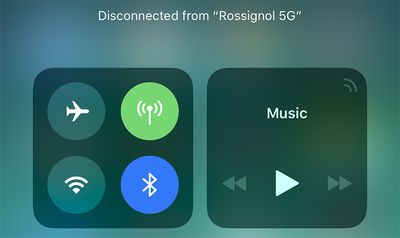
Apple has confirmed that Bluetooth and Wi-Fi are not fully disabled when toggled off in Control Center on iOS 11.
bluetooth wifi control center ios 11
Even when toggled off in Control Center on an iPhone, iPad, or iPod touch running iOS 11 and later, a new support document says Bluetooth and Wi-Fi will continue to be available for AirDrop, AirPlay, Apple Pencil, Apple Watch, Location Services, and Continuity features like Handoff and Instant Hotspot.

Toggling off Bluetooth or Wi-Fi in Control Center only disconnects accessories now, rather than disabling connectivity entirely.

If Bluetooth is turned off, the iOS device can't be connected to any Bluetooth accessories until one of these conditions is met:

  • You turn on Bluetooth in Control Center.
  • You connect to a Bluetooth accessory in Settings > Bluetooth.
  • It's 5 a.m. local time.
  • You restart your device.

While Wi-Fi is disabled, auto-join for any nearby Wi-Fi networks will also be disabled until one of these conditions is met:

  • You turn on Wi-Fi in Control Center.
  • You connect to a Wi-Fi network in Settings > Wi-Fi.
  • You walk or drive to a new location.
  • It's 5 a.m. local time.
  • You restart your device.

Apple made this change in the iOS 11 beta, and it gained more attention after the software was publicly released yesterday.

iOS 11 users can still completely disable Wi-Fi and Bluetooth for all networks and devices by toggling them off in the Settings app.

Apple says users should try to keep Wi-Fi and Bluetooth turned on for the best experience on an iOS device.

(Thanks, FlunkedFlank!)

Related Forum: iOS 11

Popular Stories

iCloud iPhone 17 Pro

iPhone Users Who Pay for iCloud Storage Get Two New Perks on iOS 27

Thursday July 2, 2026 6:10 am PDT by
If you pay for certain iCloud+ storage plans beyond the 5GB that Apple offers for free, you will receive two more perks on iOS 27 at no additional cost. A summary of the two new iCloud+ perks on iOS 27:Increased daily usage limits for some new Apple Intelligence features, including image generation in the revamped Image Playground app. HomeKit Secure Video cameras receive generated video...
iPhone 4 on Black Feature

Apple Facing One of Its Worst Leaks Since the iPhone 4

Thursday July 2, 2026 9:53 am PDT by
Apple supplier Tata Electronics recently suffered a cyberattack that resulted in thousands of confidential files being published on the dark web, and this reportedly included some photos and documents related to the upcoming iPhone 18 Pro. We have elected not to share any of the leaked photos in this story due to the illegal nature in which they were obtained, but they can easily be found...
American Express Gold Apple Pay Feature

American Express Announces New Apple Pay Feature

Tuesday June 30, 2026 10:27 am PDT by
American Express today announced that you can now redeem Membership Rewards points when checking out with Apple Pay on the web and in apps on the iPhone and iPad. When checking out with Apple Pay on iOS 18 or iPadOS 18 or later, tap on your eligible American Express card (Platinum, Gold, Green, and others) and select the Membership Rewards points option. You can use points to cover all or...

Top Rated Comments

djeeyore25 Avatar
115 months ago
This feature is annoying.
Score: 95 Votes (Like | Disagree)
Moonjumper Avatar
115 months ago
The original iPhone famously came without a manual as everything was so obvious. That time is over.
Score: 91 Votes (Like | Disagree)
Mlrollin91 Avatar
115 months ago
Where did this 5am thing come from? How did they decided on 5am?
Score: 68 Votes (Like | Disagree)
ghostface147 Avatar
115 months ago
This annoys me. Add a 3D touch option to turn it off. Thanks.
Score: 42 Votes (Like | Disagree)
115 months ago
it's all about simplicity, right? :rolleyes:
Score: 37 Votes (Like | Disagree)
115 months ago
Can you press and hold one of the shortcuts to open the full settings page in the Settings app yet?
Nope... that's the annoying part.
I'd really want the previous behavior. This "feature" is completely useless for a "pro" user and I though it was a bug for 8 betas.

Also: why not to put a flag into settings to restore the complete switch off instead of this. Apple, wtf are you doing?!
Score: 36 Votes (Like | Disagree)
















