All the New Features in Apple's Photos App in macOS High Sierra - MacRumorsOpen MenuShow RoundupsShow Forums menuVisit ForumsOpen Sidebar
Skip to Content

All the New Features in Apple's Photos App in macOS High Sierra

by

Photos App IconApple's native Photos application got an update with the release of macOS High Sierra, including new library browsing features, a reorganized editing window, enhanced image recognition, and some additional tools to help make your photos look even better. Keep reading to find out what's new in the Photos app.

Browsing the Photos Library

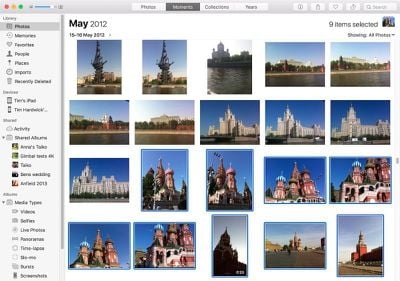
Apple has tweaked the main Library interface in Photos. Whereas previous versions of Photos let you use tabs along the top of the screen in place of an optional sidebar, Apple has now fully embraced the latter as the main navigation area, and has also added a draggable selection counter to the browser that you use to move or export batches of photos.

The new sidebar is divided into five sections: Library, Devices, Shared, Albums, and Projects. The Library section is where you can select from different browsing options, including Memories, Favorites, People, Places, and a useful new option called Imports, which organizes your photos based on when they were imported into your library.
Screen Shot 4 1
The Shared section contains links to any shared albums you've created, while likes and comments appear in the Activity feed. The Albums section meanwhile contains two collapsible sub-sections called Media Types and My Albums. Media Types contains auto-generated views of your photos filtered by Selfies, Panoramas, Live Photos, and the like, while My Albums contains all the albums you have manually created. Lastly, Projects is where any books, cards, calendars, prints, or slideshows you're working on appear.

The Editing Window

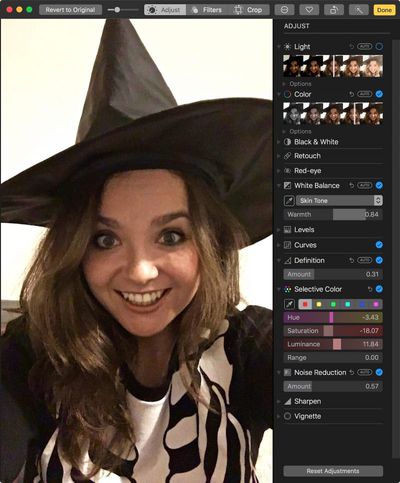
The Photos app also got a reorganized editing window in High Sierra. In addition to the sidebar, there's now a toolbar along the top of the screen with three tabs that let you toggle through three different editing sidebars, making for a less cluttered interface all around. Notice too that the One-click Enhance option is now an icon at the top right of the screen, next to the Done button. 
Screen Shot 3 1
The Crop tab corrals the traditional crop functions in the sidebar, while the Filters tab is home to an enhanced selection of image filter presets, each with three variations to choose from – Vivid, Dramatic, and Black and White.

Selecting the Adjust tab switches the sidebar to all the usual advanced editing tools, including two new ones, Curves and Selective Color. The triangle beside each tool allows you to expand it for more options, or collapse it to make room for others.

Live Photos

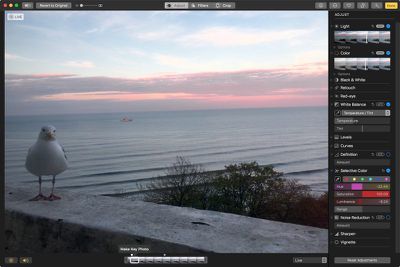
Apple has introduced additional tools for editing Live Photos, including the ability to manually select the static image that represents the clip. This is achieved by adjusting the slider at the bottom of the editing window and selecting Make Key Photo.
Screen Shot 1 3
You can also now trim Live Photos, and even apply effects such as a Boomerang-like back-and-forth effect and an ethereal Long Exposure style, similar to when a shutter has been left open for a long time. The icons at the bottom left of the editing window let you mute the clip or turn off Live Photo entirely.

Third-Party Photo Editor Support

Lastly, Apple has enhanced the integration of its native Photos app with third-party apps, which should come as good news to those looking to broaden their editing options.

For example, it's now possible to open a photo in a third-party app right from within your Photos Library. Not only that, any edits that you make within that third-party app are automatically saved back to your Photos library.
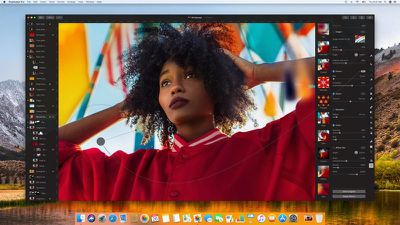
pixelmatorpro
A number of popular third-party apps have already announced their support for Apple Photos, including Pixelmator Pro, Aurora HDR, Luminar, and Creative Kit. Several photo printers have also signed up, including Whitewall and Shutterfly. You can find more apps that support Photos by checking out the new dedicated section in the Mac App Store, which can also be accessed from within the Photos app.

Related Forum: macOS High Sierra

Top Rated Comments

SBlue1 Avatar
119 months ago
Can I rotate videos yet?
Wish there was a message popping up whenever someone tries to shoot video in portrait mode. Or even better an electric shock. Just a mild reminder to turn the phone. :)
Score: 5 Votes (Like | Disagree)
cgriffis753 Avatar
119 months ago
You forgot syncing of people album across iCloud
Score: 4 Votes (Like | Disagree)
robertcoogan Avatar
119 months ago
I like the interface a lot, it is much better organized. But I still really, really, really miss the events view. Wish Apple hadn’t gotten rid of it.
Score: 3 Votes (Like | Disagree)
119 months ago
I'm actually still using iPhoto because I never liked that Photos dropped iPhoto's "Events" functionality. I like categorizing my photos into discrete containers, and the Albums functionality of Photos is just not the same because a photo can be in multiple Albums or in no albums at all. With iPhoto you know that every photo is in one and only one Event. If anyone has come up with a way to replicate similar functionality with Photos please let me know.
Score: 3 Votes (Like | Disagree)
displaced Avatar
119 months ago
Can I rotate videos yet?

I've only been asking for a decade...
Score: 2 Votes (Like | Disagree)
ep2002 Avatar
119 months ago
paul987 I just wrote to say that I’m also in agreement with you. I felt “forced” to update from Aperture and iPhoto to take advantage of the new features of Photos app. It did transfer all my events into “albums” in my Events folder, but I do missing the simplicity of importing and automatically generating new events by date. This is. It a “clunky” manual process.


Any advise for organizing is appreciated

I'm actually still using iPhoto because I never liked that Photos dropped iPhoto's "Events" functionality. I like categorizing my photos into discrete containers, and the Albums functionality of Photos is just not the same because a photo can be in multiple Albums or in no albums at all. If anyone has come up with a way to replicate similar functionality with Photos please let me know.
Score: 2 Votes (Like | Disagree)

Popular Stories

iphone duo facetime

iPhone Duo's Hidden FaceTime Camera Takes 'Trash' Photos

Wednesday October 21, 2026 11:36 am PDT by
The iPhone Duo's inner screen has an under-display front camera that's largely hidden from view. It's the first time we've seen an under-display camera on an iPhone, and it turns out there's a reason Apple hasn't used the technology before. Apple said the camera offers 1080p video recording, but didn't mention photo quality. Gizmodo said it's a 4-megapixel camera and described the photos as...
homeview faces

HomeView's Faces Include Snoopy, Photos, and Interactive Artwork

Wednesday October 14, 2026 4:00 am PDT by
Apple's HomeView includes customizable faces for photos, animations, and smart home controls. Faces Apple has named so far include: Photos Flow Snoopy Calendar Weather Home Modular Home Camera Other clock and widget layouts appear in Apple's promotional images, but have not yet been named. Apple says that selected faces change throughout the day, with different appearances...
apple pro tell logo

Apple Launching Five New Products Today

Thursday November 5, 2026 12:59 am PST by
Apple is launching five new products on Friday, November 6, following pre-orders that opened last week, including its first touchscreen MacBook Pro models. The following new products will be available from today: iPad mini with OLED display and A20 Pro chip iMac with M6 chip 14-inch MacBook Pro with M6 chip 14-inch MacBook Pro with OLED touchscreen 16-inch MacBook Pro with OLED...
Latest Stories
Siri AI Rumored to Become 'More Like an Agent' as Early as Next Year
4 hours ago
Apple Taking New Approach to Developing iOS 28 and macOS 28
6 hours ago
Early Apple Black Friday Deals on Apple Watch, MacBook Air, and More
1 day ago
'Backglow' Lets You Customize New MacBook Pro's Glowing Apple Logo
1 day ago
Top Stories: Apple Product Launches, iOS 27.3 Beta, and More
1 day ago
More Fun iPhone Duo Apps: 30 New Picks to Try
2 days ago
Hands-On With Apple's New OLED Touchscreen MacBook Pro
2 days ago
Apple Store With All-New Design Opening Soon in Southern California
2 days ago
Control the Glowing Apple Logo on Your New MacBook Pro
2 days ago
Apple Shares New 'Apple Card: Apply and Use in Minutes' Ad
2 days ago
Apple Says More Than 100,000 Apps Optimized for iPhone Duo, Here's What's Still Missing
2 days ago
Early Black Friday Deals Kickoff With Steep Discounts on Apple Watch Ultras and More
2 days ago
The MacRumors Show: iOS 27.3 Looks Like a Huge Update
2 days ago
Best Buy's Black Friday Event Begins With Sitewide Savings on Apple, TVs, More
2 days ago
Apple Releasing Yet Another Two New Products Next Week
2 days ago
MacBook Air Drops to Lowest Price in Months With Amazon's $250 Discount
2 days ago
Apple Rumored to Drop the iPhone's Action Button Next Year
2 days ago
Apple's Extended Return Policy Now in Effect for 2026 Holiday Season
2 days ago
Apple Music Classical Updated With New Icon and Refreshed Design
2 days ago
OLED iPad Mini, M6 iMac, and New MacBook Pros Available From Today
2 days ago
Apple Surveys iPhone Duo Buyers About Crease and Camera
3 days ago
Apple's First Touchscreen Mac is Now Arriving to Customers
3 days ago
Claude Gets Personal Finance Feature With Bank Account Linking
3 days ago
Apple Arcade Adds Crossy Road Rush and NBA 2K27
3 days ago
Apple's New HomeView Smart Home Hub: Here's How Much RAM It Has
3 days ago
iPad Mini vs. iPad Air Buyer's Guide: Now Just $50 Apart
3 days ago
First iOS 27.3 and macOS Golden Gate 27.3 Public Betas Now Available
3 days ago
Apple Announces a New Mac Sales Record
3 days ago
Paid $200 for Logic Pro? Apple Says You Won't Get This New Feature
3 days ago
Instagram's Edits Video Editor is Now Available on Mac
3 days ago








































