

LG Screen Manager App for UltraFine Displays Updated for macOS High Sierra - MacRumorsOpen MenuShow RoundupsShow Forums menuVisit ForumsOpen Sidebar
Skip to Content

LG Screen Manager App for UltraFine Displays Updated for macOS High Sierra

by

Alongside its UltraFine 4K and 5K displays developed in partnership with Apple, LG offers an LG Screen Manager app for Mac that serves to manage various functions of the display, including handling firmware updates for the display itself, accessing windowing features such as automatic splitting of the desktop into up to four sections, and more. LG Screen Manager includes a menu item for quick access to its desktop splitting features, as well as a full app for more advanced features.
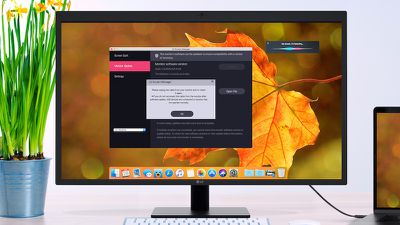
lg screen manager
Recently, LG released an updated version of LG Screen Manager for macOS High Sierra, ensuring compatibility with the latest Mac operating system and debuting a new notification system that will automatically alert you whenever there are updates for your display.

In addition to the new compatibility and update notifications, the latest update to LG Screen Manager includes tweaks and enhancements for the display firmware that were rolled out earlier this summer. Among those tweaks is fine tuning of the volume curve, which addresses some early complaints about the volume control not being fine enough at the low end of the range with a significant increase in volume between even the first and second levels. The new volume curve allows for much finer adjustment at the low end.

Other features in the display firmware update include improvements to low-light performance of the camera and better compatibility for devices connected to the three downstream USB-C ports on the rear of the display.

The updated LG Screen Manager app, version 2.08, is available for download from LG's support site.


Tag: LG

Top Rated Comments

jayhawk11 Avatar
114 months ago
This is now the fourth Mac "news" website that has posted this story, almost word for word from a sponsored post on 9to5Mac.com ('https://9to5mac.com/2017/10/02/lg-ultrafine-high-sierra-update-macbook-performance/') by LG. There is no firmware update for the display (the last update came out a couple months ago), and the last update to the Screen Manager software itself came out on September 22nd. All of this is easily findable info if anyone at these websites spent more than two seconds regurgitating what they saw somewhere else.

Do better, MacRumors.
Score: 5 Votes (Like | Disagree)
WildCowboy Avatar
114 months ago
Yes, they'll run at 5120x2880 non-Retina, but I don't know why anyone would want to...everything is super tiny.

You have to option-click the "Scaled" button in System Preferences to get the full list of resolutions that includes 5120x2880.


Attachment Image
Score: 3 Votes (Like | Disagree)
WildCowboy Avatar
114 months ago
This is now the fourth Mac "news" website that has posted this story, almost word for word from a sponsored post on 9to5Mac.com ('https://9to5mac.com/2017/10/02/lg-ultrafine-high-sierra-update-macbook-performance/') by LG. There is no firmware update for the display (the last update came out a couple months ago), and the last update to the Screen Manager software itself came out on September 22nd. All of this is easily findable info if anyone at these websites spent more than two seconds regurgitating what they saw somewhere else.

Do better, MacRumors.
It's not simply regurgitating other sites. LG has been in touch with all of the sites to provide information on the update.

They are having some issues with the latest firmware distribution and are looking into it. One of my UltraFine 5K displays saw the 3.04 version and updated fine, but the other one is still on 3.01 and showing as up to date. Not sure what the problem is.

Yes, the display firmware itself has been out for a while...I've been trying for weeks (months?) to try to get them to confirm what was changed beyond the obvious things like the volume curve tweak that helps quite a bit at the low end. Even since we've been in touch about the update to LG Screen Manager for High Sierra, it's been a couple weeks of back-and-forth trying to get the details.
Score: 3 Votes (Like | Disagree)
Supacon Avatar
114 months ago
I don't get the hate on this monitor.

I own one and it's generally pretty great. The display (you know, the part of the monitor you actually use) looks awesome. It works very elegantly with my MacBook, and the integrated hub is serviceable and useful, if limited. As far as looks, it sits in between a couple of Dell monitors and it looks nicer than just about any other PC monitor I've owned in my life. The five-head is no bigger than the bezel on some older Dells that don't even contain cameras and microphones. It's plain and gets out of the way which is what you want. I much prefer it to the giant chin and humongous bezels on an iMac, for instance.

That said, the speakers kind of suck and that volume curve is a friggin' joke (either way too loud or too quiet but no in-between unless you use the awkward shift+alt+volume shortcuts), so I'm glad they have fixed that. Unfortunately the software is showing me that the software is up to date—I bought on day one and have never updated before.
¯\_(ツ)_/¯
Score: 2 Votes (Like | Disagree)
114 months ago
Still not working. Showing version of the monitors firmware as 3.01,1.11,5234,3.00,0.1d and the text "The Software is currently up to date". LG Screen Manager's "new version" is still not working to update the monitor. Screen Manager version 2.08 here.
Score: 2 Votes (Like | Disagree)
Ohples Avatar
114 months ago
Does it still require Accessibility permissions to just install firmware and configure stuff unrelated to that screen splitting stuff they have, also who thinks to download a separate app for your monitor?

Apple should of had them integrate the firmware update on into the normal software update tool. If Fedora can update the firmware on my RF keyboard module, that should be possible.
Score: 2 Votes (Like | Disagree)

Popular Stories

iCloud iPhone 17 Pro

iPhone Users Who Pay for iCloud Storage Get Two New Perks on iOS 27

Thursday July 2, 2026 6:10 am PDT by
If you pay for certain iCloud+ storage plans beyond the 5GB that Apple offers for free, you will receive two more perks on iOS 27 at no additional cost. A summary of the two new iCloud+ perks on iOS 27:Increased daily usage limits for some new Apple Intelligence features, including image generation in the revamped Image Playground app. HomeKit Secure Video cameras receive generated video...
Apple Event Logo

Apple Just Released a New Product

Thursday July 2, 2026 8:04 am PDT by
Apple's first product release of summer 2026 occurred this week, but do not get too excited, as it is merely the Beats Solo Buds in a new color. Beats Solo Buds are now offered in orange through Best Buy in the U.S., with availability set to expand to 7-Eleven stores in Japan on July 4. Apple already offered orange Solo Buds in India for free with the purchase of an iPhone 15 or iPhone 15 ...
iPhone 4 on Black Feature

Apple Facing One of Its Worst Leaks Since the iPhone 4

Thursday July 2, 2026 9:53 am PDT by
Apple supplier Tata Electronics recently suffered a cyberattack that resulted in thousands of confidential files being published on the dark web, and this reportedly included some photos and documents related to the upcoming iPhone 18 Pro. We have elected not to share any of the leaked photos in this story due to the illegal nature in which they were obtained, but they can easily be found...














