

iOS 11.1 Beta 2 Brings Back 3D Touch App Switcher - MacRumorsOpen MenuShow RoundupsShow Forums menuVisit ForumsOpen Sidebar
Skip to Content

iOS 11.1 Beta 2 Brings Back 3D Touch App Switcher

In the second beta of iOS 11.1, Apple has reintroduced the 3D Touch App Switcher gesture on devices that are equipped with 3D Touch.

The feature was "intentionally removed" during the iOS 11 beta testing process and was not reimplemented ahead of the official iOS 11 launch, but Apple software engineering chief Craig Federighi promised it would be re-added in a future iOS 11 update.
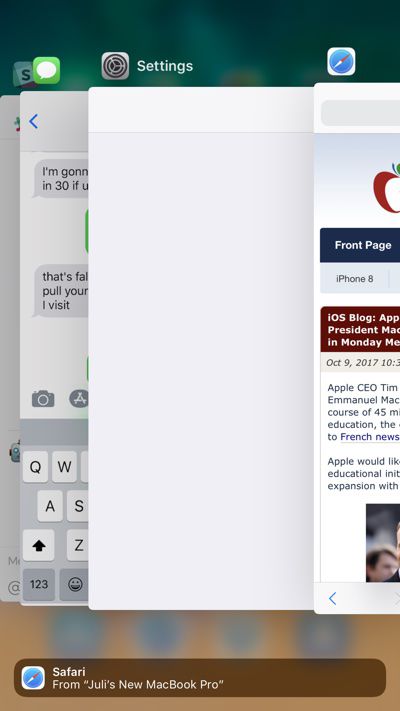
appswitcher
In an email to a MacRumors reader, Federighi said the feature needed to be temporarily removed in iOS 11 because of technical issues.

We regretfully had to temporarily drop support for this gesture due to a technical constraint. We will be bringing it back in an upcoming iOS 11.x update.

Thanks (and sorry for the inconvenience)!

The gesture, first implemented in iOS 9, allows users with a compatible iPhone to 3D Touch at the left edge of the display to bring up the App Switcher. When it was pulled from the beta, many iPhone users were disappointed as it is a convenient method for switching between apps with a single gesture. Sans gesture, the only way to bring up the App Switcher on an iPhone is by a double press on the Home button.


iOS 11.1 beta 2 is currently available for developers, but a public beta should be coming later this week. We're still early in the beta testing process, so it's not yet clear when iOS 11.1 will see a public release.


Related Forum: iOS 11

Popular Stories

iCloud iPhone 17 Pro

iPhone Users Who Pay for iCloud Storage Get Two New Perks on iOS 27

Thursday July 2, 2026 6:10 am PDT by
If you pay for certain iCloud+ storage plans beyond the 5GB that Apple offers for free, you will receive two more perks on iOS 27 at no additional cost. A summary of the two new iCloud+ perks on iOS 27:Increased daily usage limits for some new Apple Intelligence features, including image generation in the revamped Image Playground app. HomeKit Secure Video cameras receive generated video...
American Express Gold Apple Pay Feature

American Express Announces New Apple Pay Feature

Tuesday June 30, 2026 10:27 am PDT by
American Express today announced that you can now redeem Membership Rewards points when checking out with Apple Pay on the web and in apps on the iPhone and iPad. When checking out with Apple Pay on iOS 18 or iPadOS 18 or later, tap on your eligible American Express card (Platinum, Gold, Green, and others) and select the Membership Rewards points option. You can use points to cover all or...
series 10 apple watch titanium digital crown

Report: Apple Watch Redesign Coming Next Year With New Band System

Tuesday June 30, 2026 8:45 am PDT by
A "major overhaul" of the Apple Watch's design is due to arrive next year with a new system for connecting bands, according to a known Weibo leaker. In a set of recent posts, the leaker known as "Instant Digital" linked the new claim to older rumors about an "Apple Watch X" model, which was said to introduce a fresh design and break compatibility with the existing watch band system. Citing...

Top Rated Comments

penajmz Avatar
114 months ago
I’m so happy about this. Missed this BIGLY!
Score: 23 Votes (Like | Disagree)
thejadedmonkey Avatar
114 months ago
I wonder what sort of technical constraint would have caused the need to remove it.?
Score: 19 Votes (Like | Disagree)
gixxerfool Avatar
114 months ago
This is exciting. For all the naysayers claiming 3D Touch is a gimmick, when they pull something like this, you notice how much you actually use it.
Score: 13 Votes (Like | Disagree)
114 months ago
Whats the big deal never used it maybe fix 3d touch first
[doublepost=1507572527][/doublepost]Its quicker to double tap home button
Not when you are going to the previous app. Push down and swipe across the screen. Done.
Score: 11 Votes (Like | Disagree)
MartinAppleGuy Avatar
114 months ago
I’m enjoying this ‘listening’ Apple.
Score: 9 Votes (Like | Disagree)
114 months ago
There's now a toggle to manually turn off the Wi-Fi on the  Watch and force cellular in absence of bluetooth. It also displays the name of the Wi-Fi network!

Attachment Image
Score: 8 Votes (Like | Disagree)














