Amazon Updates Kindle for iOS App With New Design and Goodreads Integration - MacRumorsOpen MenuShow RoundupsShow Forums menuVisit ForumsOpen Sidebar
Skip to Content

Amazon Updates Kindle for iOS App With New Design and Goodreads Integration

by

Amazon today announced an all-new version of its Kindle iOS app, which has been redesigned to provide streamlined access to some of Kindle's most popular features. The company said this will let users more easily move between pages of a book, access their library and the bookstore, and more. Amazon has also built Goodreads into the iOS app for the first time, similar to the implementation its e-readers have seen over the years.

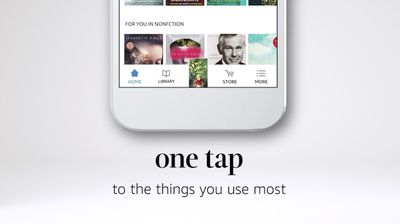
Details of the new design include larger book covers, new fonts, a new app icon, and a new light background theme to go with the existing dark option. The new bottom bar navigation allows one-tap access to the book you're currently reading, as well as tabs for Home, Library, Store, and more options. There's also now a search bar available throughout the app, allowing for instant searches of your library or the Kindle Store.
amazon ios new update

“We’ve built the new Kindle app from the ground up for book lovers, giving readers easy access to everything they might want to do with their books, all in one place,” said Chuck Moore, Vice President, Kindle. “It’s now easier than ever to turn your phone or tablet into a book and immerse yourself in an author’s world at any time.”

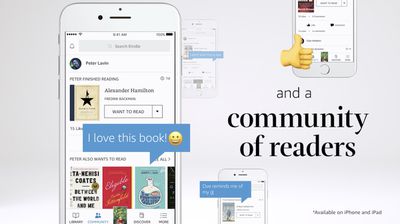
iOS users will also be able to sign into their Goodreads accounts to discuss books and get recommendations from fellow readers, thanks to integration with the social network built directly into the app. Amazon owns Goodreads, and has added functionality for the reader-based social network into a few of its Kindle devices since it purchased the company in 2013.


Goodreads features in Kindle for iOS include a Community tab to stay up-to-date with what friends are reading, as well as suggestions for people to follow who have similar tastes in books. You can post notes and highlights from the book you're currently reading so friends can comment, share when you start and finish a book, rate books, and more abilities taken from Goodreads' social network features.
amazon goodreads ios
Goodreads will be available in the Kindle app only on iOS for users in the United States, and will expand to Kindle for Android in a future update. The Kindle app is available to download for free from the iOS App Store [Direct Link], and the new update is rolling out in the App Store beginning today.


Tags: Amazon, Kindle

Top Rated Comments

118 months ago
Okay, I have an iPad/iPhone, and this app, why do I need a kindle?

Kindle has no colours, kindle has no apps...
The Kindle is exactly what this article isn't talking about, but since you asked: I also have an iOS device with the Kindle app, but I still own a Kindle e-reader. The reason is simple, and it's the screen. You can complain about the lack of colors (though very expensive screens do exist like this now, I've read), but the e-ink screen makes for a far more paper-like reading experience than an LCD. An LCD is backlit (with LEDs in the case of iOS devices), where as e-ink relies on ambient light (or an on-screen light on high-end Kindles) to illuminate the screen. This makes it great for reading outside, but many people also find it less straining to read inside. It also lets the battery last days or weeks.

If you're happy with the app, that's fine; people who read a lot often prefer the separate device for the above reasons. It's one of the reasons I wouldn't buy a Fire tablet for the primary purpose of reading--and perhaps why Amazon dropped "Kindle" from the name of this product line.
Score: 4 Votes (Like | Disagree)
rhett7660 Avatar
118 months ago
I love my Kindle. Like others have mentioned it isn't the be all end all. For my graphic novels and comic books I like the real thing. But for my casual reading, I almost exclusively use my Kindle. I do some of my study work on the Kindle also, but for researching and finding content within a book fast, aside from a specific word, having the physical book to skim through is a lot faster.

Hands down for me though, reading books, the Kindle is my go to device. I do like the fact I can also read on my iPhone, iPad, or Computer both Mac and Windows and have it sync across all my devices. That is nice.
Score: 3 Votes (Like | Disagree)
Ntombi Avatar
118 months ago
Okay, I have an iPad/iPhone, and this app, why do I need a kindle?

Kindle has no colours, kindle has no apps...
I have an iPhone, an iPad, and a Kindle Paperwhite. I read newspapers and magazines on any of the three, but books are never read on an iDevice.

I am a huge reader. I spend more time reading books than any other leisure activity. The only books I read are physical books and books on my Kindle. Reading on the kindle is as close to reading a physical book as possible. No backlight (which I find wearying when reading, rather than interacting with words, like I do on my iPhone & iPad), I can easily read it in bright sunlight or a very dark room, both without strain. I don’t use apps, I don’t bother with color (I read the occasional graphic novel on my iPad).


I know some people are fine reading on the iPad, even prefer it, I can’t do it. It’s too much like faffing about, not actual reading.
Score: 2 Votes (Like | Disagree)
artfossil Avatar
118 months ago
True to a point. Reading on an iPad, more eye strain, outside reading, Kindle lighter weight, reading fonts, just an overall enhanced reading experience on the Kindle. Especially for those readers who are more then casual readers. I use both, prefer the Kindle.
Plus, for reading outdoors, nothing beats a Kindle. It's perfect on the beach! It's also my preferred device for travel. I read studio books with color photos on my iPad but for other books, reading on the Kindle is much easier on my eyes. Plus the battery lasts a long time.

For nonfiction books, I especially value the ability to make highlights and to have those archived and retrievable online. That's much faster than the old "underline and then type out method" that used to take me hours.

As for literature, or longreads, the digital experience is soulless. Paper and ink are more sensory. It’s comparable to looking at an image of coffee versus sipping the real thing.
Speak for yourself. I get plenty of soulful/sensory experience with digital books, plus they fit better with my nomadic and small-space lifestyle than dead tree books.
Score: 2 Votes (Like | Disagree)
OS-SEX Avatar
118 months ago
Great, now where the hell is the prime video app?! :mad:
Score: 2 Votes (Like | Disagree)
npmacuser5 Avatar
118 months ago
Okay, I have an iPad/iPhone, and this app, why do I need a kindle?

Kindle has no colours, kindle has no apps...
True to a point. Reading on an iPad, more eye strain, outside reading, Kindle lighter weight, reading fonts, just an overall enhanced reading experience on the Kindle. Especially for those readers who are more then casual readers. I use both, prefer the Kindle.
Score: 2 Votes (Like | Disagree)

Popular Stories

apple pro tell logo

Apple Launching Five New Products Today

Thursday November 5, 2026 12:59 am PST by
Apple is launching five new products on Friday, November 6, following pre-orders that opened last week, including its first touchscreen MacBook Pro models. The following new products will be available from today: iPad mini with OLED display and A20 Pro chip iMac with M6 chip 14-inch MacBook Pro with M6 chip 14-inch MacBook Pro with OLED touchscreen 16-inch MacBook Pro with OLED...
duo aquarium

More Fun iPhone Duo Apps: 30 New Picks to Try

Friday November 6, 2026 3:27 pm PST by
When the iPhone Duo launched, we shared a list of some of the fun apps developers created for the new form factor. Two weeks out, developers are continuing to come up with fresh ideas, so we thought we'd share some of our favorites. Games Marbles Unhinged ($2.99) - Marbles Unhinged is a marble maze designed for the Duo. When you fold it, the floor turns into a ramp. If you stand the top...
silver iphone 18 pro

Apple Rumored to Drop the iPhone's Action Button Next Year

Friday November 6, 2026 6:07 am PST by
Apple plans to merge the iPhone's Action button with the Camera Control starting next year, according to the leaker known as "Instant Digital." In a new post on Weibo, the leaker claimed that a single press of the combined button would open the camera, while a long press would trigger the function assigned to the Action button. They explicitly clarified that the dedicated Action button would ...
Latest Stories
Siri AI Rumored to Become 'More Like an Agent' as Early as Next Year
4 hours ago
Apple Taking New Approach to Developing iOS 28 and macOS 28
5 hours ago
Early Apple Black Friday Deals on Apple Watch, MacBook Air, and More
1 day ago
'Backglow' Lets You Customize New MacBook Pro's Glowing Apple Logo
1 day ago
Top Stories: Apple Product Launches, iOS 27.3 Beta, and More
1 day ago
More Fun iPhone Duo Apps: 30 New Picks to Try
2 days ago
Hands-On With Apple's New OLED Touchscreen MacBook Pro
2 days ago
Apple Store With All-New Design Opening Soon in Southern California
2 days ago
Control the Glowing Apple Logo on Your New MacBook Pro
2 days ago
Apple Shares New 'Apple Card: Apply and Use in Minutes' Ad
2 days ago
Apple Says More Than 100,000 Apps Optimized for iPhone Duo, Here's What's Still Missing
2 days ago
Early Black Friday Deals Kickoff With Steep Discounts on Apple Watch Ultras and More
2 days ago
The MacRumors Show: iOS 27.3 Looks Like a Huge Update
2 days ago
Best Buy's Black Friday Event Begins With Sitewide Savings on Apple, TVs, More
2 days ago
Apple Releasing Yet Another Two New Products Next Week
2 days ago
MacBook Air Drops to Lowest Price in Months With Amazon's $250 Discount
2 days ago
Apple Rumored to Drop the iPhone's Action Button Next Year
2 days ago
Apple's Extended Return Policy Now in Effect for 2026 Holiday Season
2 days ago
Apple Music Classical Updated With New Icon and Refreshed Design
2 days ago
OLED iPad Mini, M6 iMac, and New MacBook Pros Available From Today
2 days ago
Apple Surveys iPhone Duo Buyers About Crease and Camera
3 days ago
Apple's First Touchscreen Mac is Now Arriving to Customers
3 days ago
Claude Gets Personal Finance Feature With Bank Account Linking
3 days ago
Apple Arcade Adds Crossy Road Rush and NBA 2K27
3 days ago
Apple's New HomeView Smart Home Hub: Here's How Much RAM It Has
3 days ago
iPad Mini vs. iPad Air Buyer's Guide: Now Just $50 Apart
3 days ago
First iOS 27.3 and macOS Golden Gate 27.3 Public Betas Now Available
3 days ago
Apple Announces a New Mac Sales Record
3 days ago
Paid $200 for Logic Pro? Apple Says You Won't Get This New Feature
3 days ago
Instagram's Edits Video Editor is Now Available on Mac
3 days ago








































