iPhone X Will Default to Hiding Text Previews of Your Notifications on the Lock Screen - MacRumorsOpen MenuShow RoundupsShow Forums menuVisit ForumsOpen Sidebar
Skip to Content

iPhone X Will Default to Hiding Text Previews of Your Notifications on the Lock Screen

by

As we get closer to the iPhone X's launch on Friday, November 3, more tidbits about the device are beginning to emerge thanks to the first wave of impressions, reviews, and hands-on coverage that hit this morning. Within his first impressions, Steven Levy shared an interesting aspect of the iPhone X's software, which turns on hiding text previews for your notifications by default instead of making you turn this privacy feature on yourself.

As an explanation, with the launch of iOS 11 Apple introduced a way for you to hide text previews of all apps at once within Settings. With this turned on, you'll notice when you have a notification for apps like Messages and Snapchat, but the actual content of the notification is hidden until you "unlock" the iPhone with Touch ID or a passcode. Then, you can read the content, and tap the Home Button to enter your iPhone. This feature has to be turned on manually on current iPhones.
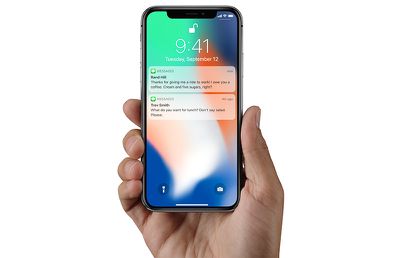
faceidmessagesunlock

After Face ID unlock, iPhone X will show text previews in notifications

According to Levy, iOS 11 on the iPhone X defaults to hiding text previews for all of your apps, automatically providing an extra bit of privacy for users on the new smartphone. So, when you raise the iPhone X in front of you, it'll unlock with Face ID, and any notifications will then be filled out to show the full content of each message. This way, if someone picks up your iPhone and looks at it, Face ID won't unlock and show notification previews. Of course, you can revert to the traditional text previews functionality in Settings.

Levy said that he used this feature as a way to confirm that Face ID had unlocked the iPhone X. Here's the part from his review concerning text previews on the iPhone X Lock Screen:

I then see if the little lock icon on the screen has released its latch. Alternatively, a good way to see when you’ve been recognized is to notice the generic messages on the lock screen saying “you have a notification” from Facebook, Gmail, or wherever. When you and your iPhone X make that turn-on connection, those flesh out with the actual content of the message. (This feature—withholding potentially private alerts until the phone was unlocked—had previously been available as an option but now is the default.)

It's also worth noting that sometimes the iPhone X review unit would unlock with Face ID and go "straight to where [Levy] left off," while other times the UI asked him to swipe up to unlock the iPhone X, as has been showcased in marketing for the smartphone. Levy didn't have an explanation for this part of his experience with the new iPhone, further stating that he was "mystified" as to why it would sometimes say swipe up after Face ID unlock, and other times simply open the iPhone.

Check out more information on the iPhone X in our Roundup.

Related Forum: iPhone

Top Rated Comments

offdutyrockstar Avatar
118 months ago
If the phone autolocked, it goes straight to where it was.

If it was manually locked with the side button, you swipe up.

It's really not that difficult, this geezer must get mystified often.
Score: 8 Votes (Like | Disagree)
jonnysods Avatar
118 months ago
It makes sense. I like this feature as it's currently easy for anyone to preview my messages
Score: 4 Votes (Like | Disagree)
dannyyankou Avatar
118 months ago
This is clever, I didn’t even know it was a feature on iOS 11. Just enabled it.
Score: 3 Votes (Like | Disagree)
118 months ago
Thank you. I’m assuming the one iPhone X is using here is ‘When Unlocked?’
Yep, and it works the exact same way on my 7+.

As long as you don’t change the accessibility option for the home button to “rest finger to open”, the notification will change to displaying the contents once you authenticate with Touch ID. Works well.
Score: 2 Votes (Like | Disagree)
OldSchoolMacGuy Avatar
118 months ago
Don't see why this is an issue. I wouldn't want them visible by default.
Score: 2 Votes (Like | Disagree)
118 months ago
I have this turned off on my phone too. I'd recommend it, especially if your phone is left where other people may have access to it.
Also I have turned off the ability for messages to even show on the lockscreen.
Agreed. Especially if your iPhone is left away,
You don't someone glancing over who might be curious to see what notifications are lighting up your display.
Score: 1 Votes (Like | Disagree)

Popular Stories

apple pro tell logo

Apple Launching Five New Products Today

Thursday November 5, 2026 12:59 am PST by
Apple is launching five new products on Friday, November 6, following pre-orders that opened last week, including its first touchscreen MacBook Pro models. The following new products will be available from today: iPad mini with OLED display and A20 Pro chip iMac with M6 chip 14-inch MacBook Pro with M6 chip 14-inch MacBook Pro with OLED touchscreen 16-inch MacBook Pro with OLED...
duo aquarium

More Fun iPhone Duo Apps: 30 New Picks to Try

Friday November 6, 2026 3:27 pm PST by
When the iPhone Duo launched, we shared a list of some of the fun apps developers created for the new form factor. Two weeks out, developers are continuing to come up with fresh ideas, so we thought we'd share some of our favorites. Games Marbles Unhinged ($2.99) - Marbles Unhinged is a marble maze designed for the Duo. When you fold it, the floor turns into a ramp. If you stand the top...


silver iphone 18 pro

Apple Rumored to Drop the iPhone's Action Button Next Year

Friday November 6, 2026 6:07 am PST by
Apple plans to merge the iPhone's Action button with the Camera Control starting next year, according to the leaker known as "Instant Digital." In a new post on Weibo, the leaker claimed that a single press of the combined button would open the camera, while a long press would trigger the function assigned to the Action button. They explicitly clarified that the dedicated Action button would ...
Latest Stories
Siri AI Rumored to Become 'More Like an Agent' as Early as Next Year
4 hours ago
Apple Taking New Approach to Developing iOS 28 and macOS 28
5 hours ago
Early Apple Black Friday Deals on Apple Watch, MacBook Air, and More
1 day ago
'Backglow' Lets You Customize New MacBook Pro's Glowing Apple Logo
1 day ago
Top Stories: Apple Product Launches, iOS 27.3 Beta, and More
1 day ago
More Fun iPhone Duo Apps: 30 New Picks to Try
2 days ago
Hands-On With Apple's New OLED Touchscreen MacBook Pro
2 days ago
Apple Store With All-New Design Opening Soon in Southern California
2 days ago
Control the Glowing Apple Logo on Your New MacBook Pro
2 days ago
Apple Shares New 'Apple Card: Apply and Use in Minutes' Ad
2 days ago
Apple Says More Than 100,000 Apps Optimized for iPhone Duo, Here's What's Still Missing
2 days ago
Early Black Friday Deals Kickoff With Steep Discounts on Apple Watch Ultras and More
2 days ago
The MacRumors Show: iOS 27.3 Looks Like a Huge Update
2 days ago
Best Buy's Black Friday Event Begins With Sitewide Savings on Apple, TVs, More
2 days ago
Apple Releasing Yet Another Two New Products Next Week
2 days ago
MacBook Air Drops to Lowest Price in Months With Amazon's $250 Discount
2 days ago
Apple Rumored to Drop the iPhone's Action Button Next Year
2 days ago
Apple's Extended Return Policy Now in Effect for 2026 Holiday Season
2 days ago
Apple Music Classical Updated With New Icon and Refreshed Design
2 days ago
OLED iPad Mini, M6 iMac, and New MacBook Pros Available From Today
2 days ago
Apple Surveys iPhone Duo Buyers About Crease and Camera
3 days ago
Apple's First Touchscreen Mac is Now Arriving to Customers
3 days ago
Claude Gets Personal Finance Feature With Bank Account Linking
3 days ago
Apple Arcade Adds Crossy Road Rush and NBA 2K27
3 days ago
Apple's New HomeView Smart Home Hub: Here's How Much RAM It Has
3 days ago
iPad Mini vs. iPad Air Buyer's Guide: Now Just $50 Apart
3 days ago
First iOS 27.3 and macOS Golden Gate 27.3 Public Betas Now Available
3 days ago
Apple Announces a New Mac Sales Record
3 days ago
Paid $200 for Logic Pro? Apple Says You Won't Get This New Feature
3 days ago
Instagram's Edits Video Editor is Now Available on Mac
3 days ago








































