iOS 11 Predictive Text Bug Automatically Changes 'I' to 'A[?]' for Some Users [Updated] - MacRumorsOpen MenuShow RoundupsShow Forums menuVisit ForumsOpen Sidebar
Skip to Content

iOS 11 Predictive Text Bug Automatically Changes 'I' to 'A[?]' for Some Users [Updated]

by

A growing number of iOS 11 users have been encountering a strange predictive text bug over the course of the last few days, with the problem outlined on the MacRumors forums.

It seems some users are seeing "A[?]" as the first recommended predictive text word when using the iOS keyboard, and whenever "I" is typed, it autocorrects to A[?].
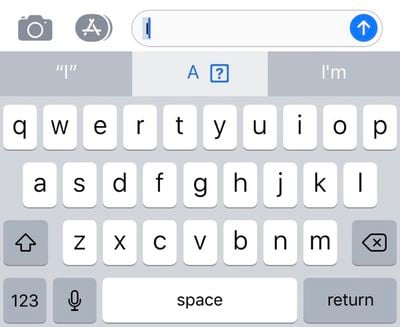
ios11predictivetextbug
It's not clear what's causing the bug, but a fair number of MacRumors readers and Twitter users seem to be experiencing the problem. Not everyone is affected, though, and we have been unable to replicate the issue on our own devices.

It may potentially be linked to emoji, as a strange "I" character also appears under the frequently used emoji for some customers who are affected.
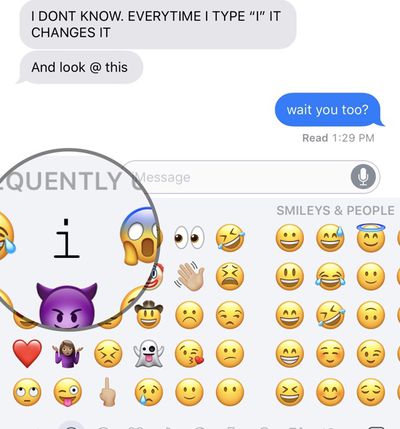
ios11predictivetextbug2
The problem seems to be affecting devices running both iOS 11.0.3 and iOS 11.1, and some users are also seeing the odd predictive text show up on Macs, too, as predictive text is available on all devices via iCloud.

Turning off predictive text is a reliable way of putting an end to the issue, as is using a third-party keyboard, but neither of these options are long term solutions for customers who want to use the full-featured built-in keyboard.

Resetting the keyboard dictionary does not appear to fix the issue, nor does a device restart or reset. One MacRumors reader who got in touch with Apple Support about the issue was told that Apple is aware of the problem and working on a fix.

Update: Apple's support staff is recommending customers affected by this bug use text replacement as a temporary workaround.

To do this, go to Settings > General > Keyboard > Text Replacement. Type in an uppercase "I" for the phrase, and a lowercase "i" as the replacement.


Related Forum: iOS 11

Top Rated Comments

iPhysicist Avatar
113 months ago
A[?] don’t have this bug!
Score: 34 Votes (Like | Disagree)
zorinlynx Avatar
113 months ago
You should try punching the [?] as there might be a coin or maybe even a 1-Up in it.
Score: 22 Votes (Like | Disagree)
DarrenC4 Avatar
113 months ago
I have the issue on my phone. I added “I” as a keyboard short cut, problem solved for the time being.
Score: 3 Votes (Like | Disagree)
marioguarneros Avatar
113 months ago
iOS 11 pretty much bricked my iPhone 6 (unresponsive screen), I am waiting for my new iPhone X but I am certainly worried about how the experience will actually be.

I’ve been on iPhones since the 3G, upgraded every year until I stopped on the 6, now going for the X as mentioned, I am genuinely concerned about this operating system release.

I don’t subscribe to conspiracy theories about Apple slowing down devices and all that which makes it worse because I definitely believe this is just poor quality programming or poor quality control.

iPhone and Apple was always about the best experience, not about specs that meant nothing, these days I’m not feeling it.

Let’s hope it was just a bump in the road.

Rooting for you Apple, I don’t want to change ecosystems, plus I believe in perpetuating and honouring Steve Jobs’ legacy with amazing experiences through Apple products.
Score: 3 Votes (Like | Disagree)
RuffyYoshi Avatar
113 months ago
Seems the quality control team has been fired since Cook took over. At least when it comes to iOS.
Score: 3 Votes (Like | Disagree)
AronDraws Avatar
113 months ago
Im not kidding you, ever since iOS 11 came out, Siri understands me far less than she did before. I have a lisp, but Siri used to do so well, and understood me. Now, she transcribes text correctly, and then "autocorrects" it to be very wrong. Same for when I type. Stuff autocorrects to incorrect things and i'm often trying 3-4 times to just type a simple sentence because everything gets changed even when I have typed it out correctly.

I absolutely hate iOS 11 and regret updating my devices. I hope this gets fixed soon.
Score: 2 Votes (Like | Disagree)

Popular Stories

iCloud iPhone 17 Pro

iPhone Users Who Pay for iCloud Storage Get Two New Perks on iOS 27

Thursday July 2, 2026 6:10 am PDT by
If you pay for certain iCloud+ storage plans beyond the 5GB that Apple offers for free, you will receive two more perks on iOS 27 at no additional cost. A summary of the two new iCloud+ perks on iOS 27:Increased daily usage limits for some new Apple Intelligence features, including image generation in the revamped Image Playground app. HomeKit Secure Video cameras receive generated video...
iPhone 4 on Black Feature

Apple Facing One of Its Worst Leaks Since the iPhone 4

Thursday July 2, 2026 9:53 am PDT by
Apple supplier Tata Electronics recently suffered a cyberattack that resulted in thousands of confidential files being published on the dark web, and this reportedly included some photos and documents related to the upcoming iPhone 18 Pro. We have elected not to share any of the leaked photos in this story due to the illegal nature in which they were obtained, but they can easily be found...
American Express Gold Apple Pay Feature

American Express Announces New Apple Pay Feature

Tuesday June 30, 2026 10:27 am PDT by
American Express today announced that you can now redeem Membership Rewards points when checking out with Apple Pay on the web and in apps on the iPhone and iPad. When checking out with Apple Pay on iOS 18 or iPadOS 18 or later, tap on your eligible American Express card (Platinum, Gold, Green, and others) and select the Membership Rewards points option. You can use points to cover all or...