

Workflow, the popular automation app Apple purchased earlier this year, was today updated to introduce support for iOS 11 and iPhone X.
The new version of the app allows users to drag and drop files onto a workflow to run the workflow using that file, and it adds HEIF and HEVC support to the Convert Image and Encode Media actions, respectively.
Support for new iOS 11 Health data types including Insulin Delivery, V02 Max, Waist Circumference, Resting Heart Rate, Walking Heart Rate Average, and Heart Rate Variability has also been added.
With the Get File and Save File actions, there's now support for retrieving and saving multiple files at one time, and there's also a new option to specify a default "From" address when using the Send Email action. Apple has also introduced a long list of bug fixes, listed below:
- Fixed the Tweet and Post on Facebook actions on iOS 11
- Fixed an issue where text items could unexpectedly be converted to image metadata dictionaries
- Fixed an issue where granting access to Ulysses may not work
- Fixed an issue where workflows launched from the Complication would not run on watchOS 4
- Fixed an issue where the Text action may randomly scroll to the top while typing
- Fixed an issue where the Send Message via WhatsApp action contact field did not work properly
- Fixed an issue where the Convert Image action may crash in the Today Widget or Action Extension
- Fixed an issue where the Show Directions action may not use the correct travel mode when opening Google Maps
- Fixed an issue where messaging the attendees of an event may include yourself
- Fixed an issue where VoiceOver may not focus on an action after it's added to a workflow
- Fixed an issue where the Select Photos action did not work with VoiceOver when "Select Multiple" was turned on
- Fixed an issue where a Workflow Input variable may not be editable after being added from the variable bar
- Fixed a crash when inserting variables into the List and Dictionary actions
- Fixed an issue where some files may not be selectable in the Dropbox and Box file pickers
- Fixed an issue where a ghost workflow may appear while workflows are being reordered
- Fixed an issue where passing a comma-separated list of email addresses into the Send Email action did not work
- Fixed an issue where the Get Contents of URL action did not support passing a JSON body in DELETE requests
- Fixed an issue where saving a file to Dropbox when a file already exists with the same name did not properly append a number to the filename
- Other bug fixes and minor additions
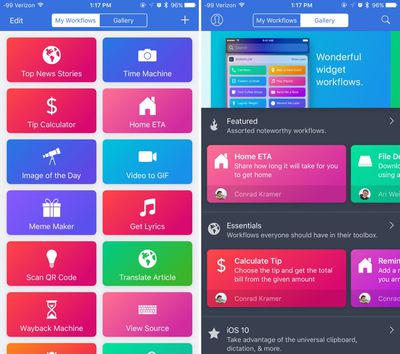
For those unfamiliar with Workflow, it's an automation tool that can essentially do anything. It allows users to create workflows to accomplish tasks like creating GIFs from a series of photos, pulling images from a web page, translating an article, posting photos to multiple social networks at once, calculating a tip, and more.
Since Apple acquired the app, it has been free to download. Regular improvements have been introduced, including bug fixes and new actions.
Workflow can be downloaded from the App Store for free. [Direct Link]



















Top Rated Comments