

iOS 11.2 Beta 3 Introduces Pop-up to Explain Control Center Wi-Fi/Bluetooth Functionality - MacRumorsOpen MenuShow RoundupsShow Forums menuVisit ForumsOpen Sidebar
Skip to Content

iOS 11.2 Beta 3 Introduces Pop-up to Explain Control Center Wi-Fi/Bluetooth Functionality

With iOS 11, Apple changed the way the Bluetooth and Wi-Fi toggles in Control Center work. The two buttons are no longer standard on/off switches, and instead disable Bluetooth and Wi-Fi only for a set period of time.

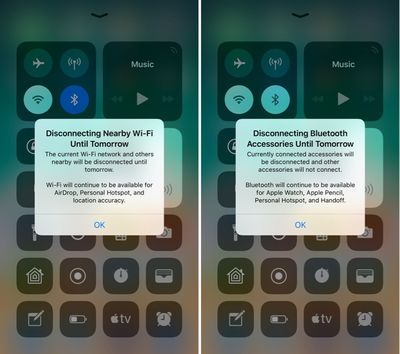
In the new iOS 11.2 beta released this morning, Apple has added new informational pop-ups to let users know exactly how these toggles work. The new pop-ups explain that Bluetooth and Wi-Fi will be disabled temporarily rather than permanently.
controlcenterwifitoggles
Prior to today's update, the Control Center toggles for Wi-Fi and Bluetooth could be somewhat confusing, because there was no on-device explanation. Apple outlined how the toggles work in a support document, but if you didn't see it, you might wonder why Wi-Fi or Bluetooth were turning themselves back on after being disabled via Control Center.

These new messages will appear the first time the Control Center toggles are used. Subsequent uses will show a message at the top that reads "Disconnecting Nearby Wi-Fi Networks Until Tomorrow" or "Disconnecting Bluetooth Devices Until Tomorrow."

bluetoothwifidisconnectingmessage
While Apple's new pop-ups offer a better explanation than was previously available, there are other situations where Wi-Fi or Bluetooth might be turned back on sooner than one day. When you use the Wi-Fi toggle in Control Center, Wi-Fi is disabled until one of the following conditions occurs:

- Wi-Fi is reactivated using Control Center
- You connect to a Wi-Fi network using Settings > Wi-Fi
- You walk or drive to a new location
- It's 5:00 a.m. local time
- Your iOS device is restarted

When you use the Bluetooth toggle in Control Center, Bluetooth is disabled until one of the following conditions occurs:

- Bluetooth is reactivated using control Center
- You connect to a Bluetooth accessory in Settings > Bluetooth
- It's 5:00 a.m. local time
- Your iOS device is restarted

To more permanently disable Bluetooth and Wi-Fi on an iOS device running iOS 11, it's necessary to go to the Settings app and toggle these features off in the Wi-Fi and Bluetooth sections. Apple likely made the change to Control Center in iOS 11 for a better overall user experience, as some iPhone and iPad owners might not realize the impact that turning Wi-Fi and Bluetooth off can have when it comes to iOS features like GPS directions, Continuity, and more.

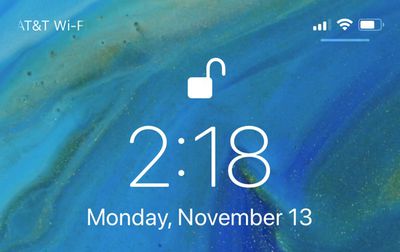
In addition to introducing a message to let users know how Bluetooth and Wi-Fi work in Control Center, on the iPhone X, there's also a small UI change designed to make the Control Center gesture more obvious. Whenever you're on the Lock screen, there's a small bar underneath the icons on the right side of the device, letting you know there's more to see there. The bar is not displayed on the Home screen of an unlocked iPhone X, nor is it displayed within apps.
lockscreencontrolcenterbar
For those unfamiliar, accessing the Control Center on the iPhone X is done from a swipe down on the top right side of the device rather than a swipe upwards from the bottom.


Related Forum: iOS 11

Popular Stories

iCloud iPhone 17 Pro

iPhone Users Who Pay for iCloud Storage Get Two New Perks on iOS 27

Thursday July 2, 2026 6:10 am PDT by
If you pay for certain iCloud+ storage plans beyond the 5GB that Apple offers for free, you will receive two more perks on iOS 27 at no additional cost. A summary of the two new iCloud+ perks on iOS 27:Increased daily usage limits for some new Apple Intelligence features, including image generation in the revamped Image Playground app. HomeKit Secure Video cameras receive generated video...
iPhone 4 on Black Feature

Apple Facing One of Its Worst Leaks Since the iPhone 4

Thursday July 2, 2026 9:53 am PDT by
Apple supplier Tata Electronics recently suffered a cyberattack that resulted in thousands of confidential files being published on the dark web, and this reportedly included some photos and documents related to the upcoming iPhone 18 Pro. We have elected not to share any of the leaked photos in this story due to the illegal nature in which they were obtained, but they can easily be found...
Apple Event Logo

Apple Just Released a New Product

Thursday July 2, 2026 8:04 am PDT by
Apple's first product release of summer 2026 occurred this week, but do not get too excited, as it is merely the Beats Solo Buds in a new color. Beats Solo Buds are now offered in orange through Best Buy in the U.S., with availability set to expand to 7-Eleven stores in Japan on July 4. Apple already offered orange Solo Buds in India for free with the purchase of an iPhone 15 or iPhone 15 ...

Top Rated Comments

113 months ago
I understand what they’re trying to do, but I believe it’s unnecessary.

Off should be off, on should be on.

Keep it simple stupid.
Score: 134 Votes (Like | Disagree)
Scottsoapbox Avatar
113 months ago
Why keep it an intuitive on/off when you can add a pop up explaining it? :rolleyes:
Score: 76 Votes (Like | Disagree)
113 months ago
Why not long press for the option to turn it off completely?...
Score: 61 Votes (Like | Disagree)
theelysium Avatar
113 months ago
They are turned off to SAVE BATTERY DURPA-DURRRR Apple!

I want my OFF toggles back. I understand how to manage my antennas I don't need to be antenna coddled by Apple's OS.

We should be able to swap the toggles out or HOLD on the WiFi Bluetooth to switch them OFF!

So STUPID.
Score: 42 Votes (Like | Disagree)
113 months ago
iOS used to be such an elegant, simple and clear way of accessing a device.
That was a long time ago.
Score: 30 Votes (Like | Disagree)
spazzcat Avatar
113 months ago
I understand what they’re trying to do, but I believe it’s unnecessary.

Off should be off, on should be on.

Keep it simple stupid.
The new way is much better. When I get to my car for example at work, it has a very weak connection to wifi. I don't want to turn off wifi, I want to just disconnect from work. The old way I would forget to turn wifi back on.
Score: 29 Votes (Like | Disagree)














