

Ten One Design's New Mountie+ Lets You Mount Your iPad to Your MacBook as a Second Screen - MacRumorsOpen MenuShow RoundupsShow Forums menuVisit ForumsOpen Sidebar
Skip to Content

Ten One Design's New Mountie+ Lets You Mount Your iPad to Your MacBook as a Second Screen

by

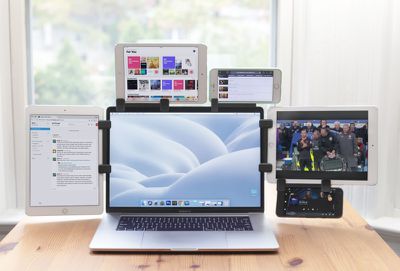
Ten One Design is today introducing the Mountie+, a new version of its popular Mountie device that allows an iPad or iPhone to be attached to the display of a Mac laptop for use as a second screen.
mountie1
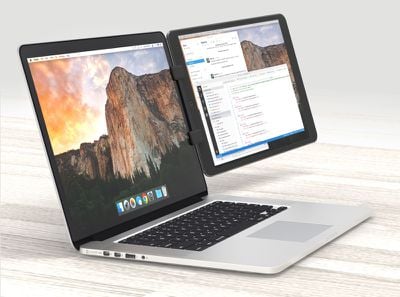
The Mountie+ mount for the iPad has been designed with larger devices in mind. Mountie+ uses a two-clip system to attach an iPhone or iPad to a MacBook, and it works with all iPad Pro, iPad Air, and iPad mini tablets. It's also compatible with all MacBooks and "every other laptop," according to Ten One Design. The standard Mountie, which is also still available, works well with smaller tablets and the iPhone.
mountie2
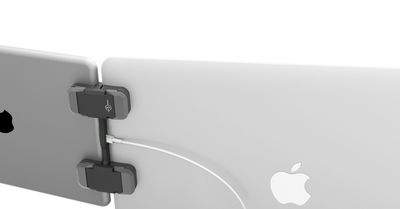
Mountie+ also incorporates a new feature that allows an iPad to be charged while it's attached to a MacBook, by tucking the iPad's charging cable around the back where it can then be plugged in to an adapter. It's designed to make it quick and easy to snap an iPad on and off of the MacBook.
mountie3
When attached to a MacBook via Mountie+, there's only 4mm of space between the iPad and the MacBook screen, making it easy to see both displays at once. Mountie+ lets the iPad be mounted in either landscape or portrait mode.

"Remote working and co-working is growing; we can see that trend as our customers look to use their iPads and other portable devices as second or even third screens," said Peter Skinner, founder of Ten One Design. "Even if it's just for watching Stranger Things. We don't judge."

The Mountie+ can be pre-ordered from the Ten One Design website for $34.95. It will begin shipping out in December.


Top Rated Comments

113 months ago
Seems like a gadget that would cause premature failure to the MacBook's hinge...
Score: 8 Votes (Like | Disagree)
113 months ago
Actually, mounting your phone to the top of the screen makes a lot of sense and might not be too heavy.

But what’s the prefered software strategy for using an iPad as a second screen these days?
I use Duet: https://www.duetdisplay.com

In this case you would use it connected/wired to the laptop. There is an option to use it over Wifi, but that increases lag. While I haven't used a/this clip, I have used my iPad as extra display for tool pallets and Messenger/Mail. (I work in either AutoCAD, ArchiCAD, VectorWorks, Rhino, or SketchUp ... so maximizing model space is welcomed when on the go)
Score: 3 Votes (Like | Disagree)
113 months ago
Seems like a gadget that would cause premature failure to the MacBook's hinge...
My first thought was, "Well, that extra weight can't be good for the hinge..."
Score: 3 Votes (Like | Disagree)
somethingelsefl Avatar
113 months ago
The first photo is the clearest evidence that future has arrived... And it's wonderfully absurd
Score: 3 Votes (Like | Disagree)
113 months ago
Obsolete.
iOS devices gaining hovering capabilities in 2018 according to Kuo Chi Ming. ;)
Score: 2 Votes (Like | Disagree)
riverfreak Avatar
113 months ago
This sounds like a terrible idea for the hinge.
It opens up an entirely new market for hinge enhancers.
Score: 2 Votes (Like | Disagree)

Popular Stories

iCloud iPhone 17 Pro

iPhone Users Who Pay for iCloud Storage Get Two New Perks on iOS 27

Thursday July 2, 2026 6:10 am PDT by
If you pay for certain iCloud+ storage plans beyond the 5GB that Apple offers for free, you will receive two more perks on iOS 27 at no additional cost. A summary of the two new iCloud+ perks on iOS 27:Increased daily usage limits for some new Apple Intelligence features, including image generation in the revamped Image Playground app. HomeKit Secure Video cameras receive generated video...
American Express Gold Apple Pay Feature

American Express Announces New Apple Pay Feature

Tuesday June 30, 2026 10:27 am PDT by
American Express today announced that you can now redeem Membership Rewards points when checking out with Apple Pay on the web and in apps on the iPhone and iPad. When checking out with Apple Pay on iOS 18 or iPadOS 18 or later, tap on your eligible American Express card (Platinum, Gold, Green, and others) and select the Membership Rewards points option. You can use points to cover all or...
series 10 apple watch titanium digital crown

Report: Apple Watch Redesign Coming Next Year With New Band System

Tuesday June 30, 2026 8:45 am PDT by
A "major overhaul" of the Apple Watch's design is due to arrive next year with a new system for connecting bands, according to a known Weibo leaker. In a set of recent posts, the leaker known as "Instant Digital" linked the new claim to older rumors about an "Apple Watch X" model, which was said to introduce a fresh design and break compatibility with the existing watch band system. Citing...















