

Promise Technology Debuts $249 Thunderbolt 3 Dock With 5 USB-A Ports, 2 TB3 Ports and SD Card Slot - MacRumorsOpen MenuShow RoundupsShow Forums menuVisit ForumsOpen Sidebar
Skip to Content

Promise Technology Debuts $249 Thunderbolt 3 Dock With 5 USB-A Ports, 2 TB3 Ports and SD Card Slot

by

Promise Technology today announced the launch of its new TD-300 Thunderbolt 3 dock, which is designed for Apple's latest MacBook Pro models with USB-C and Thunderbolt 3.

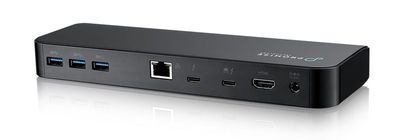
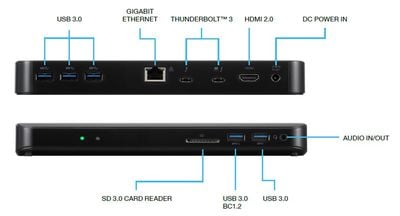
The TD-300 features five USB 3.0 ports (three at the back and two at the front), two Thunderbolt 3 ports, a Gigabit Ethernet port, an audio in/out port, and an HDMI 2.0 port.
promisetb3dock1
There are a range of Thunderbolt 3 docks on the market now, but Promise Technology's TD-300 includes a good number of ports and an SD card slot, something that we've only seen on OWC's TB3 dock. A Thunderbolt 3 cable and power adapter are also included.
promisetb3dock2
Promise Technology's dock supports two 4K displays or one 5K display and delivers up to 60W of power to charge a MacBook Pro. That's sufficient for the 13-inch MacBook Pro models, but may be inadequate for charging a 15-inch MacBook Pro under a heavy load.

"As part of our mission to offer solutions that are optimized for rich media workflows, we're constantly expanding our portfolio of innovative solutions that harness the latest technology," noted Vijay Char, president, Promise Technology USA. "The addition of a Thunderbolt 3 dock brings a new level of efficiency and flexibility to creative professionals. Laptops can be charged at the fastest speeds possible, images from DSLR cameras are easily transferred, peripherals such as hard drives and monitors can be daisy-chained for increased productivity, 4K video can be sent to multiple displays, and more. The possibilities are truly endless."

The TD-300 Thunderbolt 3 Dock can be purchased from the Promise website or from Amazon for $249.

Top Rated Comments

113 months ago
Another disappointing dock.
Score: 5 Votes (Like | Disagree)
ajfahey Avatar
113 months ago
HDMI 2.0, no DisplayPort and inadequate power for MB Pro 15”. Pass.
Score: 5 Votes (Like | Disagree)
113 months ago
Too bad there's no support for dual monitors. It needs a mini display port or another TB3 port.
Score: 5 Votes (Like | Disagree)
113 months ago
65W? Why turn away half your target market ...
Score: 4 Votes (Like | Disagree)
113 months ago
Exactly. All 15" MacBook Pro needs 85W charging. Anything lower is not adequate since Apple's charger is 87W. If you think you can do 60W with 15" MBP, you are either using it without any bus powered devices nor using any GPU / CPU power, in that case, 60W might work. If you use 60W and a lot of tasks in the background plus thunderbolt portable drives and GPU drivers, you will find your 15" MBP is discharging slowly instead of charging slowly and sooner or later you will need apple's charger to juice it up when it comes down to 5%.

Save yourself from the trouble by just paying a little bit more.
Belkin, CalDigit, Elgato are selling great docks for Pro-users. And such 85W dock is definitely a right choice for any 15" MBP users.

Belkin one is 350 dollars, not cheap, I know, but good quality. Caldigit one is 269 bucks directly on their site, and their Thunderbolt Station 3has more ports than Belkin and el gato's. all are better than promise's and owc's IMHO
This is quite honestly rubbish.... I can run my 15" MBP13,3 all day long with the OWC TB3 Dock connected along with running video, tons of cpu, memory and i/o intensive workload and the battery charge level stays at a solid 100%. The 60 watt power from the OWC TB3 dock is quite sufficient.
Score: 2 Votes (Like | Disagree)
113 months ago
HDMI 2.0, no DisplayPort and inadequate power for MB Pro 15”. Pass.
Yeah, inadequate power. A desk-bound user (those docks will overwhelmingly be used on desks) really cannot live with a charging time that is maybe 65% longer .
[doublepost=1511077850][/doublepost]

Has anybody actually tried running a 15" MBP on 60W? Does it "run down" while doing heavy work, or is it just that it won't charge the battery and run off mains at the same time (which would be tolerable for a desktop dock)?
Unless you are pegging all CPU cores constantly, an 60 W charger will still charge the 15" MBP just fine while using it, merely more slowly. Look at the range of battery life times people report, you find numbers from three hours (or even less) upwards. Meaning if running the MBP full throttle results in three hours of battery life (and the same usage while on the 87 W power adaptor maintains the battery charging level), than a usage corresponding to a six hour battery life only requires half as much power, ie, 43.5 W. Therefore a 60 W power supply will still have power left to charge the battery, just more slowly.

And I am sure those numbers are still conservative from my point of view. Pegging all CPU cores (+GPU, full screen brightness) probably results in a battery life even lower, maybe only two hours. Meaning usage resulting in six hours of battery life would only need 29 W. Thus instead of having 58 W of 'charging power' (87 - 29 W), you'd have 31 W (60 - 29 W) of charging power. My guess would then be that using a 60 W power supply (instead of an 87 W power supply), charging during usage might on average take twice as long. And charging while the machine is sleeping might only take 50% longer.
[doublepost=1511078004][/doublepost]
Exactly. All 15" MacBook Pro needs 85W charging. Anything lower is not adequate since Apple's charger is 87W. If you think you can do 60W with 15" MBP, you are either using it without any bus powered devices nor using any GPU / CPU power, in that case, 60W might work. If you use 60W and a lot of tasks in the background plus thunderbolt portable drives and GPU drivers, you will find your 15" MBP is discharging slowly instead of charging slowly and sooner or later you will need apple's charger to juice it up when it comes down to 5%.
Nonsense, see above.

EDIT: Just found some numbers on battery life under very heavy load, of about 80 minutes ('https://www.pcworld.com/article/3157392/laptop-computers/tested-the-truth-behind-the-macbook-pros-terrible-battery-life.html'). Again that means, even if your usual battery life is only four hours, you are only using 80/240 * 87 W = 29 W to power the computer, leaving 31 W to charge its battery.
Score: 2 Votes (Like | Disagree)

Popular Stories

iCloud iPhone 17 Pro

iPhone Users Who Pay for iCloud Storage Get Two New Perks on iOS 27

Thursday July 2, 2026 6:10 am PDT by
If you pay for certain iCloud+ storage plans beyond the 5GB that Apple offers for free, you will receive two more perks on iOS 27 at no additional cost. A summary of the two new iCloud+ perks on iOS 27:Increased daily usage limits for some new Apple Intelligence features, including image generation in the revamped Image Playground app. HomeKit Secure Video cameras receive generated video...
iPhone 4 on Black Feature

Apple Facing One of Its Worst Leaks Since the iPhone 4

Thursday July 2, 2026 9:53 am PDT by
Apple supplier Tata Electronics recently suffered a cyberattack that resulted in thousands of confidential files being published on the dark web, and this reportedly included some photos and documents related to the upcoming iPhone 18 Pro. We have elected not to share any of the leaked photos in this story due to the illegal nature in which they were obtained, but they can easily be found...
American Express Gold Apple Pay Feature

American Express Announces New Apple Pay Feature

Tuesday June 30, 2026 10:27 am PDT by
American Express today announced that you can now redeem Membership Rewards points when checking out with Apple Pay on the web and in apps on the iPhone and iPad. When checking out with Apple Pay on iOS 18 or iPadOS 18 or later, tap on your eligible American Express card (Platinum, Gold, Green, and others) and select the Membership Rewards points option. You can use points to cover all or...














