

PSA: If You Upgrade to macOS High Sierra 10.13.1, You'll Need to Reinstall Apple's Root Security Fix - MacRumorsOpen MenuShow RoundupsShow Forums menuVisit ForumsOpen Sidebar
Skip to Content

PSA: If You Upgrade to macOS High Sierra 10.13.1, You'll Need to Reinstall Apple's Root Security Fix

Mac owners who are still running macOS High Sierra 10.13 and who have already installed Apple's root security fix on that version of the operating system will need to install it once again upon upgrading to macOS 10.13.1, reports Wired.

Security researchers running a patched version of the original macOS High Sierra update, 10.13.0, told Wired that the root bug was reintroduced upon installing the macOS 10.13.1 update. After updating, they needed to install Apple's security patch again. Even that didn't fix the issue until their machines were rebooted.
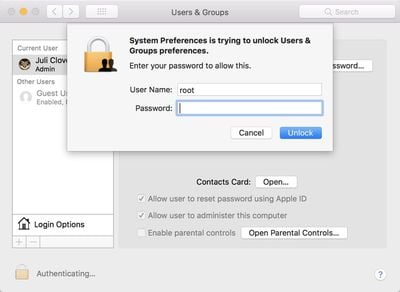
rootbug

Those who had not yet upgraded their operating system from the original version of High Sierra, 10.13.0, to the most recent version, 10.13.1, but had downloaded the patch, say the "root" bug reappears when they install the most recent macOS system update.

And worse, two of those Mac users say they've also tried re-installing Apple's security patch after that upgrade, only to find that the "root" problem still persists until they reboot their computer, with no warning that a reboot is necessary.

The root fix, released on Wednesday for macOS High Sierra 10.13.0 and 10.13.1, addresses a serious vulnerability that was first discovered a day earlier on Tuesday. The bug enabled the root superuser on a Mac with a blank password and no security check, letting anyone bypass the security of an admin account with the username "root" and no password.

While the security update successfully fixes the issue, it appears Apple may not have releases a modified and patched version of macOS 10.13.1, so customers who installed the update on 10.13 might think they're protected upon updating to 10.13.1, but they're not. Instead, the bug is fully re-introduced.

Apple may fix this problem now that the oversight has been pointed out, but in the meantime, customers upgrading from macOS High Sierra 10.13 to 10.13.1 should make sure to download the security update a second time and restart to be certain the root vulnerability is patched.

This won't be an issue when the macOS High Sierra 10.13.2 update is released, as Apple patched the bug in the macOS High Sierra 10.13.2 beta that was released this morning.


Related Forum: macOS High Sierra

Popular Stories

macOS 27 on MacBook Pro

Apple Says macOS 27 Won't Be Compatible With These Macs

Wednesday June 3, 2026 8:29 am PDT by
During WWDC 2025, Apple revealed that macOS 26 Tahoe would be the final major macOS version for Intel-based Macs. macOS 27 will be compatible with Apple silicon Macs only, meaning that you will need a Mac with an M-series chip or a MacBook Neo with an A18 Pro chip in order to install the software update. Apple will unveil macOS 27 during its WWDC 2026 keynote this Monday, June 8, and the...
MacBook Neo on Yellow Feature

MacBook Neo is So Popular That Apple Reportedly Doubled Production

Wednesday June 3, 2026 9:24 am PDT by
On an earnings call in late April, Apple's CEO Tim Cook said that customer response to the MacBook Neo was "off the charts," and the popularity of the laptop has reportedly led the company to significantly boost production. Apple supply chain analyst Ming-Chi Kuo this week said he believes that MacBook Neo shipments to Apple were doubled from an initial target of 5 million units to 10...
iphone 18 pro blue%402x

iPhone 18 Pro: Dark Cherry, Light Blue, and Dark Gray Chassis Leaked [Update]

Thursday June 4, 2026 5:18 am PDT by
Update: Since publication, new information has come to light suggesting the images have been AI-manipulated and are not in fact iPhone 18 Pro chassis parts. The original article follows. The color options Apple is reportedly planning for the upcoming iPhone 18 Pro and ‌iPhone 18 Pro‌ Max have appeared online today in the form of images of chassis parts of unknown authenticity....

Top Rated Comments

111 months ago
I am speechless
Score: 14 Votes (Like | Disagree)
velocityg4 Avatar
111 months ago
how much worse can High Sierra get?
27 pages of people with this issue.
https://discussions.apple.com/thread/8097885?start=0&tstart=0

I've noted it as well and it is quite serious. I setup a new Mac Pro and updated it to High Sierra. It crashed constantly. Got a replacement unit from the vendor. It came with High Sierra already installed and does the exact same thing. It seems to be exacerbated if you have numerous windows open and multiple high resolution displays.

There was a reason why Steve Jobs gave up on the yearly OS X updates. It forced shoddy releases. They need to go back to releasing OS X version when they are ready. Not to hit a yearly mark. The best OS is one you don't even notice is there.
Score: 13 Votes (Like | Disagree)
111 months ago
how much worse can High Sierra get?
Score: 13 Votes (Like | Disagree)
antiprotest Avatar
111 months ago
For a while I have been irritated at Apple, but their incompetence has reached a point that I am beginning to be impressed.
Score: 12 Votes (Like | Disagree)
thadoggfather Avatar
111 months ago
It just works:

After applying patch, then a patch to fix the patch’s issues.

Then go .1, rinse and repeat

Just in case it doesnt you can run some terminal commands

Weeee
Score: 10 Votes (Like | Disagree)
chrfr Avatar
111 months ago
I don't excuse Apple for this one, but I have a hard time getting worked up over it. This bug brings the current version of MacOS (unpatched) to the level of Windows without UAC enabled, which is basically the norm. After that, I really don't intend to allow others physical access to my systems to exploit this. Seriously, we can stop the arm waving
For the typical home computer, this is not a real big concern. For computers in shared environments, or in environments where the users are given limited privileges, this is a huge problem.
Score: 7 Votes (Like | Disagree)













