Final Cut Pro X 10.4 Released With Support for 360º VR Video Editing, HDR and HEVC Video, and Much More - MacRumorsOpen MenuShow RoundupsShow Forums menuVisit ForumsOpen Sidebar
Skip to Content

Final Cut Pro X 10.4 Released With Support for 360º VR Video Editing, HDR and HEVC Video, and Much More

Apple today announced it has released Final Cut Pro X 10.4 and updated Logic Pro X, Motion, and Compressor alongside the launch of the iMac Pro.
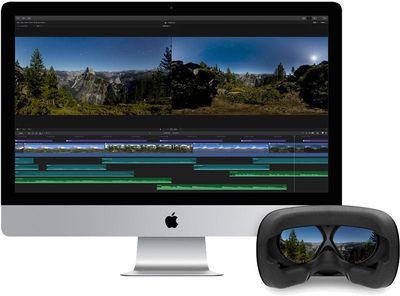
final cut pro x 10 4
As previewed earlier this year, Final Cut Pro X 10.4 includes 360º VR video editing, HDR support, and new color tools like a white balance picker. It also includes support for HEVC, the new video format introduced in macOS High Sierra and iOS 11, and direct import of iMovie for iOS timelines.
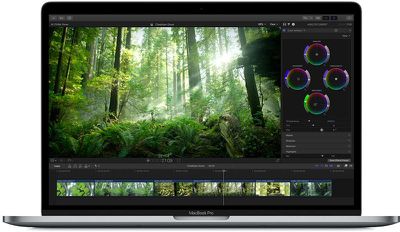
macbook pro final cut pro 10 4
Logic Pro X also has been updated with optimized performance for the iMac Pro, including support for up to 36 cores with hyperthreading. Version 10.3.3 includes performance and stability improvements as well, including a fix for an issue which could cause user-created content to become unavailable on macOS High Sierra.

Motion has been updated with support for 360 VR motion graphics. Users can now import 360° video and design 360° titles, generators, and effects, and later output the 360° video to a connected VR headset. Version 5.4 also supports import, playback, and editing of HEVC video and HEIF photos from Apple devices.

Final Cut Pro X version 10.4 release notes:

360 VR editing
• Import and edit 360° equirectangular video in a wide range of formats and frame sizes
• Output 360° video to a connected VR headset*
• Open the 360° viewer to simultaneously monitor headset and equirectangular views while editing
• Option to track movement of a VR headset in the 360° viewer in Final Cut Pro
• Add 360° effects including blurs, glows, and more
• Share 360° video directly to YouTube, Facebook, and Vimeo
• Use the 360° patch to instantly remove cameras and rigs from the scene
• Use the Horizon overlay to easily change the orientation of 360° video right in the viewer
• Edit 360° video into a non-360° project and animate the pan, tilt, and zoom
• Place any graphic, still, or video into a 360° project, then reposition and resize to fit perfectly into the 360° scene
• Support for monoscopic and stereoscopic 360° video

Advanced color grading
• Dedicated color tab in the inspector provides one location for all color controls
• Powerful new color wheels improve upon traditional wheels with integrated sliders to adjust hue, saturation, and brightness
• Color curves enable ultra-fine adjustments using multiple control points to change color and contrast
• Hue/saturation curves let you select a specific hue or brightness level to make adjustments while leaving other parts of the image unchanged
• Use the eye dropper in the color and hue/saturation curves to quickly sample parts of an image for adjustment
• Balance Color command includes an eye dropper for manual white balance
• Apply custom LUTs from popular color grading apps and sites
• Adjust color corrections over time with precise keyframe controls
• Speed through color correction using new keyboard shortcuts for color adjustments and role-based timeline navigation
• Color presets are now located in the effects browser for skimmable preview and fast search

High Dynamic Range
• Import, grade, and deliver High Dynamic Range (HDR) video as Rec. 2020 HLG or Rec. 2020 PQ for HDR10
• Output video to third-party HDR monitors using third-party I/O devices
• Built-in waveform monitor indicates HDR brightness levels up to 10,000 nits
• HDR Tools effect lets you easily tone map HDR to Standard Dynamic Range (SDR) output as well as convert between PQ and HLG formats
• Option to view HDR as raw values when working without an HDR monitor

Additional features
• Send your iMovie for iOS project directly to Final Cut Pro for advanced editing, audio work, and finishing
• Import, playback, and editing of High Efficiency Video Coding (HEVC, also known as H.265) video clips and High Efficiency Image Format (HEIF) photos from Apple devices**
• Send to Compressor to export video projects in the HEVC format
• Adjust audio using effects plug-ins from Logic Pro X with redesigned, resizable interfaces
• Support for Canon Cinema RAW Light format with additional software from Canon
• Faster Optical Flow analysis using Metal 2
• Support for NFS-based libraries and media
• XML 1.7 with support for new color grading controls, 360 VR effects, and HDR

Apple's new versions of Final Cut Pro X, Logic Pro X, and Motion, and Compressor are available from the Updates tab in the Mac App Store.
Related Forums: iMac, macOS High Sierra

Popular Stories

Logic Pro Intelligent Assistant

Paid $200 for Logic Pro? Apple Says You Won't Get This New Feature

Thursday November 5, 2026 9:51 am PST by
According to Apple's full release notes for version 13.0 of Logic Pro for Mac, released today, the new AI-powered Intelligent Assistant feature requires an Apple Creator Studio subscription for $12.99 per month or $129 per year. In other words, the feature is not available in the $199.99 one-time purchase version of Logic Pro. Apple's fine print on the Logic Pro release notes page:The...
Apple Creator Studio

Apple Creator Studio App Updates Rolling Out, Starting With Logic Pro

Thursday November 5, 2026 6:57 am PST by
Apple today began rolling out the Creator Studio app updates that it announced last month. Both the Creator Studio version and standalone version of Logic Pro for the Mac were updated today, and the remaining app updates will come out later in November. MacStories editor John Voorhees tested the updated Creator Studio apps over the past week and has shared his impressions of the new...
apple pro tell logo

Apple Launching Five New Products Today

Thursday November 5, 2026 12:59 am PST by
Apple is launching five new products on Friday, November 6, following pre-orders that opened last week, including its first touchscreen MacBook Pro models. The following new products will be available from today: iPad mini with OLED display and A20 Pro chip iMac with M6 chip 14-inch MacBook Pro with M6 chip 14-inch MacBook Pro with OLED touchscreen 16-inch MacBook Pro with OLED...

Top Rated Comments

v1597psh Avatar
116 months ago
36-core Mac Pro confirmed?
Score: 7 Votes (Like | Disagree)
Chupa Chupa Avatar
116 months ago
but better late than never, I suppose.
Yes! And, honestly, with Apple we are always on edge, not knowing if TC will randomly drop the wrecking ball on any given app, like he did with Aperture.

But I still can't complain given the price of this update or the one's before it. And unlike some other video apps, there is no subscription fee either, so there is that.
Score: 5 Votes (Like | Disagree)
PaulRustad007 Avatar
116 months ago
HEVC! Excellent, I can finally empty my phone.

"Balance Color command includes an eye dropper for manual white balance." I invoked balance color, but I see no white balance picker. Anybody able to find it?

You need to chant the Jony Ives mantra will strutting around naked carrying an apple at dawn on the Winter Solstice and you will be rewarded......
Score: 4 Votes (Like | Disagree)
Abazigal Avatar
116 months ago
Umm....finally?!? Surprised that HEVC support took so long to come, but better late than never, I suppose.
Score: 3 Votes (Like | Disagree)
116 months ago
When High Sierra came out I was dismayed to learn that non of my Handbrake HEVC encodes run natively on the Mac. They must have a very specific implementation. (Though the Handbrake nightly builds do now encode in an Apple supported HEVC format).
Apple uses a different fourcc code for some reason (hvc1 instead of hev1), you can make your files compatible without re-encoding using this command.


ffmpeg -i infile.mp4 -c: copy -tag:v hvc1 oufile.mp4
Score: 2 Votes (Like | Disagree)
Xavier Avatar
116 months ago
I'm part surprised (but also part not surprised at all) that FCP hasn't had HDR editing yet. I've seen 4k HDR movies for months now, so Apple's pretty late to the game.
FCPX is usually late to support. Great editor though.
Score: 2 Votes (Like | Disagree)
Latest Stories
Early Apple Black Friday Deals on Apple Watch, MacBook Air, and More
12 hours ago
'Backglow' Lets You Customize New MacBook Pro's Glowing Apple Logo
12 hours ago
Top Stories: Apple Product Launches, iOS 27.3 Beta, and More
19 hours ago
More Fun iPhone Duo Apps: 30 New Picks to Try
1 day ago
Hands-On With Apple's New OLED Touchscreen MacBook Pro
1 day ago
Apple Store With All-New Design Opening Soon in Southern California
1 day ago
Control the Glowing Apple Logo on Your New MacBook Pro
2 days ago
Apple Shares New 'Apple Card: Apply and Use in Minutes' Ad
2 days ago
Apple Says More Than 100,000 Apps Optimized for iPhone Duo, Here's What's Still Missing
2 days ago
Early Black Friday Deals Kickoff With Steep Discounts on Apple Watch Ultras and More
2 days ago
The MacRumors Show: iOS 27.3 Looks Like a Huge Update
2 days ago
Best Buy's Black Friday Event Begins With Sitewide Savings on Apple, TVs, More
2 days ago
Apple Releasing Yet Another Two New Products Next Week
2 days ago
MacBook Air Drops to Lowest Price in Months With Amazon's $250 Discount
2 days ago
Apple Rumored to Drop the iPhone's Action Button Next Year
2 days ago
Apple's Extended Return Policy Now in Effect for 2026 Holiday Season
2 days ago
Apple Music Classical Updated With New Icon and Refreshed Design
2 days ago
OLED iPad Mini, M6 iMac, and New MacBook Pros Available From Today
2 days ago
Apple Surveys iPhone Duo Buyers About Crease and Camera
2 days ago
Apple's First Touchscreen Mac is Now Arriving to Customers
2 days ago
Claude Gets Personal Finance Feature With Bank Account Linking
2 days ago
Apple Arcade Adds Crossy Road Rush and NBA 2K27
2 days ago
Apple's New HomeView Smart Home Hub: Here's How Much RAM It Has
2 days ago
iPad Mini vs. iPad Air Buyer's Guide: Now Just $50 Apart
3 days ago
First iOS 27.3 and macOS Golden Gate 27.3 Public Betas Now Available
3 days ago
Apple Announces a New Mac Sales Record
3 days ago
Paid $200 for Logic Pro? Apple Says You Won't Get This New Feature
3 days ago
Instagram's Edits Video Editor is Now Available on Mac
3 days ago
Prevent Siri and Search From Accessing Specific iPhone Apps
3 days ago
Best Early Black Friday Deals on iPhone 18 Pro and iPhone Duo
3 days ago







































