

Portrait Camera App 'Focos' Gains Real Lens Optical Effects and Improved Shooting Mode - MacRumorsOpen MenuShow RoundupsShow Forums menuVisit ForumsOpen Sidebar
Skip to Content

Portrait Camera App 'Focos' Gains Real Lens Optical Effects and Improved Shooting Mode

by

Portrait Mode photo editor Focos received an update today that should pique the interest of dual-lens camera iPhone owners. The app recently made our end-of-year best iOS app list for its impressive granular aperture and bokeh adjustment tools, but version 1.2 builds on the existing feature set by adding the ability to apply real lens optical effects to depth images.

The update introduces a redesigned interface layout to accommodate the new preset lenses, which include Olympus Zuiko, Helios 44, CarlZeiss Jena, CarlZeiss Otus, Leica Noctilux, Minolta STF, Minolta RF250, A1, A2, A3, and A4.
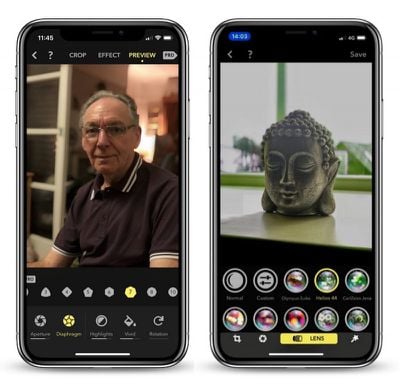
Screen Shot 2 2
In addition to the above lenses, users can create custom presets for images with depth information by combining multiple lens settings and saving them under a recognizable name. Fotos' library of presets can also be re-organized for easy access from the editing menu.

Elsewhere in this update, a tilt-shift effect has been added to the app's range of filters, offering users another level of control over the plane of focus when widening aperture, while a new ratio of 2.25:1 can be found in the cropping menu.

A torchlight has also been added to Focus' built-in camera mode, which should help when taking Portrait Mode photos in low light, and the app now supports Bluetooth for taking photos remotely.

Lastly, a look at the general settings screen reveals an added ability to choose between JPEG, HEIC, and TIFF export formats, as well as a simple language selector, which now includes Persian.

Focos supports iPhone 7 Plus, iPhone 8 Plus, and iPhone X, and is a free download from the App Store, although many pro features are behind a paywall. It costs $0.99 per month or $5.99 per year to unlock them, but there's also a $9.99 lifetime access purchase option. [Direct Link]

Top Rated Comments

110 months ago
Is it better than the default camera app for portrait?
Yes, absolutely.

Focos allows depth capture for portrait shots beyond Apple's 8-foot maximum range. Photos will simply be a non-portrait 2x shot if you try and take pictures like mine below with the stock camera app.

This is the absolute game changer here. This is honestly the best app in years - here's some shots from the past couple months. Without a doubt the biggest step in mobile photography in the last decade.

MacRumors content image
MacRumors content image MacRumors content image MacRumors content image MacRumors content image MacRumors content image MacRumors content image MacRumors content image MacRumors content image MacRumors content image MacRumors content image
Score: 6 Votes (Like | Disagree)
GabrielMoro Avatar
110 months ago
This app is flawless. Best way to edit Portrait Pictures.
Score: 6 Votes (Like | Disagree)
GabrielMoro Avatar
110 months ago
Is it better than the default camera app for portrait?
For sure. You can adjust just about anything in there. You can separate the background and edit saturation, hue, brightness etc and edit the front in a different way. You can set up lenses for various effects and tweak them as well.

There's also way to select the exact point that the background is blurred (so you won't cut ears off or hair). Great great app.

Example of a quick selfie edited there with some of those effects:


Attachment Image
Score: 5 Votes (Like | Disagree)
PaulRustad007 Avatar
110 months ago
The image on the left is stock from Apple. IPX 256 G version. The image on the right is from FOCOS. You have tremendous control on focus plane and adding in a better bokeh. You can scale the blur as much as you want.

Attachment Image

Attachment Image
Score: 4 Votes (Like | Disagree)
MartinAppleGuy Avatar
110 months ago
Is it better than the default camera app for portrait?
For taking the photo; up to you (although it lets you use the torch which makes low light shots better).

For editing; it’s a must. Can alter the focus point after taking a photo in either the app or default camera, increase the blur...
Score: 4 Votes (Like | Disagree)
ErikGrim Avatar
110 months ago
Bought the lifetime subscription within 30 seconds of using this app. It’s that good.
Score: 3 Votes (Like | Disagree)

Popular Stories

iCloud iPhone 17 Pro

iPhone Users Who Pay for iCloud Storage Get Two New Perks on iOS 27

Thursday July 2, 2026 6:10 am PDT by
If you pay for certain iCloud+ storage plans beyond the 5GB that Apple offers for free, you will receive two more perks on iOS 27 at no additional cost. A summary of the two new iCloud+ perks on iOS 27:Increased daily usage limits for some new Apple Intelligence features, including image generation in the revamped Image Playground app. HomeKit Secure Video cameras receive generated video...
iPhone 4 on Black Feature

Apple Facing One of Its Worst Leaks Since the iPhone 4

Thursday July 2, 2026 9:53 am PDT by
Apple supplier Tata Electronics recently suffered a cyberattack that resulted in thousands of confidential files being published on the dark web, and this reportedly included some photos and documents related to the upcoming iPhone 18 Pro. We have elected not to share any of the leaked photos in this story due to the illegal nature in which they were obtained, but they can easily be found...
American Express Gold Apple Pay Feature

American Express Announces New Apple Pay Feature

Tuesday June 30, 2026 10:27 am PDT by
American Express today announced that you can now redeem Membership Rewards points when checking out with Apple Pay on the web and in apps on the iPhone and iPad. When checking out with Apple Pay on iOS 18 or iPadOS 18 or later, tap on your eligible American Express card (Platinum, Gold, Green, and others) and select the Membership Rewards points option. You can use points to cover all or...













