HomePod Music Streams Don't Count Toward Apple Music and iTunes Device Limits - MacRumorsOpen MenuShow RoundupsShow Forums menuVisit ForumsOpen Sidebar
Skip to Content

HomePod Music Streams Don't Count Toward Apple Music and iTunes Device Limits

Yesterday, reviews for the HomePod launched online and with them new details about Apple's smart speaker began emerging ahead of its release date on February 9. One new tidbit of information came from Rene Ritchie's review of the speaker on iMore, which confirmed that any music streamed via HomePod does not count toward an Apple Music subscription's device streaming limit. Additionally, HomePod does not count toward the 10 device limit placed on devices associated with an Apple ID.
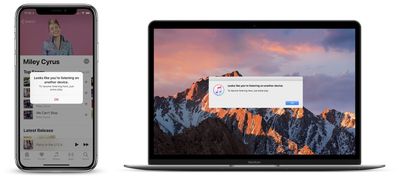
apple music streaming error
This means that subscribers with single memberships to Apple Music will be able to ask Siri to play a song on HomePod while listening to music on another iPhone, iPad, or Mac. Prior to HomePod, if single membership users streamed Apple Music on an iPhone and then began listening to music on a Mac, for example, the iPhone would disconnect from the music and serve up a warning about the new stream.

When users get their HomePods this weekend, it appears that they won't have to worry about the speaker taking up similar streaming limits on their Apple Music accounts. Apple Music family plans already support simultaneous streaming across multiple devices, but the HomePod feature should work the same for those users as well.

That includes HomePod not counting against any Apple Music device or concurrent stream limit — set it up one or more HomePods with your iPhone or iPad, leave the house with that device, and anyone who stays or comes home can still listen to Apple Music on any or all the HomePods you've set up.

Another small tidbit relates to how HomePod affects each user's music recommendations within the "For You" tab of Apple Music. According to The Loop's Jim Dalrymple, there's a toggle in the HomePod section of the Home app (where the speaker will be controlled on iOS devices), and turning it off allows users to prevent the HomePod's streams from impacting how Apple Music's algorithms recommend new music.

When using the feature, no music streamed via HomePod will count towards the subscriber's overall taste profile, but if users want HomePod streams to affect recommendations they can ignore the setting.

One thing about having multiple people access the HomePod that bothered me was that it would affect my “For You” section in Apple Music.

When you love songs, play songs and add songs to your library, Apple Music will suggest similar music, assuming that is what you want. If someone else, or a group of people come over and start playing genres you don’t like, it would screw everything up.

Well, it turns out I didn’t have to worry about that after all. There is a setting in the Home app that allows you to prevent the music played on HomePod from affecting the “For You” section of Apple Music.

This way, when users know a lot of people will be around the HomePod -- at a party, for example -- they can toggle the setting off. Then, if other people begin asking HomePod to play music that doesn't particularly align with the tastes of the main account, that Apple Music subscriber's New Music Mix and other song/artist recommendations won't be thrown off.

The same setting will also control the albums and playlists that appear on an Apple Music profile. In leaked screenshots posted by iGen in January, it was confirmed that turning off this one setting will prevent both music recommendations from being affected as well as "Listening To" history from being updated. It also synchronizes the playback status of podcasts on all devices connected to the same Apple ID.

If you're interested in reading up on everything else we know about the HomePod so far, be sure to check out our full HomePod Roundup.
Related Roundup: HomePod
Buyer's Guide: HomePod (Caution)

Popular Stories

Apple Music iPod Page Not Found

Apple Music Has a Hidden iPod You Can Play With

Friday October 23, 2026 7:11 am PDT by
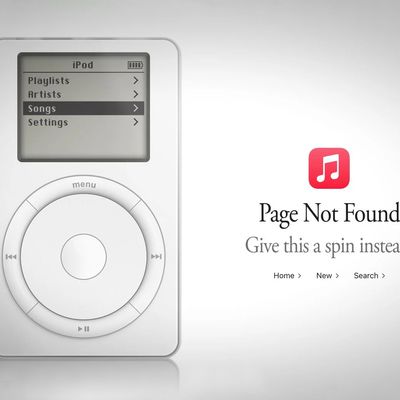
Apple Music has a 404 page easter egg on the web: a functional iPod that appears when you load a page that does not exist, such as music.apple.com/macrumors. "Page Not Found," says Apple. "Give this a spin instead." Apple is clever with this. If you navigate to music.apple.com/ipod instead, the page says "Looking for something?" instead of "Page Not Found." The easter egg is only...

Apple Music New Branding

Apple Music's New Look Officially Announced

Wednesday October 21, 2026 9:06 am PDT by
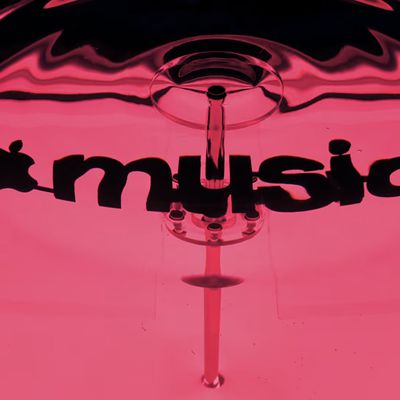
Following the introduction of a new Apple Music logo and app icon earlier this month, Apple today officially introduced Apple Music's new brand identity. In a YouTube video shared today, Apple said the new Apple Music visuals were "made by sound." More specifically, Apple said it played a sound through a container of water, resulting in the liquid moving at the frequency of the notes. Apple...
homepod sound glow

HomePod 27.2 Adds Sound Glow to Existing HomePod Models

Monday October 19, 2026 1:31 pm PDT by
Apple's latest software update for the HomePod brings a new Sound Glow feature to the HomePod, HomePod mini, and HomePod mini 2. Apple introduced Sound Glow as a HomePod mini 2 feature, but it's available for the second-generation HomePod and the original HomePod mini too. HomePod Software 27.2 is available as a release candidate update for developers and public beta testers, but it should...

Top Rated Comments

114 months ago
Can't wait to see how commentors on here manage to turn this into bad news.
Score: 14 Votes (Like | Disagree)
OllyW Avatar
114 months ago
This means that subscribers with single memberships to Apple Music will be able to ask Siri to play a song on HomePod while listening to music on another iPhone, iPad, or Mac. Prior to HomePod, if single membership users streamed Apple Music on an iPhone and then began listening to music on a Mac, for example, the iPhone would disconnect from the music and serve up a warning about the new stream.
Makes sense really, you wouldn't want your music in the car to be cut off if your partner or your kids start playing music on your HomePod.
Score: 10 Votes (Like | Disagree)
BornAgainMac Avatar
114 months ago
I didn't even know about the Streaming Limits.
Score: 8 Votes (Like | Disagree)
CausticSoda Avatar
114 months ago
Well, I should think not!
Score: 4 Votes (Like | Disagree)
114 months ago
Device limits are arbitrary and ridiculous. Devices don’t count.... or do they? It’s kinda confusing.... but computers do. And if you’re like me with multiple computers you’ve got to pick which machines to work with Apple Music and which don’t get music on them at all. I have 3 machines; 1 iMac and 2 MBP’s that are all used for very different reasons and each of those dualboots into windows for software compatibility purposes. So even though I’ve given Apple more money than others I still can’t use all my devices equally. I don’t expect the opposite.... to be treated better.... equally would be nice!

When I worked at Sony I used to fight against their decisions to limit the amount of PlayStations one could install software onto per account. All the excuses were laughable.
Generally they have to do with whatever deal was worked out with the record companies for licensing. It’s a bargaining chip for both sides.
Score: 2 Votes (Like | Disagree)
itsmilo Avatar
114 months ago
Why do you want to “control” the HomePod from another device?
It doesn’t need controlling. It’s self-sufficient! :)
I hate talking to things and can never recall the names of my playlists
Score: 2 Votes (Like | Disagree)
Latest Stories
Siri AI Rumored to Become 'More Like an Agent' as Early as Next Year
4 hours ago
Apple Taking New Approach to Developing iOS 28 and macOS 28
5 hours ago
Early Apple Black Friday Deals on Apple Watch, MacBook Air, and More
1 day ago
'Backglow' Lets You Customize New MacBook Pro's Glowing Apple Logo
1 day ago
Top Stories: Apple Product Launches, iOS 27.3 Beta, and More
1 day ago
More Fun iPhone Duo Apps: 30 New Picks to Try
2 days ago
Hands-On With Apple's New OLED Touchscreen MacBook Pro
2 days ago
Apple Store With All-New Design Opening Soon in Southern California
2 days ago
Control the Glowing Apple Logo on Your New MacBook Pro
2 days ago
Apple Shares New 'Apple Card: Apply and Use in Minutes' Ad
2 days ago
Apple Says More Than 100,000 Apps Optimized for iPhone Duo, Here's What's Still Missing
2 days ago
Early Black Friday Deals Kickoff With Steep Discounts on Apple Watch Ultras and More
2 days ago
The MacRumors Show: iOS 27.3 Looks Like a Huge Update
2 days ago
Best Buy's Black Friday Event Begins With Sitewide Savings on Apple, TVs, More
2 days ago
Apple Releasing Yet Another Two New Products Next Week
2 days ago
MacBook Air Drops to Lowest Price in Months With Amazon's $250 Discount
2 days ago
Apple Rumored to Drop the iPhone's Action Button Next Year
2 days ago
Apple's Extended Return Policy Now in Effect for 2026 Holiday Season
2 days ago
Apple Music Classical Updated With New Icon and Refreshed Design
2 days ago
OLED iPad Mini, M6 iMac, and New MacBook Pros Available From Today
2 days ago
Apple Surveys iPhone Duo Buyers About Crease and Camera
3 days ago
Apple's First Touchscreen Mac is Now Arriving to Customers
3 days ago
Claude Gets Personal Finance Feature With Bank Account Linking
3 days ago
Apple Arcade Adds Crossy Road Rush and NBA 2K27
3 days ago
Apple's New HomeView Smart Home Hub: Here's How Much RAM It Has
3 days ago
iPad Mini vs. iPad Air Buyer's Guide: Now Just $50 Apart
3 days ago
First iOS 27.3 and macOS Golden Gate 27.3 Public Betas Now Available
3 days ago
Apple Announces a New Mac Sales Record
3 days ago
Paid $200 for Logic Pro? Apple Says You Won't Get This New Feature
3 days ago
Instagram's Edits Video Editor is Now Available on Mac
3 days ago