

iPad App of the Year 'Affinity Photo' Updated With RAW Improvements and Limited-Time Free Add-On Brush Packs - MacRumorsOpen MenuShow RoundupsShow Forums menuVisit ForumsOpen Sidebar
Skip to Content

iPad App of the Year 'Affinity Photo' Updated With RAW Improvements and Limited-Time Free Add-On Brush Packs

by

Affinity Photo, which Apple named the iPad App of the Year for 2017, was today updated with a suite of "more powerful professional features," according to developer Serif. To celebrate the new update, users can also download three add-on brush and filter packs for free starting today.

Specifically, version 1.6.7 of Affinity Photo lets users shoot direct in RAW or HDR video from within the iPad app, and introduces upgrades for RAW processing so that the clarity of RAW images has improved. There's direct integration from the iOS Files app, enhancements to Drag and Drop, the ability to add personalized fonts, and much more, which you can glimpse in the Version History on the iOS App Store.
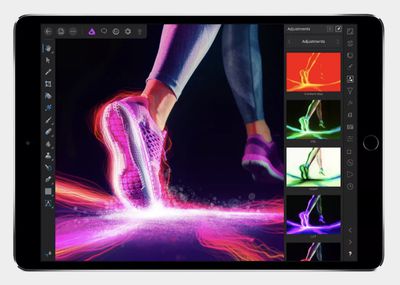
affinity photo update
We've listed a few updates below:

- Save overwrites back to the same location, without needing to create a copy
- A new ‘Solo Layer View’ mode, allowing you to isolate individual layers instantly
- A new ‘Show Touches’ option to create more detailed screen captures – great for users who create tutorials
- Added ‘Average blur” filter from desktop
- Brand new shadows / highlights algorithm in Develop
- Brand new clarity algorithm in Develop
- New “Solo” layer option in layer properties panel
- New preferences option to show touches - good for screen recording
- Enhanced angle / tilt support for Apple Pencil
- Snapping candidates can be selected by hovering over them whilst in a drag

Starting today and lasting for the next two weeks (expiring March 8), Serif is also offering a trio of packs for free, available for Affinity Photo owners to download on the web. These include the Luminance Brush Pack (normally $9.99) with 13 light effect brushes, the Retouch Brush Pack ($9.99) with 20 retouch brushes, and Live Filters Macro Pack (already free) with 28 "non-destructive" live filter layers.

The base Affinity Photo for iPad app costs $19.99 on the iOS App Store [Direct Link] and is compatible with the 9.7-inch, 10.5-inch, and 12.9-inch iPad Pro, iPad Air 2, and iPad from 2017. For users with an iPad Pro, Serif notes that the app has been optimized for use with the Apple Pencil.


Top Rated Comments

ErikGrim Avatar
108 months ago
Great app. We need more productivity apps like this on the iPad to ensure a vibrant platform.
As a Photoshop user since v1.0, this is truly the first app I would call a Photoshop replacement (sorry Pixelmator).
Score: 3 Votes (Like | Disagree)
macduke Avatar
108 months ago
I love this app. I recently bought their Mac apps when they were on sale but haven't used them much yet. I just got around to installing them on my work machine though so we'll see.

I'm looking forward to their Affinity Designer app coming out for the iPad. However, I think at this point they're saving it to show off on stage at WWDC alongside iPad improvements in iOS 12. I want them to take their time so they can put out a quality product like Affinity Photo, but I'm still really looking forward to using it!

Are there any Serif people here that can give an ETA on Affinity Designer for iPad? I think I've seen them around the forums at some point.
Score: 2 Votes (Like | Disagree)
Donka Avatar
108 months ago
You can also email the packs to yourself and do the same to copy to Affinity Photo or copy them to a cloud service and tap on them in the Files app and use the share icon to copy to AP.
Score: 1 Votes (Like | Disagree)
fhall1 Avatar
108 months ago
I used my iPad to go to my Affinity Store account page, then went to where it shows the three free product download links. Make sure the Affinity app isn’t open. Click on one of the download links. It should bring up a page that has links that say “open in iMovie” and “More”. Click the “More” and scroll to and select “Copy to Photo”. The Affinity app should open and a box will pop up saying it loaded the feature.

Close the Affinity app and repeat for the other two packages.
Score: 1 Votes (Like | Disagree)
BWhaler Avatar
108 months ago
Great app. We need more productivity apps like this on the iPad to ensure a vibrant platform.
Score: 1 Votes (Like | Disagree)
bladerunner2000 Avatar
108 months ago
Does it support smart objects?
Score: 1 Votes (Like | Disagree)

Popular Stories

macOS 27 on MacBook Pro

Apple Says macOS 27 Won't Be Compatible With These Macs

Wednesday June 3, 2026 8:29 am PDT by
During WWDC 2025, Apple revealed that macOS 26 Tahoe would be the final major macOS version for Intel-based Macs. macOS 27 will be compatible with Apple silicon Macs only, meaning that you will need a Mac with an M-series chip or a MacBook Neo with an A18 Pro chip in order to install the software update. Apple will unveil macOS 27 during its WWDC 2026 keynote this Monday, June 8, and the...
MacBook Neo on Yellow Feature

MacBook Neo is So Popular That Apple Reportedly Doubled Production

Wednesday June 3, 2026 9:24 am PDT by
On an earnings call in late April, Apple's CEO Tim Cook said that customer response to the MacBook Neo was "off the charts," and the popularity of the laptop has reportedly led the company to significantly boost production. Apple supply chain analyst Ming-Chi Kuo this week said he believes that MacBook Neo shipments to Apple were doubled from an initial target of 5 million units to 10...
iphone 18 pro blue%402x

iPhone 18 Pro: Dark Cherry, Light Blue, and Dark Gray Chassis Leaked [Update]

Thursday June 4, 2026 5:18 am PDT by
Update: Since publication, new information has come to light suggesting the images have been AI-manipulated and are not in fact iPhone 18 Pro chassis parts. The original article follows. The color options Apple is reportedly planning for the upcoming iPhone 18 Pro and ‌iPhone 18 Pro‌ Max have appeared online today in the form of images of chassis parts of unknown authenticity....















