

Netflix Rolling Out iOS Update That Adds Bottom Tab Bar for Easier Navigation - MacRumorsOpen MenuShow RoundupsShow Forums menuVisit ForumsOpen Sidebar
Skip to Content

Netflix Rolling Out iOS Update That Adds Bottom Tab Bar for Easier Navigation

by

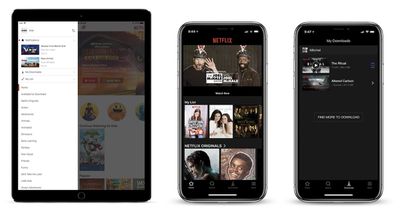
Over the past few days there have been multiple reports of a new update to the Netflix app on iOS and Android devices, which includes a design overhaul for the streaming service's navigation bar on smartphones. Instead of placing every piece of navigation within the top lefthand corner "hamburger" menu, Netflix has introduced a simpler tab bar at the bottom of the app with four tabs for Home, Search, Downloads, and More.
netflix update ios

Netflix's hamburger menu (iPad) compared to the new bottom tab bar (iPhone)

Previously, the left-handed menu housed profile switching, notifications, downloads, My List, and various themed categories. Now, these options are mostly located in the "More" tab, and Netflix has broken out Search and Downloads as a quicker method of jumping into those areas of the app. TV and film categories are also now located in the Search tab, including those Available for Download, Netflix Originals, Action, Dramas, Horror, and more. On Android, it appears that there will be an additional tab for users called "Coming Soon," displaying TV shows and movies launching soon on Netflix.

Apple encourages developers to use tab bars at the bottom of their apps in its Human Interface Guidelines, since they're easier to use one-handed and provide more information at a glance. Two years ago Spotify made a similar change, replacing its hamburger menu with five tabs for Home, Browse, Search, Radio, and Your Library, akin to Apple Music's tabs on iOS. Earlier this month, Google Maps added a bottom tab bar in its iOS app as well, so users could easily jump to Explore, Driving, or Transit information.

Netflix's rollout plan for the new tab bar remains unclear, with some iPhone and iPad users already seeing the update and others remaining on the older hamburger menu style.


Tag: Netflix

Top Rated Comments

Iconoclysm Avatar
109 months ago
Netflix ... just please do NOT screw up the AppleTV UI like Google did with their YouTube app. Please I'm begging you!!
Netflix's AppleTV app wastes massive amounts of space. You can literally only see one row at a time. Youtube's app isn't great but at least they don't devote 2/3 of the screen to a jpeg image.
Score: 6 Votes (Like | Disagree)
WiseAJ Avatar
109 months ago
Can they make the Apple TV app easier to navigate now?
Score: 2 Votes (Like | Disagree)
109 months ago
I hate hamburger menus. They literally looked at the worst design mistake you can ever make, mystery meat navigation, and said “YES! LETS DO THAT!” And to add insult injury they even made it look like a hamburger
Score: 2 Votes (Like | Disagree)
109 months ago
Care to provide some suggestions for improvements? I feel the UI their using is pretty much standard: Tubi, Twitter is the same for scrubbing, Tubi the same for icon layout of videos, no auto preview. I don't like how auto previews have some Netflix custom audio that doesn't match with the video (Tron Classic) and is repeated for other movies.
#1: get rid of auto-play. It's an abomination. No app should just start randomly playing crap if you leave it sitting alone for a moment.
Score: 1 Votes (Like | Disagree)
supercoolmanchu Avatar
109 months ago
Netflix ... just please do NOT screw up the AppleTV UI like Google did with their YouTube app. Please I'm begging you!!
Netflix’s Apple TV UI is 100% pure *******.

Love ‘me for the video content, but their software warrants war crime prosecutions.

Worst use of space, horribly sized content thumbnails, obnoxious new auto-audio when browsing adds new lows in overall piss poor user experience, which already includes perhaps the worst content browsing of any modern media platform.

And the cherry on Netflix’s software failure is the absolutely stupid profile select screen you’re forced to click thru every time you select the app, even if your home is using only one profile.
Score: 1 Votes (Like | Disagree)
109 months ago
It’s a welcome improvement, but still not enough to make it a great app.

Why didn’t they add ‘My List’ to the tab bar as well? To me that item is more important than the download section. The app also still kicks you out of the app when you attempt to access the account settings.

I personally also still hate the horizontal scrolling. I’d rather have vertical scrolling only (you can do this on the web version).
Score: 1 Votes (Like | Disagree)

Popular Stories

iCloud iPhone 17 Pro

iPhone Users Who Pay for iCloud Storage Get Two New Perks on iOS 27

Thursday July 2, 2026 6:10 am PDT by
If you pay for certain iCloud+ storage plans beyond the 5GB that Apple offers for free, you will receive two more perks on iOS 27 at no additional cost. A summary of the two new iCloud+ perks on iOS 27:Increased daily usage limits for some new Apple Intelligence features, including image generation in the revamped Image Playground app. HomeKit Secure Video cameras receive generated video...
Apple Event Logo

Apple Just Released a New Product

Thursday July 2, 2026 8:04 am PDT by
Apple's first product release of summer 2026 occurred this week, but do not get too excited, as it is merely the Beats Solo Buds in a new color. Beats Solo Buds are now offered in orange through Best Buy in the U.S., with availability set to expand to 7-Eleven stores in Japan on July 4. Apple already offered orange Solo Buds in India for free with the purchase of an iPhone 15 or iPhone 15 ...
iPhone 4 on Black Feature

Apple Facing One of Its Worst Leaks Since the iPhone 4

Thursday July 2, 2026 9:53 am PDT by
Apple supplier Tata Electronics recently suffered a cyberattack that resulted in thousands of confidential files being published on the dark web, and this reportedly included some photos and documents related to the upcoming iPhone 18 Pro. We have elected not to share any of the leaked photos in this story due to the illegal nature in which they were obtained, but they can easily be found...















