

Amazon Kindle App for iOS Gains Support for iPad's Split View - MacRumorsOpen MenuShow RoundupsShow Forums menuVisit ForumsOpen Sidebar
Skip to Content

Amazon Kindle App for iOS Gains Support for iPad's Split View

by

The Amazon Kindle app for iOS devices, which is designed to allow Amazon-purchased ebooks to be read on the iPhone and iPad, was today updated with several new features.

On compatible iPad models, there's now support for Split View, so you can use the Amazon Kindle app side-by-side with other apps for multitasking while reading.
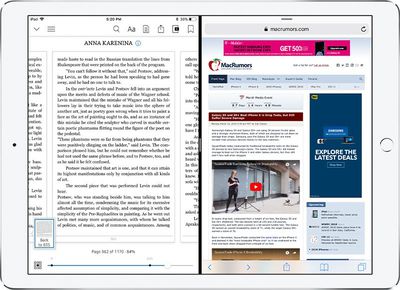
kindlesplitscreen
In addition to Split View support, today's update adds continuous scrolling, a feature that lets you scroll through books like you would an iPad. You can activate the option by going to Settings and turning on continuous scrolling. Once enabled, the feature can be turned on and off using the Aa menu in your book.

Amazon has also added a feature to pull down in your book library to refresh the list of available books, and there are new Kindle dictionaries for Arabic.

What's New

- Split view on iPad is here! Resize the app to multi-task while reading without ever switching context.
- Try scrolling through your book - just like a web page. Turn continuous scrolling on via Settings, then easily turn it on and off from the Aa menu in your book. Tell us what you think.
- Pull down in the library to refresh your list of books.
- We've added Kindle dictionaries for Arabic.

Amazon Kindle can be downloaded from the App Store for free. [Direct Link]

Top Rated Comments

pdaholic Avatar
107 months ago
Why would you want to read a book while browsing the web? I use the Kindle application because there are no distractions.
From my standpoint, I have a textbook open and scroll through reading. I love having a second window open with a browser to search a little more on a subject when I come across something new. If I were reading for pleasure...that’s a different scenario and I prefer to have no distractions.
Score: 2 Votes (Like | Disagree)
107 months ago
Finally, I'll be able to take notes while I'm reading in the Kindle!
Score: 1 Votes (Like | Disagree)
107 months ago
Why would you want to read a book while browsing the web? I use the Kindle application because there are no distractions.
Score: 1 Votes (Like | Disagree)
pdaholic Avatar
107 months ago
Wow vertical scrolling. I have no reason to purchase more expensive iBooks anymore. Thanks Amazon!
Score: 1 Votes (Like | Disagree)

Popular Stories

Aston Martin CarPlay Ultra Screen

Apple Says CarPlay Ultra is Coming to These Vehicle Brands

Thursday May 21, 2026 11:53 am PDT by
Last year, Apple launched CarPlay Ultra, the long-awaited next-generation version of its CarPlay software system for vehicles. Nearly a year later, CarPlay Ultra is still limited to Aston Martin's latest luxury vehicles, but that should change fairly soon. In May 2025, Apple said many other vehicle brands planned to offer CarPlay Ultra, including Hyundai, Kia, and Genesis. CarPlay Ultra...
iphone 18 pro blue%402x

iPhone 18 Pro: Dark Cherry, Light Blue, and Dark Gray Chassis Leaked [Update]

Thursday June 4, 2026 5:18 am PDT by
Update: Since publication, new information has come to light suggesting the images have been AI-manipulated and are not in fact iPhone 18 Pro chassis parts. The original article follows. The color options Apple is reportedly planning for the upcoming iPhone 18 Pro and ‌iPhone 18 Pro‌ Max have appeared online today in the form of images of chassis parts of unknown authenticity....
iOS 27 All the New App Features

iOS 27: All the Rumored App Features

Wednesday June 3, 2026 3:48 pm PDT by
Siri is getting a major overhaul in iOS 27, but Apple also has some big updates planned for apps like Camera, Photos, and Wallet. There are multiple new AI features in the works, plus some non-AI upgrades. Camera Apple is moving Visual Intelligence from the Camera Control button to the Camera app in iOS 27, according to Bloomberg. There will be a Siri mode that will be available alongside...
















