

Wi-Fi Alliance today announced a new certification program called "EasyMesh," which will allow users who own mesh network products to choose from devices across different brands, while still ensuring reliable Wi-Fi coverage (via PCWorld). This way, customers will no longer need to stay within a single-vendor ecosystem dictated by the brand of the hub router, and can branch out to add on access points to their network that might have better performance, or other advantages.
So with EasyMesh certified products, if you own a Linksys Velop router then you can extend coverage across your home using a Netgear Orbi access point. Right now, users can only add products onto mesh networks that work with the main network gateway. For EasyMesh, the limitation as of now is company adoption, so users will have to wait for each mesh system maker to introduce EasyMesh compatibility into their devices.
According to Wi-Fi Alliance marketing vice president Kevin Robinson, EasyMesh is implemented in software, "so there should be no need for new hardware," which could speed up adoption rates. Still, Robinson pointed out that it will be up to each company to decide about adding EasyMesh into existing products. He also stated that companies will also be able to "differentiate their products with unique features or performance" and went on to break down the main components of EasyMesh.
“Interoperability has been core to Wi-Fi’s success,” said Wi-Fi Alliance marketing VP Kevin Robinson in an embargoed interview last week. “A standardized approach enables great economies of scale.” Robinson explained that EasyMesh has two main components: The controller and the agent.
“The controller resides in one device on the network—in either a gateway or an access point—where it controls and manages all the devices on the network and how they connect to each other. Agents are in the mesh access points, and they organize with each other and provide information to the controller about how the network is operating.”
In the announcement, the Alliance described EasyMesh as a system that will be familiar to any mesh network user. The program monitors network conditions and "self-adapts as needed," and it can guide internet-connected devices to the optimal access point in order for the user to have the best possible connection. Of course, the main advantage is that EasyMesh accomodates Wi-Fi extending access points across various brands, making the creation of an in-home Wi-Fi network far easier.
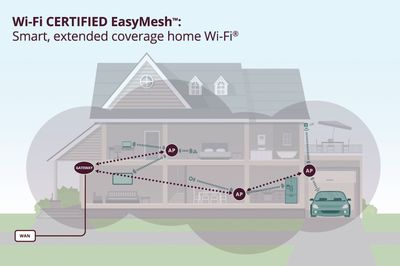
Wi-Fi EasyMesh networks accommodate a greater selection of devices across brands and are also extensible, making it easy for users to introduce new Wi-Fi EasyMesh access points into their network. Wi-Fi EasyMesh access points today will maintain interoperability with future Wi-Fi EasyMesh networks, providing an enhanced user experience for years to come.
“Wi-Fi EasyMesh offers both service providers and Wi-Fi users a consistent approach to multiple AP solutions," said Edgar Figueroa, president and CEO of Wi-Fi Alliance. “Wi-Fi Alliance is delivering a standardized solution to a market-leading product category enabling a strong ecosystem for interoperable, Wi-Fi CERTIFIED devices.”
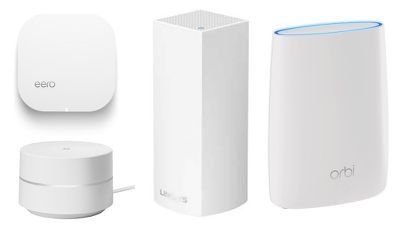
Mesh networks have become increasingly popular over the last few years, thanks to their ability to easily extend Wi-Fi signals throughout a home. Some well-known brands include eero, Linksys Velop, Google Wi-Fi, Luma, and Netgear Orbi, which just announced a new 2-in-1 modem router system earlier this month.
Apple itself never offered a Wi-Fi mesh system, and the company officially got out of the router market completely in April with the discontinuation of the AirPort Express, AirPort Extreme, and AirPort Time Capsule. As an alternative Apple sells the tri-band Linksys Velop system on Apple.com, and the new dual-band system will be launching tomorrow, May 15, although it's still unclear if it will also be up on Apple's website.
Check out our full review of the dual-band Linksys Velop for more information on the company's latest Wi-Fi product.




















Top Rated Comments
Have airport express, extreme and extreme tower and have them extended together on one network.
Is this not the same thing? Don’t see why there is a need to “mesh”?
https://www.wi-fi.org/news-events/newsroom/wi-fi-certified-easymesh-delivers-intelligent-wi-fi-networks