Apple Announces macOS 10.14 Mojave, Featuring New Dark Mode, Desktop Stacks, a Redesigned Mac App Store, and More - MacRumorsOpen MenuShow RoundupsShow Forums menuVisit ForumsOpen Sidebar
Skip to Content

Apple Announces macOS 10.14 Mojave, Featuring New Dark Mode, Desktop Stacks, a Redesigned Mac App Store, and More

Apple today previewed macOS Mojave during its keynote event at the Worldwide Developers Conference in San Jose, California. Version 10.14 of the Mac operating system introduces a slew of new features, including a Dark Mode, Dynamic Desktop wallpapers, Desktop Stacks, a redesigned Mac App Store, and more.

mojave e1528142238343
The new optional Dark Mode lets users shift their desktop to a darkened color scheme that touches almost every part of the OS, including System Preferences, Messages, Mail, Maps, Photos, Calendar, and more. Developers will be happy to learn that the newest version of Xcode coming in Mojave also supports the new Dark Mode, and Apple is making an API available so developers can implement Dark Mode in their own apps.
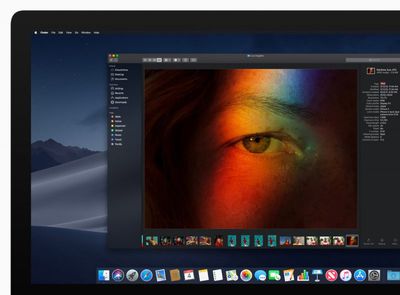
iMac macOS dark mode finder preview 06042018

"macOS Mojave is a major update that introduces powerful new features for a wide range of Mac users, from consumers to pros," said Craig Federighi, Apple’s senior vice president of Software Engineering. "Dark Mode brings a dramatic new look to macOS that puts your content front and center, familiar iOS apps come to the Mac for the first time and the redesigned Mac App Store makes finding new apps easier and more enjoyable than ever."

Mojave's Dark Mode also includes a new Dynamic Desktop feature that automatically transitions new desktop wallpapers to match the time of day.

Meanwhile, a new Desktop Stacks feature is designed to keep your desktop more organized. The new Stacks feature organizes messy desktops by automatically stacking files into neat groups based on file type. Users can customize their Stacks to sort based on other file attributes like date and tags.
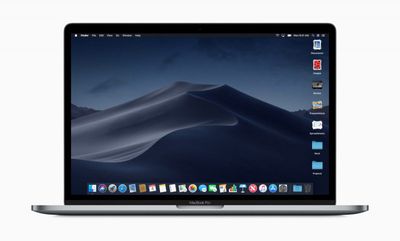
macOS preview Stacks Finder screen 06042018
In addition, a new Gallery view for Finder makes it easier to preview files visually, including images, video, presentations, spreadsheets, PDFs, and more. It also comes with a new Finder sidebar that offers media metadata and Quick Actions, which allow users to do things like create and password-protect PDFs and run custom Automator Actions on files.

Finder's Quick View has also been updated with new Markup tools, and will allows users to rotate and crop images, mark up PDFs, and trim video and audio clips without ever opening an app.
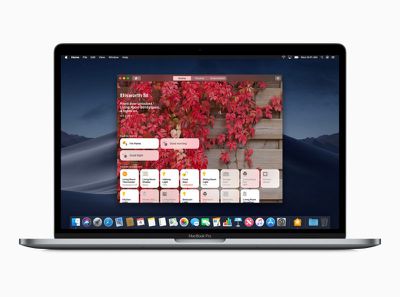
macOS preview Home screen 06042018
macOS Mojave also introduces desktop versions of a number of iOS apps, including News, Stocks, Voice Memos and Home. The apps were were brought to Mac using iOS frameworks that have been adapted to macOS. Apple says that starting in late 2019, these additional frameworks will be available for developers to bring their iOS apps to macOS.

An all-new redesigned Mac App Store is also coming with macOS Mojave. Like the iOS App Store, the redesigned Mac App Store has a new look and includes rich editorial content to help app discovery. The new design also highlights new and updated apps in a Discover tab, while tabs for Create, Work, Play and Develop aim to help users find apps for a specific project or purpose.
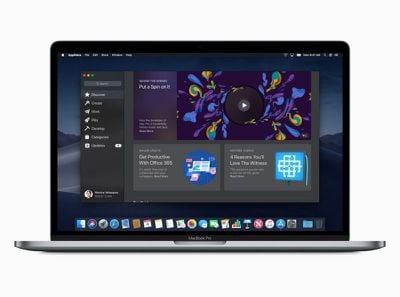
macOS preview Mac App Store Discover screen 06042018
Apple has also focused on improving security and privacy in macOS 10.14. For example, the new Safari browser includes enhanced Intelligent Tracking Prevention to help block social media "Like" or "Share" buttons and comment widgets from tracking users without permission.

In addition, Safari now presents simplified system information when users browse the web, preventing them from being tracked based on their system configuration. In another security measure, Safari will automatically create, autofill, and store strong passwords when users create new online accounts, and flag reused passwords so users can change them.
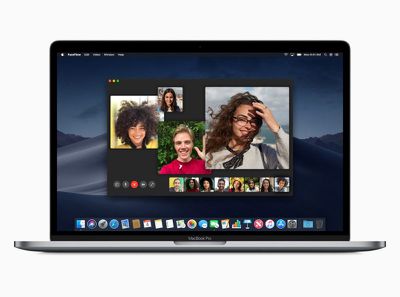
Macbook Pro macOS preview Facetime screen 06042018
Group FaceTime is another feature exclusive to macOS Mojave, and enables users to initiate chat sessions with up to 32 people at the same time. FaceTime users can also join later if a conversation is still active and choose to join using video or audio from an iPhone, iPad or Mac, or using FaceTime audio via Apple Watch. Group FaceTime is also available on iPhones and iPads running iOS 12.

Elsewhere, in an extension of Apple's existing Continuity features, a new function called Continuity Camera allows the Photos app in macOS Mojave to access still shots and video captured from nearby iOS devices. Screenshots in macOS will also include new on-screen controls for accessing existing but hidden screenshot options as well as new video recording and photo editing capabilities.

macOS Mojave will be available this fall as a free software update for Macs introduced in mid-2012 or later, plus 2010 and 2012 Mac Pro models with recommended Metal-capable graphics cards.


Related Forum: macOS Mojave

Popular Stories

duo aquarium

More Fun iPhone Duo Apps: 30 New Picks to Try

Friday November 6, 2026 3:27 pm PST by
When the iPhone Duo launched, we shared a list of some of the fun apps developers created for the new form factor. Two weeks out, developers are continuing to come up with fresh ideas, so we thought we'd share some of our favorites. Games Marbles Unhinged ($2.99) - Marbles Unhinged is a marble maze designed for the Duo. When you fold it, the floor turns into a ramp. If you stand the top...


apple pro tell logo

Apple Launching Five New Products Today

Thursday November 5, 2026 12:59 am PST by
Apple is launching five new products on Friday, November 6, following pre-orders that opened last week, including its first touchscreen MacBook Pro models. The following new products will be available from today: iPad mini with OLED display and A20 Pro chip iMac with M6 chip 14-inch MacBook Pro with M6 chip 14-inch MacBook Pro with OLED touchscreen 16-inch MacBook Pro with OLED...
iOS 28 AI

Apple Taking New Approach to Developing iOS 28 and macOS 28

Sunday November 8, 2026 7:42 am PST by
Apple has made a change to its development process for iOS 28, macOS 28, and corresponding software updates, according to Bloomberg's Mark Gurman. In his Power On newsletter today, he said Apple separates development of each year's new operating systems into three major stages. Typically, he said each stage consists of four weeks of coding followed by a four-week "convergence" period where...

Top Rated Comments

Christian 5G Avatar
110 months ago
Don’t know about you guys but I’m Going Dark from Day 1!
Score: 15 Votes (Like | Disagree)
freezelighter Avatar
110 months ago
My body is ready for the Dark Mode...

Attachment Image
Score: 14 Votes (Like | Disagree)
tkermit Avatar
110 months ago
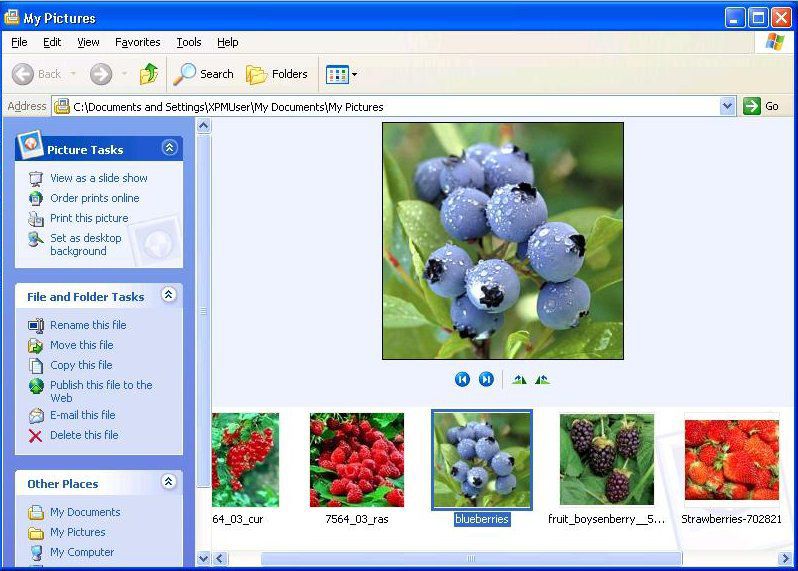
finder Gallery mode is a feature I remember using in Windows XP. :/
What's old is new again, huh? :D


Attachment Image
Score: 9 Votes (Like | Disagree)
jmh600cbr Avatar
110 months ago
No dark mode on iOS? or did they just not announce it because it was a flagship feature for macOS?
Score: 9 Votes (Like | Disagree)
110 months ago
No dark mode on iOS? or did they just not announce it because it was a flagship feature for macOS?
Y Apple Y? No Dark Mode for iOS Buy for MacOS o_O
My guess is dark mode is part of the iOS redesign that they pushed back to next year in order to focus on quality.
Score: 8 Votes (Like | Disagree)
FrancoisC Avatar
110 months ago
HomeKit on macOS finally!
Score: 7 Votes (Like | Disagree)
Latest Stories
Apple Store Subscription Sign-Up Controversy Exposed
5 hours ago
Siri AI Rumored to Become 'More Like an Agent' as Early as Next Year
15 hours ago
Apple Taking New Approach to Developing iOS 28 and macOS 28
17 hours ago
Early Apple Black Friday Deals on Apple Watch, MacBook Air, and More
2 days ago
'Backglow' Lets You Customize New MacBook Pro's Glowing Apple Logo
2 days ago
Top Stories: Apple Product Launches, iOS 27.3 Beta, and More
2 days ago
More Fun iPhone Duo Apps: 30 New Picks to Try
2 days ago
Hands-On With Apple's New OLED Touchscreen MacBook Pro
2 days ago
Apple Store With All-New Design Opening Soon in Southern California
2 days ago
Control the Glowing Apple Logo on Your New MacBook Pro
3 days ago
Apple Shares New 'Apple Card: Apply and Use in Minutes' Ad
3 days ago
Apple Says More Than 100,000 Apps Optimized for iPhone Duo, Here's What's Still Missing
3 days ago
Early Black Friday Deals Kickoff With Steep Discounts on Apple Watch Ultras and More
3 days ago
The MacRumors Show: iOS 27.3 Looks Like a Huge Update
3 days ago
Best Buy's Black Friday Event Begins With Sitewide Savings on Apple, TVs, More
3 days ago
Apple Releasing Yet Another Two New Products Next Week
3 days ago
MacBook Air Drops to Lowest Price in Months With Amazon's $250 Discount
3 days ago
Apple Rumored to Drop the iPhone's Action Button Next Year
3 days ago
Apple's Extended Return Policy Now in Effect for 2026 Holiday Season
3 days ago
Apple Music Classical Updated With New Icon and Refreshed Design
3 days ago
OLED iPad Mini, M6 iMac, and New MacBook Pros Available From Today
3 days ago
Apple Surveys iPhone Duo Buyers About Crease and Camera
3 days ago
Apple's First Touchscreen Mac is Now Arriving to Customers
3 days ago
Claude Gets Personal Finance Feature With Bank Account Linking
3 days ago
Apple Arcade Adds Crossy Road Rush and NBA 2K27
3 days ago
Apple's New HomeView Smart Home Hub: Here's How Much RAM It Has
3 days ago
iPad Mini vs. iPad Air Buyer's Guide: Now Just $50 Apart
4 days ago
First iOS 27.3 and macOS Golden Gate 27.3 Public Betas Now Available
4 days ago
Apple Announces a New Mac Sales Record
4 days ago
Paid $200 for Logic Pro? Apple Says You Won't Get This New Feature
4 days ago