iOS 12 Hidden Features: New Close App Gesture on iPhone X, Revamped iPad Gestures, Screen Time Widget and More - MacRumorsOpen MenuShow RoundupsShow Forums menuVisit ForumsOpen Sidebar
Skip to Content

iOS 12 Hidden Features: New Close App Gesture on iPhone X, Revamped iPad Gestures, Screen Time Widget and More

Apple today introduced iOS 12 with a whole slew of updates, ranging from improvements to Do Not Disturb to a whole new activity monitoring system that tracks how much time you spend on your iPhone or iPad.

There are also new "Memoji," aka personalized Animojis, there's support for Group FaceTime, and there were tons of other changes covered in the keynote event. But in addition to all of these new features, there are dozens of smaller tweaks that Apple didn't cover in its iOS 12 announcement.

Below, we've rounded up a list of new, lesser-known or "hidden" features in the new iOS 12 operating system update.

- iPhone X App Switcher - You no longer need to hold down on apps to close them. Swiping up like on the iPhone 8 and older works.

- Siri Voices - In the U.S., there are new Siri Voice options for Irish and South African accents in both male and female genders.

- Multiple Faces in Face ID - In the Face ID Settings, there's an option to "Set Up an Alternate Appearance" which appears to be aimed at people who may need to drastically change their appearance on the regular or those who want to unlock Face ID with two faces.
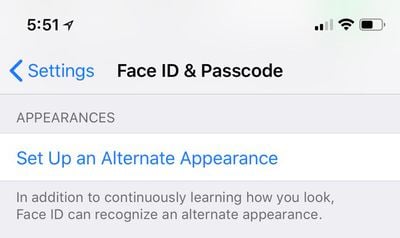
ios12faceidalternateappearance
- Face ID Rescanning - After Face ID fails, you can swipe up from the bottom of the iPhone X to initiate a rescan.

- Screen Time Widget - In the Widgets section, accessible by swiping to the right on the Home screen, there's a new Screen Time widget where you can see how much time you've spent on your iOS device lately, and what you've been doing. You can also see your full Screen Time usage metrics in the Settings app.
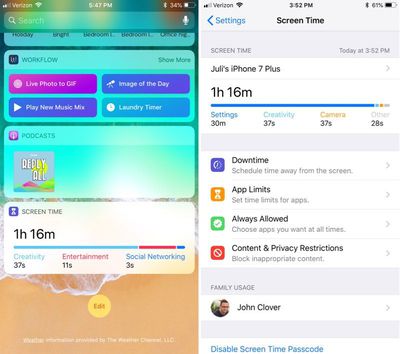
ios12screentimesettings
- Automatic Updates - iOS 12 introduces an option to turn on automatic software updates under General --> Software Update. This will update your version of iOS automatically when an update is available.
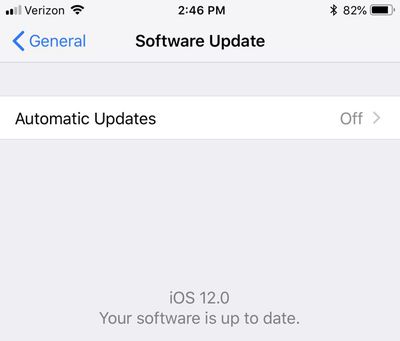
automaticupdatesios12
- Messages Shortcuts - If you tap on a person's name in the Messages app, there are now shortcuts to initiate a FaceTime audio call, initiate a standard FaceTime video call, or get info on the contact. This is also how group FaceTime calls are started from the Messages app.

messagesfacetimeoptionios12
- Notification Grouping - In the Notifications section of the Settings app, there are options to customize Notification Grouping for all of your apps. Notification Grouping Settings include Automatic, By App, and off. Notification settings have also been redesigned somewhat, and there are toggles for setting notifications to show up only in the Notification Center but not the Lock screen.
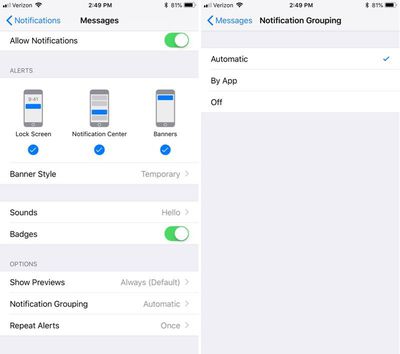
ios12notificationsettings
- New iPad Gestures - Apple tweaked gestures on the iPad to better match the iPhone X. You now swipe down from the top right of the iPad to bring up Control Center, rather than swiping up from the bottom. Swiping up from the dock goes to the Home screen.

- iPad Menu Bar - The menu bar at the top of the iPad has been redesigned, and it looks like Apple is making room for a notch that will be included on upcoming iPad Pro models that will feature Face ID. The time, day, and date are located on the upper left hand side of the screen, while the right shows Wi-Fi or LTE connection, Bluetooth, and battery life.

ipadmenubar
- Passwords - There's a new Password Manager API that can show passwords from 1Password and similar apps in the QuickType suggestion bar when you're inputting login information. iOS 12 also adds iOS password suggestions to third-party apps, like Keychain in Safari. Apple will also keep track of passwords that have been reused and prompt you to create new ones.

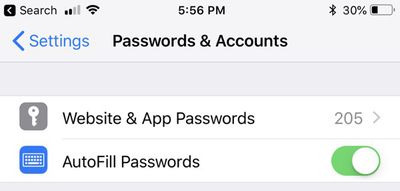
- One-Time Password Autofill - Apple says that one-time SMS passcodes will appear automatically as Autofill options so you don't need to hassle with quitting out of an app, opening the Messages app, copying it, and then entering it in the app that needs the code. In the Settings app, Safari Autofill has been replaced with the more general Password Autofill, and there's a new Autofill Passwords setting under Passwords & Accounts.
autofillpasswordsios12
- Smarter Siri - Siri can answer questions about famous people, food, and motorsports. Siri can also look up passwords and search for memories in Photos.

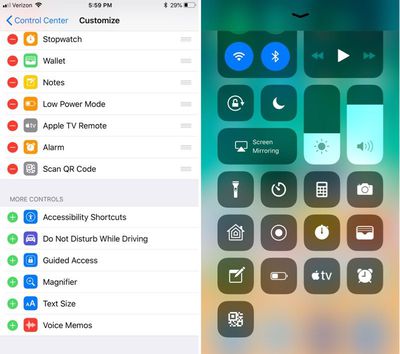
- Scan QR Code in Control Center - There's a new Control Center shortcut for scanning a QR code.
controlcenterqrcode
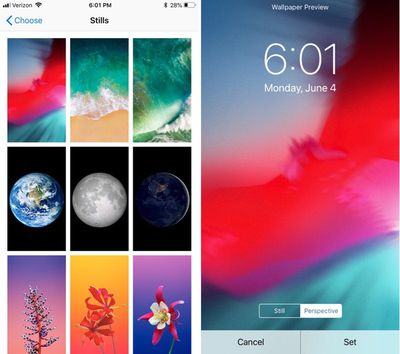
- Wallpaper - There's a new iOS 12 wallpaper available.
newiphonewallpaper
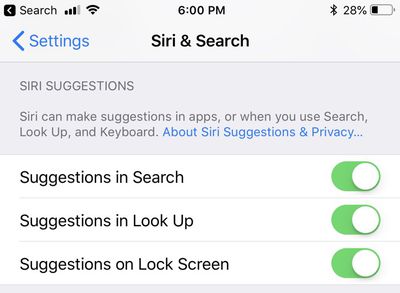
- Siri Suggestions - Siri is smarter in iOS 12, and there's a new setting to allow Siri suggestions to appear on the Lock screen. You can also enable Shortcuts in the Settings menu, though Shortcuts are not yet available and will be coming through an app set to be released at a later date. Siri suggestions on the Lock screen can be enabled on a per-app basis.
sirilockscreensuggestionsios12
- Lock Screen Options - There are new options to disable access to Wallet and USB Accessories when an iPhone is locked with a passcode. With USB Accessories disabled, you need to unlock the iPhone to allow USB accessories to connect when it has been more than an hour since your iPhone was locked. This setting will make it more difficult for law enforcement to access locked devices with USB tools like the GrayKey box.
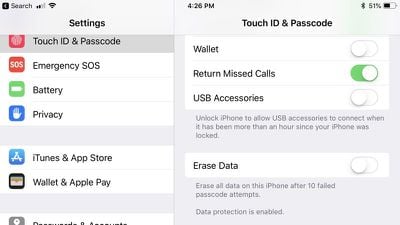
ios12usbaccessoriessetting
- Voice Memos - Now that Voice Memos is also on the iPad and Mac and has iCloud support, there are settings for Voice Memos in the Settings app. You can choose when to delete Voice Memos, choose audio compression quality, and set a default recording name.

- Markup Colors - There are a lot more colors available when using Markup for editing screenshots, marking up images, editing PDFs, and more.
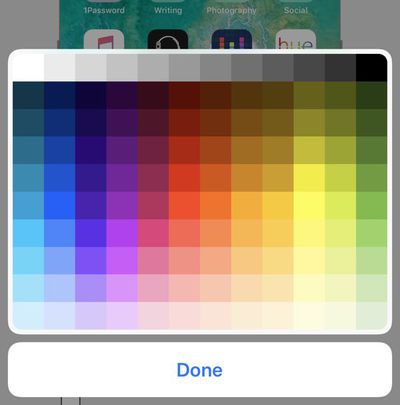
ios12markupcolors
- Safari Icons - There's an option in the Settings app to enable Favicons for Safari tabs, a new feature in iOS 12. There are also several new Experimental WebKit Features that Apple is testing.

- Apple Books - With the Books app getting a revamp and a new name, there are several new settings for Books in the Settings app. You can turn on syncing options for the "Reading Now" feature to keep track of where you are in a book across devices, and you can choose specific devices where you want to update your place.
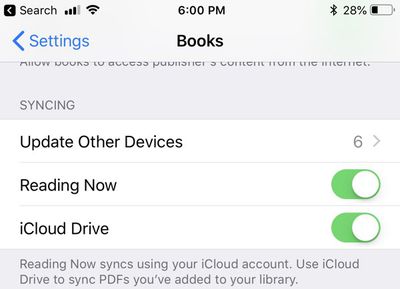
booksreadnowios12
- Podcasts - You can set custom durations for the Forward and Back options in Podcasts. The two options are separate, and durations from 10 to 60 seconds are available.
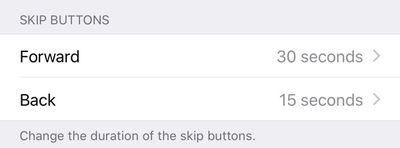
ios12podcastskipbuttons
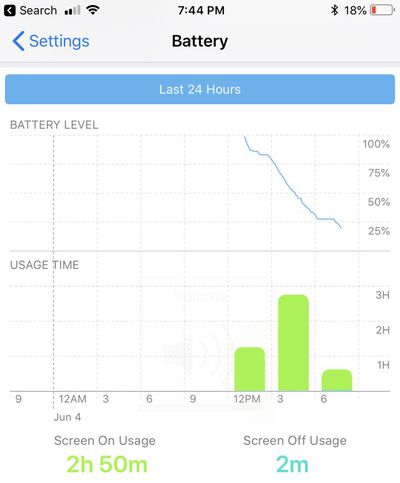
- Battery Info - In the Settings app, the battery usage chart shows usage for the last 24 hours or the last 10 days instead of the last 7 days. There's also a whole new chart that displays battery usage information.
ios12batteryusage
- Apple Music Changes - In Apple Music, you can search for songs by lyric in iOS 12. Artist pages also display larger artwork and a new "Play" button that plays an artist's entire catalog of songs.

- Siri in Low Power Mode - You can use "Hey Siri" with Low Power Mode turned on in iOS 12.

- Password AirDropping - In iOS 12, you can AirDrop your saved passwords to both your other devices and other people, which makes sharing passwords simple.

- 3D Touch - There are new 3D Touch options for the Camera and Notes apps. With Camera, you can 3D Touch to scan a QR code, and in Notes, there is a shortcut to scan a document.

Have you found other features in iOS 12 that we haven't mentioned here? Make sure to let us know in the comments, and stay tuned for more coverage on the new features in iOS 12, macOS Mojave, tvOS 12, and watchOS 5.


Related Forum: iOS 12

Popular Stories

apple pro tell logo

Apple Launching Five New Products Today

Thursday November 5, 2026 12:59 am PST by
Apple is launching five new products on Friday, November 6, following pre-orders that opened last week, including its first touchscreen MacBook Pro models. The following new products will be available from today: iPad mini with OLED display and A20 Pro chip iMac with M6 chip 14-inch MacBook Pro with M6 chip 14-inch MacBook Pro with OLED touchscreen 16-inch MacBook Pro with OLED...

duo aquarium

More Fun iPhone Duo Apps: 30 New Picks to Try

Friday November 6, 2026 3:27 pm PST by
When the iPhone Duo launched, we shared a list of some of the fun apps developers created for the new form factor. Two weeks out, developers are continuing to come up with fresh ideas, so we thought we'd share some of our favorites. Games Marbles Unhinged ($2.99) - Marbles Unhinged is a marble maze designed for the Duo. When you fold it, the floor turns into a ramp. If you stand the top...
silver iphone 18 pro

Apple Rumored to Drop the iPhone's Action Button Next Year

Friday November 6, 2026 6:07 am PST by
Apple plans to merge the iPhone's Action button with the Camera Control starting next year, according to the leaker known as "Instant Digital." In a new post on Weibo, the leaker claimed that a single press of the combined button would open the camera, while a long press would trigger the function assigned to the Action button. They explicitly clarified that the dedicated Action button would ...

Top Rated Comments

110 months ago
These little tweaks are always much more exciting to me than the actual headline features! Anyone else? :rolleyes:
Score: 31 Votes (Like | Disagree)
110 months ago
Still haven't fixed the huge volume icon yet?
Score: 29 Votes (Like | Disagree)
MacPrince Avatar
110 months ago
- iPhone X App Switcher - You no longer need to hold down on apps to close them. Swiping up like on the iPhone 8 and older works.
Ugh. I was hoping that the way it worked on the iPhone X was intentional to kill off the superstition of force quitting all of your apps.
Score: 18 Votes (Like | Disagree)
fastasleep Avatar
110 months ago
Why in the hell was this so difficult? It's the first damn motion I tried when the X was released.
Because they were trying to quietly kill the stupid behavior where so many people repeatedly force-quit all their apps instead of like, looking at battery usage and turning off Background App Refresh on Facebook etc.
Score: 12 Votes (Like | Disagree)
EM2013 Avatar
110 months ago
Really wish they would’ve changed the swipe down on top corner for control Center. Looks like they’re sticking with it :mad:
Score: 12 Votes (Like | Disagree)
haruhiko Avatar
110 months ago
- New iPad Gestures - Apple tweaked gestures on the iPad to better match the iPhone X. You now swipe down from the top right of the iPad to bring up Control Center, rather than swiping up from the bottom. Swiping up from the dock goes to the Home screen.

So iPad will lose the home button and support Face ID very soon.
Score: 11 Votes (Like | Disagree)
Latest Stories
Early Apple Black Friday Deals on Apple Watch, MacBook Air, and More
12 hours ago
'Backglow' Lets You Customize New MacBook Pro's Glowing Apple Logo
12 hours ago
Top Stories: Apple Product Launches, iOS 27.3 Beta, and More
19 hours ago
More Fun iPhone Duo Apps: 30 New Picks to Try
1 day ago
Hands-On With Apple's New OLED Touchscreen MacBook Pro
1 day ago
Apple Store With All-New Design Opening Soon in Southern California
1 day ago
Control the Glowing Apple Logo on Your New MacBook Pro
2 days ago
Apple Shares New 'Apple Card: Apply and Use in Minutes' Ad
2 days ago
Apple Says More Than 100,000 Apps Optimized for iPhone Duo, Here's What's Still Missing
2 days ago
Early Black Friday Deals Kickoff With Steep Discounts on Apple Watch Ultras and More
2 days ago
The MacRumors Show: iOS 27.3 Looks Like a Huge Update
2 days ago
Best Buy's Black Friday Event Begins With Sitewide Savings on Apple, TVs, More
2 days ago
Apple Releasing Yet Another Two New Products Next Week
2 days ago
MacBook Air Drops to Lowest Price in Months With Amazon's $250 Discount
2 days ago
Apple Rumored to Drop the iPhone's Action Button Next Year
2 days ago
Apple's Extended Return Policy Now in Effect for 2026 Holiday Season
2 days ago
Apple Music Classical Updated With New Icon and Refreshed Design
2 days ago
OLED iPad Mini, M6 iMac, and New MacBook Pros Available From Today
2 days ago
Apple Surveys iPhone Duo Buyers About Crease and Camera
2 days ago
Apple's First Touchscreen Mac is Now Arriving to Customers
2 days ago
Claude Gets Personal Finance Feature With Bank Account Linking
2 days ago
Apple Arcade Adds Crossy Road Rush and NBA 2K27
2 days ago
Apple's New HomeView Smart Home Hub: Here's How Much RAM It Has
2 days ago
iPad Mini vs. iPad Air Buyer's Guide: Now Just $50 Apart
3 days ago
First iOS 27.3 and macOS Golden Gate 27.3 Public Betas Now Available
3 days ago
Apple Announces a New Mac Sales Record
3 days ago
Paid $200 for Logic Pro? Apple Says You Won't Get This New Feature
3 days ago
Instagram's Edits Video Editor is Now Available on Mac
3 days ago
Prevent Siri and Search From Accessing Specific iPhone Apps
3 days ago
Best Early Black Friday Deals on iPhone 18 Pro and iPhone Duo
3 days ago









































