

watchOS 5 Beta Adds Manual Wi-Fi Connection Option to Apple Watch Settings Menu - MacRumorsOpen MenuShow RoundupsShow Forums menuVisit ForumsOpen Sidebar
Skip to Content

watchOS 5 Beta Adds Manual Wi-Fi Connection Option to Apple Watch Settings Menu

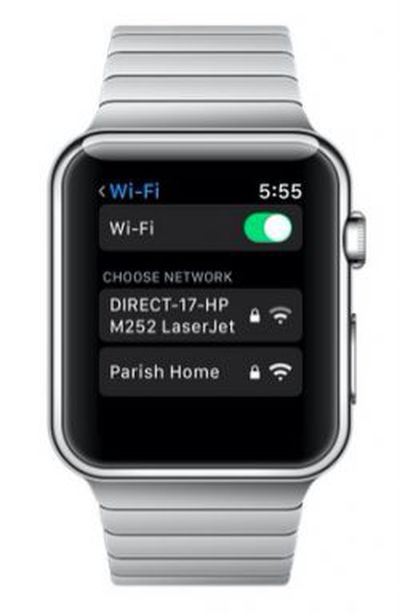
watchos 5 wi fi screenTesters of the first watchOS 5 beta for Apple Watch are hailing a new option in the software's Settings menu that enables you to manually connect your device to nearby Wi-Fi networks.

In previous versions of watchOS, your Apple Watch is locked to the wireless network that your tethered iPhone is using, and there's no way to browse and manually connect to networks from your wrist.

But that all changes in watchOS 5, if the beta 1 seed is anything to go by. Reddit user whiskey_91 found a new option in Settings where users can search for and connect their Apple Watch directly to available Wi-Fi networks when their iPhone is out of range.

After a network is selected from the list, users are prompted to enter the Wi-Fi password via Scribble (scribbling characters one by one on the screen with their finger), while using the Digital Crown to select lowercase/uppercase and special characters. A Join button then appears for users to tap and connect to the network.

The new Wi-Fi option appears on both Apple Watch Series 2 and Series 3 models, but we've yet to confirm whether it works on Series 1 (watchOS 5 doesn't support the original Apple Watch, or Series 0).

There's plenty more to look forward to when watchOS 5 gets its official release in the fall, but eager adopters are advised to stay patient while Apple works out the kinks. Apple temporarily pulled the watchOS 5 beta 1 seed from its developer portal in the early hours of this morning after reports that the software was bricking some devices.


Related Roundup: Apple Watch 11
Buyer's Guide: Apple Watch (Caution)

Popular Stories

Apple Watch SE 3 1

Apple Adds Apple Watch to Education Store in Australia, China, Japan, and More

Thursday May 7, 2026 8:14 am PDT by
Apple today added the Apple Watch to its Education Store in select countries, allowing students and teachers to purchase the device at a discount. The Apple Watch Series 11, Apple Watch SE, and Apple Watch Ultra 3 are available with education pricing in Australia, China, Hong Kong, Japan, Malaysia, Singapore, South Korea, Taiwan, Thailand, and Vietnam. Apple is offering up to a 10%...
apple watch ultra 3 1

Apple Now Requires UNiDAYS Verification for Education Discounts in U.S. and Canada, Adds Apple Watch

Friday May 8, 2026 3:00 am PDT by
Starting today, Apple will require customers in the U.S., Canada, and Chile to verify their status as a student or educator to get educational discounts. Apple is adopting the UNiDAYS verification system that it uses in other countries, with a new process to accommodate homeschool families. Apple is also adding the Apple Watch Series 11, Apple Watch SE, and Apple Watch Ultra 3 to its...
Apple Watch Series 10 Jet Black Touch ID

Apple Watch Series 12 and watchOS 27: What to Expect Later This Year

Friday May 8, 2026 2:07 pm PDT by
While not too much has been reported about the next Apple Watch models, there are a few rumors about potential design changes and watchOS 27 features. Apple Watch Series 12 and Apple Watch Ultra 4 models are expected to be released in September, and we have outlined some of the key rumored hardware and software changes below. A new Apple Watch SE is not expected this year, as that model was...

Top Rated Comments

104 months ago
This must be an awful way to set your password, nice to have the option but the watch is just not up to inputing difficult passwords.
It's a very rare occurrence where one would need to do this. You'd have to be without your phone and connecting to an unfamiliar WiFi network to actually need this option. Cumbersome but nice to have in a pinch.
Score: 5 Votes (Like | Disagree)
Little Marvin Avatar
104 months ago
Any news about included support of 802.1x certificates to have it connect to WPA2 Enterprise networks?
Yes it works! Just tested it on Apple watch 2.
Score: 4 Votes (Like | Disagree)
104 months ago
It would be nice if the keyboard popped up on the iPhone like it does on Apple TV remote app.
I think this is for when you DON’T have your phone nearby. If you do, why not just connect to WiFi thru your phone as it shares the WiFi with the watch automatically?
Score: 3 Votes (Like | Disagree)
OriginalClone Avatar
104 months ago
This must be an awful way to set your password, nice to have the option but the watch is just not up to inputing difficult passwords.
It would be nice if the keyboard popped up on the iPhone like it does on Apple TV remote app.
Score: 3 Votes (Like | Disagree)
104 months ago
Any news about included support of 802.1x certificates to have it connect to WPA2 Enterprise networks?
Score: 3 Votes (Like | Disagree)
justperry Avatar
104 months ago

After a network is selected from the list, users are prompted to enter the Wi-Fi password via Scribble (scribbling characters one by one on the screen with their finger), while using the Digital Crown to select lowercase/uppercase and special characters. A Join button then appears for users to tap and connect to the network.
This must be an awful way to set your password, nice to have the option but the watch is just not up to inputing difficult passwords.
Score: 2 Votes (Like | Disagree)













