

macOS 'Quick Look' Bug Can Leak Encrypted Data Through Thumbnail Caches - MacRumorsOpen MenuShow RoundupsShow Forums menuVisit ForumsOpen Sidebar
Skip to Content

macOS 'Quick Look' Bug Can Leak Encrypted Data Through Thumbnail Caches

A long-standing bug in macOS's Quick Look feature has the potential to expose sensitive user files like photo thumbnails and the text of documents, even on encrypted drives, according to security researchers.

Details on the Quick Look flaw were shared earlier this month by security researcher Wojciech Regula and over the weekend on security researcher Patrick Wardle's blog (via The Hacker News).
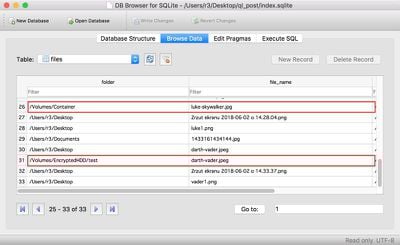
quicklookbug

Image via Wojciech Regula

Quick Look in macOS is a convenient Finder feature that's designed to present a zoomed-in view when you press the space bar on a photo or document that's selected.

To provide this preview functionality, Quick Look creates an unencrypted thumbnail database where thumbnails of files are kept, with the database storing file previews from a Mac's storage and any attached USB drives whenever a folder is opened. These thumbnails, which provide previews of content on an encrypted drive, can be accessed by someone with the technical know how and there's no automatic cache clearing that deletes them. As Regula explains:

It means that all photos that you have previewed using space (or Quicklook cached them independently) are stored in that directory as a miniature and its path. They stay there even if you delete these files or if you have previewed them in encrypted HDD or TrueCrypt/VeraCrypt container.

This is an issue that's existed for at least eight years and concerns have been raised about it in the past, but Apple has made no changes in macOS to address it. "The fact that behavior is still present in the latest version of macOS, and (though potentially having serious privacy implications), is not widely known by Mac users, warrants additional discussion," writes Wardle.

As Wardle points out, this information is valuable in law enforcement investigations, but most users are not going to be happy to learn that their Mac records file paths and thumbnails of documents from every storage device that's been attached to it.

For a forensics investigation or surveillance implant, this information could prove invaluable. Imagine having a historic record of the USB devices, files on the devices, and even thumbnails of the files...all stored persistently in an unencrypted database, long after the USB devices have been removed (and perhaps destroyed). For users, the question is: "Do you really want your Mac recording the file paths and 'previews' thumbnails of the files on any/all USB sticks that you've ever inserted into your Mac?" Me thinks not...

It's worth noting that if the main drive on the Mac is encrypted, the Quick Look cache that's created is too. Wardle says that data "may be safe" on a machine that's powered off, but on a Mac that's running, even if encrypted containers are unmounted, the caching feature can reveal their contents.

"In other words, the increased security encrypted containers were thought to provide, may be completely undermined by QuickLook," writes Wardle.

Wardle recommends that users concerned about unencrypted data storage clear the Quick Look cache manually whenever a container is unmounted, with instructions for this available on Wardle's website. It's also worth checking out Wardle's site for full details on the Quick Look bug.


Popular Stories

iOS 27 Next to iPhone

Here's When iOS 27 Rolls Out Today in Every Time Zone [Update: It's Out]

Sunday September 13, 2026 3:00 am PDT by
Update 10:04 a.m.: iOS 27 is rolling out now, though it may take a bit for all users to see it, so keep checking! Apple is about to release iOS 27, which will finally deliver more advanced Siri AI capabilities as well as a variety of other refinements, improvements, and new features to iPhones. It's Apple's biggest software update of the year, and Apple announced at Wednesday's iPhone event...
iOS 27 Icon iPhone

iOS 27 Available Now With These 8 New Features

Monday September 14, 2026 9:00 am PDT by
Update — 10 a.m. Pacific Time: Apple has released iOS 27. During its iPhone 18 Pro and iPhone Duo event last week, Apple announced that iOS 27 will be released widely on Monday, September 14. iOS 27 should be available around 10 a.m. Pacific Time / 1 p.m. Eastern Time today via the Settings app, under General → Software Update. Below, we have highlighted eight new features and...
Apple iCloud Plus expansion hero

iCloud+ Now Includes Apple TV, Apple Arcade, and Curated Apple Music Stations in Over 100 Countries

Tuesday September 15, 2026 1:43 am PDT by
Apple today announced a new subscription initiative that turns paid iCloud+ subscriptions into a broader services bundle in more than 100 countries. In select countries, Apple says every paid iCloud+ plan, including the cheapest 50GB tier, now includes Apple TV and Apple Arcade "at no additional cost," while family sharing extends the storage, TV and Arcade access to up to five people....

Top Rated Comments

luvbug Avatar
108 months ago
It's a one line command (in terminal) to clear the cache. You need to be an "admin" user, but you don't need to be root:

qlmanage -r cache

Of course, someone here will figure out a reason to whine about having to do this.
Score: 20 Votes (Like | Disagree)
InuNacho Avatar
108 months ago
I’ve known about this for years. I accidently locked a word file and was able to “rescue” it by hitting the space bar.
Great security.
Score: 18 Votes (Like | Disagree)
magicschoolbus Avatar
108 months ago
This is an issue that's existed for at least eight years and concerns have been raised about it ('http://osxdaily.com/2010/07/25/filevault-and-quicklook-leak-some-information-from-encrypted-volumes/') in the past, but Apple has made no changes in macOS to address it. "The fact that behavior is still present in the latest version of macOS, and (though potentially having serious privacy implications), is not widely known by Mac users, warrants additional discussion," writes Wardle.
Apple does not care about the Mac. The hardware and this proves it. You guys should seriously consider naming this site iosrumors.com (that's not a shot at you either.. Apple is all about iOS)
Score: 17 Votes (Like | Disagree)
108 months ago
So, you get the prize for first whiner! I guess assigning blame is more important to you than addressing the problem in the first person using readily available information.
Ordinary people wouldn’t know to input a terminal command, or even know that Quick Look is leaking their data.

The bug lies with Apple’s code. How is this the fault of the consumer? The consumer is certainly not the party to blame in this situation.
Score: 12 Votes (Like | Disagree)
108 months ago
It's a one line command (in terminal) to clear the cache. You need to be an "admin" user, but you don't need to be root:

qlmanage -r cache

Of course, someone here will figure out a reason to whine about having to do this.
You shouldn't have to do this because of a bug in the software left in from literally years ago.
Score: 11 Votes (Like | Disagree)
iapplelove Avatar
108 months ago
Apple does not care about the Mac. The hardware and this proves it. You guys should seriously consider naming this site iosrumors.com (that's not a shot at you either.. Apple is all about iOS)
Apple is all about where the revenue comes from. You would too. We all would.

iPhone is their main source of revenue.

Still though it’s a damn shame they can’t at least keep a healthy Mac lineup going.
Score: 8 Votes (Like | Disagree)














