

What's New in iOS 12 Beta 2: Screen Time Updates, Battery Usage Tweaks and More - MacRumorsOpen MenuShow RoundupsShow Forums menuVisit ForumsOpen Sidebar
Skip to Content

What's New in iOS 12 Beta 2: Screen Time Updates, Battery Usage Tweaks and More

Apple this morning released the second beta of iOS 12 to developers, and as expected, there are tweaks and changes to many of the new features introduced in iOS 12.

Changes to Screen Time include new options to sort by device and view additional details on a per app basis, while tweaks made to Battery Usage make it easier to see which apps are eating up battery. There are several other smaller changes in iOS 12 beta 2, which we've listed below.

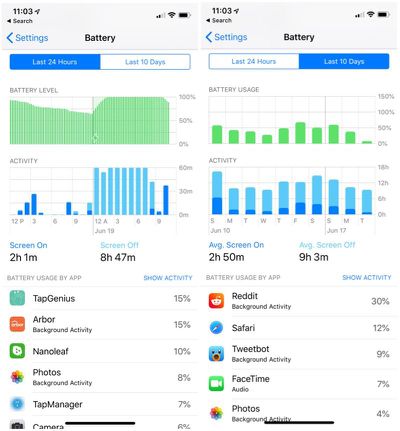
- Battery Usage - The charts for activity and battery level for the last 24 hours have been redesigned in iOS 12 beta 2, and some of the wording has been updated in this section.
ios12b2batterycharts
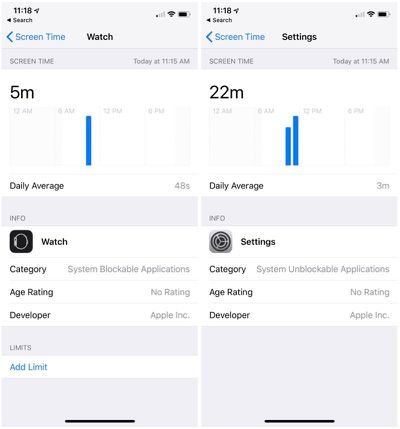
- Screen Time - Apple has removed a toggle for clearing Screen Time data, and the interface for adding time limits to apps from the main Screen Time screen has been tweaked. In the first beta, when you tapped an app it went right into the limits interface, but now tapping on an app displays more info on the app, including daily average use, developer, category, and more, and lets you tap to set a limit. There's also a new splash screen when opening Screen Time for the first time.
screentimemoreappinfo
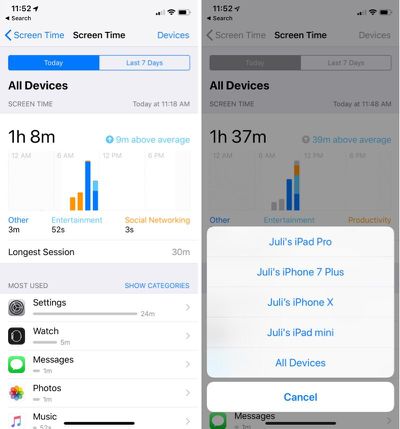
- Screen Time By Device - There's now an option to view activity on a single device or all devices.
screentimebydevice
- Notifications - There's a new toggle in the Notifications section of the Settings app that allows you to toggle off Siri Suggestions for individual apps. In iOS 12, Siri makes suggestions about limiting the notifications you receive from apps that aren't often used.

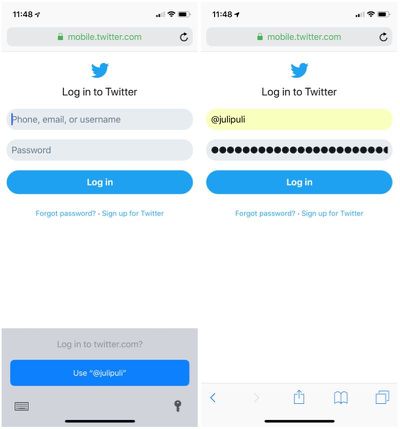
- Password AutoFill - There's a new interface for autofilling a password saved in iCloud Keychain.
twitterpasswordautofill
- Voice Memos - There's a new introductory splash screen for Voice Memos in iOS 12 beta 2.

- Face ID - When unlocking content using Face ID, the iPhone X now says "Scanning with Face ID."

- Photos - The text size for the "Media Types" and "Albums" listings in the Photos app is now much bigger, making it easier to read.

- Photos Search - In iOS 12 beta 2, Photos appears to support more advanced searches. For example, if you search for a specific date like July 10, it will show all photos from all years taken on July 10. This is different than the behavior in iOS 12 beta 1.

- iPhone apps on iPad - When you open iPhone apps on the iPad, like Instagram, they're now displayed in a modern device size (iPhone 6) in both 1x and 2x mode.
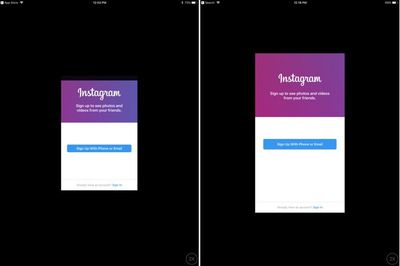
ios12ipadiphoneappsize
There are also multiple known issues in the second developer beta of iOS 12, with full details available from Apple's developer site. We've listed a handful of the more prominent problems users might run into:

  • The Weather widget is not functional.
  • Universal Links might not open the expected target app.
  • Netflix might unexpectedly quit when downloading a video.
  • Twitter might display a blank login screen.
  • Playback might not pause when one AirPod is removed from your ears.
  • CarPlay might not connect to certain vehicles.
  • Group FaceTime calls can't be initiated between iOS 12 beta 2 and iOS 12 beta 1. FaceTime calls may also be interrupted by a poor connection message, and FaceTime might unexpectedly quit.
  • Screen Time must be re-enabled after installing iOS 12 beta 2, and all Screen Time settings are reset after updating.
  • Voice Memos might not sync between devices even when iCloud syncing is enabled.

iOS 12 is limited to developers at the current time, but Apple has promised a public beta for its public beta testing group before the end of June, so we could be seeing a public beta as soon as later this week.


Related Forum: iOS 12

Popular Stories

iCloud iPhone 17 Pro

iPhone Users Who Pay for iCloud Storage Get Two New Perks on iOS 27

Thursday July 2, 2026 6:10 am PDT by
If you pay for certain iCloud+ storage plans beyond the 5GB that Apple offers for free, you will receive two more perks on iOS 27 at no additional cost. A summary of the two new iCloud+ perks on iOS 27:Increased daily usage limits for some new Apple Intelligence features, including image generation in the revamped Image Playground app. HomeKit Secure Video cameras receive generated video...
Apple Event Logo

Apple Just Released a New Product

Thursday July 2, 2026 8:04 am PDT by
Apple's first product release of summer 2026 occurred this week, but do not get too excited, as it is merely the Beats Solo Buds in a new color. Beats Solo Buds are now offered in orange through Best Buy in the U.S., with availability set to expand to 7-Eleven stores in Japan on July 4. Apple already offered orange Solo Buds in India for free with the purchase of an iPhone 15 or iPhone 15 ...
iPhone 4 on Black Feature

Apple Facing One of Its Worst Leaks Since the iPhone 4

Thursday July 2, 2026 9:53 am PDT by
Apple supplier Tata Electronics recently suffered a cyberattack that resulted in thousands of confidential files being published on the dark web, and this reportedly included some photos and documents related to the upcoming iPhone 18 Pro. We have elected not to share any of the leaked photos in this story due to the illegal nature in which they were obtained, but they can easily be found...

Top Rated Comments

izyreal Avatar
105 months ago
But did they fix the stupid volume setting screen hog?

Attachment Image
Score: 9 Votes (Like | Disagree)
Exxhara Avatar
105 months ago
I'm so ready for iOS 12 in the fall! It'll be lit! Can't wait for the new emoji too :)
Score: 8 Votes (Like | Disagree)
macfacts Avatar
105 months ago
How do we have battery usage over 100%?
I mean, why is it necessary to show the vertical axis ranging from 100% to 150%?
If the iPhone lasts 10 hrs of non stop usage and I recharge it for 4 hrs and then use it non stop for another 10 hrs, that's 200% usage in one day.
Score: 5 Votes (Like | Disagree)
OldSchoolMacGuy Avatar
105 months ago
How can I become a developer to try the betas. I can't wait until the fall. Thanks.
You need to pay $99 a year to gain developer access. And be aware that you will have to deal with lots of bugs and other issues. Many apps won't work or will crash frequently. That's all just part of being a developer and using beta software.

You can also wait until the end of this month and sign up for the public beta program. They get access later than developers but it's free. Keep in mind you will still have to deal with frequent crashes, bugs, battery drain, non-working apps and other issues that are just part of a beta.

https://beta.apple.com/sp/betaprogram/
Score: 5 Votes (Like | Disagree)
chrisbrummel Avatar
105 months ago
They also seemed to indicate that Airplay 2 support for Airport Express is imminent: https://www.reddit.com/r/HomeKit/comments/8sb69n/airport_express_airplay_2_ios12_beta_2/

If they’re bothering to update the copy, that signals their intent.
Score: 5 Votes (Like | Disagree)
105 months ago
Did they fix the GPS issue?
Score: 5 Votes (Like | Disagree)














