

Astropad Standard and Studio Apps Updated With Support for Luna Display Adapter, Which is Now Available for Pre-Order - MacRumorsOpen MenuShow RoundupsShow Forums menuVisit ForumsOpen Sidebar
Skip to Content

Astropad Standard and Studio Apps Updated With Support for Luna Display Adapter, Which is Now Available for Pre-Order

by

Astropad today introduced new updates for both its Astropad Studio and Astropad Standard apps, bringing support for the Luna Display adapter, which is also now available for pre-order.

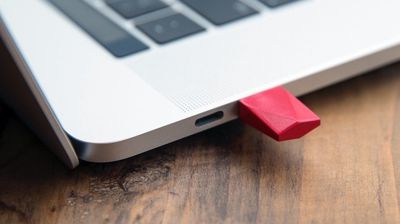
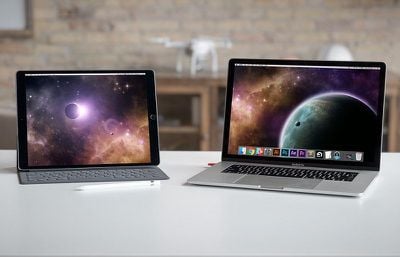
Introduced as a Kickstarter project last year, the Luna Display is designed to turn any iPad into a wireless second display for the Mac.
astropadluna
Astropad alone mirrors the Mac display, but Luna Display is designed to extend the Mac display rather than simply mirror it.

The Luna Display adapter plugs into a Mac using Mini DisplayPort or USB-C, and then after downloading the app, the Luna Display serves as an extension of the Mac, letting Mac content be accessed directly from an iPad.

Both of the Astropad apps now support Luna Display, and the Luna Display itself can be pre-ordered from the Luna Display website for $69.99.
astropadluna2
Astropad also announced today that it is discontinuing all support for third-party styluses. The company says that third-party styluses deliver poor performance compared to Apple Pencil and create engineering complexities.

Astropad no longer recommends third-party styluses for artists. Support will cease at the end of 2018 to allow Astropad to focus on optimizing its apps for the Apple Pencil.

Astropad Standard can be downloaded from the App Store for $29.99. [Direct Link]

Astropad Studio, which costs $11.99 per month for syncing and monthly feature updates, is free to download initially. [Direct Link]
Top Rated Comments

Cindori Avatar
104 months ago
Other apps have allowed wireless display transmission, but at less than optimal frame rates and resolution using WiFi. Is this like some sort of lower-latency USB 3.0 thing with a built-in H.265 encoder or something? It can't be too proprietary considering that the iPad only has Bluetooth, LTE and WiFi to communicate and I don't see a dongle on the iPad end.
The dongle is simply a display emulator. A chip tricking the OS that "hey a display was connected". By doing this you can then capture the "fake" display and stream it as video to the iPad (over WiFi). There is no real magic behind the Luna dongle except it being USB-C. There's tons of this type of dongle available in HDMI-format for cheap:

https://www.headlessghost.com/

https://www.amazon.com/CompuLab-fit-Headless-Display-Emulator/dp/B00FLZXGJ6

Price is 90% less than what Astropad is charging for their dongle.
Score: 3 Votes (Like | Disagree)
ipedro Avatar
104 months ago
Nice ad.
How much do you pay MacRumors to read their site?

...oh, you don’t? Breaking news: advertising pays the bills so you don’t have to.
Score: 2 Votes (Like | Disagree)
aevan Avatar
104 months ago
Am I understanding this right -- could you take an image you're working on and drag it over to the iPad Pro display and draw on it with the Apple Pencil? (I mean, assuming the app supports that?)
Just with the app, the iPad mirrors your Mac’s screen and, yes, you can draw on it great. Works really well.

Luna is a smart hardware hack that “tricks” macOS that there is a second monitor present and then the iPad image is “mirrored” from that virtual monitor - esentially creating a separate display on the iPad. You can draw on this too, of course.

So, Astropad - mirrored Mac screen you can draw on, Astropad + Luna - separate Mac screen you can draw on :)
[doublepost=1531323299][/doublepost]
Other apps have allowed wireless display transmission, but at less than optimal frame rates and resolution using WiFi. Is this like some sort of lower-latency USB 3.0 thing with a built-in H.265 encoder or something? It can't be too proprietary considering that the iPad only has Bluetooth, LTE and WiFi to communicate and I don't see a dongle on the iPad end.
It uses wifi or a lightning cable to connect (latency is better with the cable).

The adapter on the Mac is Luna Display, a little dongle that makes your Mac think there is a separate display which it can mirror on the iPad with Astropad. It’s the only way you can get a separate (non-mirrored) image with Astropad.

Please note I’m not affiliated with Astropad in any way - I’m just a user :)
Score: 2 Votes (Like | Disagree)
aevan Avatar
104 months ago
What’s the difference between Standard and Studio?

I used to use Astropad but the pixelation sucked and Duet was better. Then Duet started requiring a subscription to use the Pencil so I stopped using mirroring apps like these alltogether and went with using native apps for Mac and iOS that could open each other’s files (I.e. Lightroom for Mac and iOS).

I’d consider going back to Astropad if it works with Apple Pencil and has solved the pixelation problem. I already paid for Astropad, I’m not going to pay for a subscription too.
Duet can’t really compare with Astropad when it comes to drawing. Not even close. Yes, there used to be pixelation in Astropad before, but that was because the app was art-focused, putting low lag before picture quality. But now even that is fixed. If you want a second screen, Duet is fine, but for actual art, Astropad is the only choice.

As for Standard and Studio - Studio has some nice gestures, shortcuts and pressure curve settings. Standard has the same performance and the most important features. If you plan on using a keyboard instead of gesture shortcuts, Standard is perfectly fine.
Score: 1 Votes (Like | Disagree)
cocoua Avatar
104 months ago
What’s the difference between Standard and Studio?

I used to use Astropad but the pixelation sucked and Duet was better. Then Duet started requiring a subscription to use the Pencil so I stopped using mirroring apps like these alltogether and went with using native apps for Mac and iOS that could open each other’s files (I.e. Lightroom for Mac and iOS).

I’d consider going back to Astropad if it works with Apple Pencil and has solved the pixelation problem. I already paid for Astropad, I’m not going to pay for a subscription too.
Subscription is way too expensive...
Score: 1 Votes (Like | Disagree)
aevan Avatar
104 months ago
How good is it for drawing when it comes to latency etc?
Very good - you can definitely do professional work on it with ease. This is coming from someone who used various Cintiqs and Intuoses. Please note that I use a lightning cable for best results.
Score: 1 Votes (Like | Disagree)

Popular Stories

iCloud iPhone 17 Pro

iPhone Users Who Pay for iCloud Storage Get Two New Perks on iOS 27

Thursday July 2, 2026 6:10 am PDT by
If you pay for certain iCloud+ storage plans beyond the 5GB that Apple offers for free, you will receive two more perks on iOS 27 at no additional cost. A summary of the two new iCloud+ perks on iOS 27:Increased daily usage limits for some new Apple Intelligence features, including image generation in the revamped Image Playground app. HomeKit Secure Video cameras receive generated video...
Apple Event Logo

Apple Just Released a New Product

Thursday July 2, 2026 8:04 am PDT by
Apple's first product release of summer 2026 occurred this week, but do not get too excited, as it is merely the Beats Solo Buds in a new color. Beats Solo Buds are now offered in orange through Best Buy in the U.S., with availability set to expand to 7-Eleven stores in Japan on July 4. Apple already offered orange Solo Buds in India for free with the purchase of an iPhone 15 or iPhone 15 ...
iPhone 4 on Black Feature

Apple Facing One of Its Worst Leaks Since the iPhone 4

Thursday July 2, 2026 9:53 am PDT by
Apple supplier Tata Electronics recently suffered a cyberattack that resulted in thousands of confidential files being published on the dark web, and this reportedly included some photos and documents related to the upcoming iPhone 18 Pro. We have elected not to share any of the leaked photos in this story due to the illegal nature in which they were obtained, but they can easily be found...













