Facebook and Instagram Reveal Tools for Managing Your Time, Setting Reminders, and Limiting Notifications - MacRumorsOpen MenuShow RoundupsShow Forums menuVisit ForumsOpen Sidebar
Skip to Content

Facebook and Instagram Reveal Tools for Managing Your Time, Setting Reminders, and Limiting Notifications

by

Earlier in the summer, Facebook and Instagram each promised that users would soon be able to access a suite of digital health tools to help them manage their time on the social networks and promote healthier habits. Today, the companies revealed these tools in a press release and confirmed they will be rolling out to all mobile app users "soon."
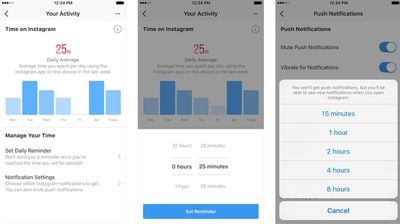
instagram your activity
The tools will be found within the settings page on both iOS apps -- on Instagram it'll be called "Your Activity" and on Facebook it'll be called "Your Time on Facebook." At the top of the page, the activity dashboard will highlight your daily average time for each app on the device you have it installed on, and below that will be a bar graph detailing exactly how long you spent per day in each app over the last week.

We developed these tools based on collaboration and inspiration from leading mental health experts and organizations, academics, our own extensive research and feedback from our community. We want the time people spend on Facebook and Instagram to be intentional, positive and inspiring. Our hope is that these tools give people more control over the time they spend on our platforms and also foster conversations between parents and teens about the online habits that are right for them.

Below that is "Manage Your Time" section with a few features that focus on customizing push notifications. One is a "set daily reminder" option, which is an alert that notifies you when you've reached the amount of time you want to spend on Facebook or Instagram for that day. The other is for "notification settings," where you can access a new "mute push notifications" option to limit your Facebook or Instagram notifications for a period of time (15 minutes to 8 hours).
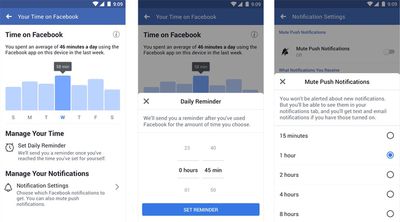
facebook your time
Apple has its own time management settings coming in iOS 12, called "Screen Time," with many of the same features as Facebook's new activity dashboards. In the Settings app in iOS 12, Apple presents information gathered from overall iPhone use on any given day so that users can see which apps they open the most, which send the most notifications, how often they pick up their iPhone, set "Downtime" limits and app limits, and more.

For Facebook, the company says that the new dashboard tools for managing screen time are just a "first step," and it will continue to work to develop features that promote digital health on its platforms.


Top Rated Comments

Mike MA Avatar
104 months ago
If you need FB to monitor and supervise the time you spend on FB, you or your kids are in troubles anyway.
Score: 3 Votes (Like | Disagree)
jmh600cbr Avatar
104 months ago
They need to release the promised messenger update with night mode and a cleaner interface
Score: 3 Votes (Like | Disagree)
grundoon Avatar
103 months ago
So, scrolling down about 20 items and continually running into "There are no more posts to show right now." isn't the entirety of this initiative? Because really, it has been quite effective here this past week.
Score: 2 Votes (Like | Disagree)
macduke Avatar
103 months ago
I limit my time on FaceBook by deleting my account in 2010.
Score: 1 Votes (Like | Disagree)
Return Zero Avatar
103 months ago
My favorite way to reduce my time spent on Facebook is to delete my account :D
Score: 1 Votes (Like | Disagree)
SegPip Avatar
103 months ago
I wonder if FB/IG's time management tool will match Apple's "Screen Time"?
I could see FB/IG saying "your usage is down 25% from last week" to make you feel good about yourself,
and then going to Screen Time and Apple saying something differently. Maybe that's just me..
Score: 1 Votes (Like | Disagree)

Popular Stories

Instagram Feature 1

Instagram Now Lets Users Reorder Posts on Their Profile Grid

Tuesday June 9, 2026 2:51 am PDT by
Instagram is now rolling out a long-awaited feature that lets users rearrange posts in any order on their profile grid. The update, which began reaching users on June 8, is available via the Instagram app for iPhone and Android. To reorder posts, users can go to their profile, long-press any post on the grid, select "reorder grid" from the pop-up menu, then drag content to the desired...
iCloud iPhone 17 Pro

iPhone Users Who Pay for iCloud Storage Get Two New Perks on iOS 27

Thursday July 2, 2026 6:10 am PDT by
If you pay for certain iCloud+ storage plans beyond the 5GB that Apple offers for free, you will receive two more perks on iOS 27 at no additional cost. A summary of the two new iCloud+ perks on iOS 27:Increased daily usage limits for some new Apple Intelligence features, including image generation in the revamped Image Playground app. HomeKit Secure Video cameras receive generated video...
Apple Event Logo

Apple Just Released a New Product

Thursday July 2, 2026 8:04 am PDT by
Apple's first product release of summer 2026 occurred this week, but do not get too excited, as it is merely the Beats Solo Buds in a new color. Beats Solo Buds are now offered in orange through Best Buy in the U.S., with availability set to expand to 7-Eleven stores in Japan on July 4. Apple already offered orange Solo Buds in India for free with the purchase of an iPhone 15 or iPhone 15 ...