

Mimeo Photos Releases Themes, Book Sizes, and Templates 'Identical' to Apple Photo Books as Apple's Service Ends - MacRumorsOpen MenuShow RoundupsShow Forums menuVisit ForumsOpen Sidebar
Skip to Content

Mimeo Photos Releases Themes, Book Sizes, and Templates 'Identical' to Apple Photo Books as Apple's Service Ends

by

In July it was discovered that Apple is planning to discontinue its physical Photo Books printing service on September 30, 2018. With Apple's first-party option disappearing, users will be left to create and buy physical books from third-party companies, and now one such company -- Mimeo Photos -- has announced the release of "identical" formats, templates, and book sizes that Apple Photo Books currently offers its users.
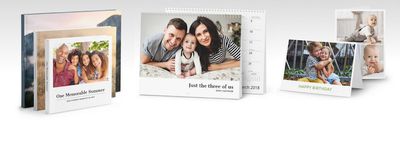
mimeo photosThis means that those users who opted for Apple's printing service in the past will now be able to transition to Mimeo Photos and its macOS extension to find all of the features that they're used to. Specifically, in Mimeo Photos the company says customers will now find design themes, product sets, templates, book sizes, materials, and print quality that is all "the same" as Apple's Photo Books service.

"This is a real opportunity for us to expand our successes as a prominent Apple Photos extension since the beginning," said John Delbridge, CEO, Mimeo. "We are really excited to see an increase in demand from countries like Australia and Japan in addition to our strong US customer base."

The company points out that in addition to the same Apple themes, book formats, and other materials now found within the extension, Mimeo Photos also offers a few other features for designing and creating physical photo books, cards, and calendars. Users can crop and move photos easily with in-depth transformation tools; write personalized texts in numerous fonts, colors, and sizes; add colors into pages with various background options; and choose from a "large variety" of layouts.

Pricing for the two services also appears largely similar, with Mimeo Photo's softcover landscape books starting at $9.99 in a medium size and increasing to $49.99 for extra large hardcovers. There are also calendars available for $19.99 and cards starting at $0.99, just like Apple Photo Books.

Those interested can download Mimeo Photos for free on the Mac App Store [Direct Link].

Top Rated Comments

robbysibrahim Avatar
103 months ago
That sucks, I love the photo books from Apple! We get them made every year
I have good news for you mate! https://www.macrumors.com/2018/08/02/mimeo-photos-apple-photo-books/
Score: 3 Votes (Like | Disagree)
103 months ago
That sucks, I love the photo books from Apple! We get them made every year
Score: 3 Votes (Like | Disagree)
103 months ago
How does the quality compare to Motif (which I believe was also an Apple's printing partner before it launched an extension)?
Anyone have experience with both Mimeo and Motif photos?
After trying both Mimeo Photos and Motif, I personally prefer Mimeo Photos for their book quality, layouts, design and overall easy to use interface! Motif gave me very limited creative freedom to design my pages the way I wanted them to look. With Mimeo, I was able to move photos and text freely around the page for a look and feel I envisioned.

Hope that helps!
Score: 3 Votes (Like | Disagree)
WarHeadz Avatar
103 months ago
I wish there was an iOS version.
Score: 3 Votes (Like | Disagree)
103 months ago
Even if the hard copy books are the same as they were before, this extension system no longer allows you to export the album to PDF, or am I missing something? I like keeping a pdf version of the hard copy albums that I order. Or is this a feature that was removed at the time of the Photos introduction?
Score: 2 Votes (Like | Disagree)
103 months ago
I have been experimenting with a few photobook services and, so far, Mimeo looks to be the most promising. I have not had an order printed so cannot comment on the quality of the end product.

In terms of ease of use, while it does have similarities to the Apple system found in Aperture or Photos there are some features I would like to see added.

A wider range of backgrounds, not just solid colours e.g Mixbooks has much better backgrounds available. I can install my own but the Mixbook system is more convenient.

Print PDFs and import PDFs from e.g. Aperture.

Re-order single pages not just a double page.

Round trip editing from Mimeo - Editor-Mimeo. i.e. be able to click on an image in Mimeo, have it open in a photo editor, make changes and then save with those changes immediately visible in Mimeo.
Score: 1 Votes (Like | Disagree)

Popular Stories

iCloud iPhone 17 Pro

iPhone Users Who Pay for iCloud Storage Get Two New Perks on iOS 27

Thursday July 2, 2026 6:10 am PDT by
If you pay for certain iCloud+ storage plans beyond the 5GB that Apple offers for free, you will receive two more perks on iOS 27 at no additional cost. A summary of the two new iCloud+ perks on iOS 27:Increased daily usage limits for some new Apple Intelligence features, including image generation in the revamped Image Playground app. HomeKit Secure Video cameras receive generated video...
iPhone 4 on Black Feature

Apple Facing One of Its Worst Leaks Since the iPhone 4

Thursday July 2, 2026 9:53 am PDT by
Apple supplier Tata Electronics recently suffered a cyberattack that resulted in thousands of confidential files being published on the dark web, and this reportedly included some photos and documents related to the upcoming iPhone 18 Pro. We have elected not to share any of the leaked photos in this story due to the illegal nature in which they were obtained, but they can easily be found...
American Express Gold Apple Pay Feature

American Express Announces New Apple Pay Feature

Tuesday June 30, 2026 10:27 am PDT by
American Express today announced that you can now redeem Membership Rewards points when checking out with Apple Pay on the web and in apps on the iPhone and iPad. When checking out with Apple Pay on iOS 18 or iPadOS 18 or later, tap on your eligible American Express card (Platinum, Gold, Green, and others) and select the Membership Rewards points option. You can use points to cover all or...
















