Apple Offering 30-Minute One-on-One Phone Lessons on Editing Images With Photos App - MacRumorsOpen MenuShow RoundupsShow Forums menuVisit ForumsOpen Sidebar
Skip to Content

Apple Offering 30-Minute One-on-One Phone Lessons on Editing Images With Photos App

Apple recently started offering customers one-on-one phone-based tutorial sessions with a "Photos expert," allowing them to receive training on using the image editing tools built into the Photos app.

According to a new support document, Apple users in the United States can sign up for a 30 minute session with an Apple Support Advisor that's an expert in "using Photos to transform pictures from good to amazing."

photosappapple
It's not clear how useful these sessions will be for customers as they seem to be conducted over the phone with no visual aid included.

You'll have 30 minutes one-on-one with a Photos expert who'll describe how to edit pictures from your own collection. They'll tailor the session to your skill level and show you how to get the results you want.

The support document instructs customers to update their Macs and iOS devices to the latest versions and call using speakerphone or headphones for hands-free access to editing tools while talking to an advisor.

Apple says that customers will learn about all of the editing tools that Photos offers, from Auto Enhance to detailed color and light adjustments. The lesson will also cover editing Live Photos and images taken in Portrait mode along with tools like cropping, filters, and more.

While phone-based Photos app tutorials appear to be a new offering, Apple has long offered online lessons for new device purchasers.

The Personal Setup feature, for example, lets new device owners get help from Apple in store or online, with Apple support staff helping users find apps, personalize their devices, and discover key features.

On the iPhone, for example, Personal Setup covers details like transferring contacts, setting up email accounts, and using Find My iPhone, plus it includes "handy camera tips" and App Store suggestions.

Apple also hosts many "Today at Apple" training sessions in its online stores on topics like editing videos, getting started with coding, shooting photos on iPhone, photo walks that focus on photography tips, and more.

Apple's new online Photos session appears to be something of an online extension of Today at Apple and the Personal Setup process, with Apple perhaps planning to extend these online tutorials to other topics in the future.

Popular Stories

iphone duo facetime

iPhone Duo's Hidden FaceTime Camera Takes 'Trash' Photos

Wednesday October 21, 2026 11:36 am PDT by
The iPhone Duo's inner screen has an under-display front camera that's largely hidden from view. It's the first time we've seen an under-display camera on an iPhone, and it turns out there's a reason Apple hasn't used the technology before. Apple said the camera offers 1080p video recording, but didn't mention photo quality. Gizmodo said it's a 4-megapixel camera and described the photos as...
homeview faces

HomeView's Faces Include Snoopy, Photos, and Interactive Artwork

Wednesday October 14, 2026 4:00 am PDT by
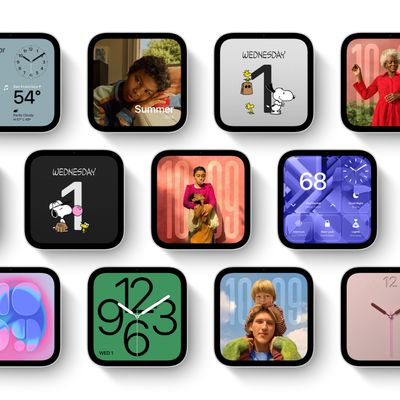
Apple's HomeView includes customizable faces for photos, animations, and smart home controls. Faces Apple has named so far include: Photos Flow Snoopy Calendar Weather Home Modular Home Camera Other clock and widget layouts appear in Apple's promotional images, but have not yet been named. Apple says that selected faces change throughout the day, with different appearances...
apple pro tell logo

Apple Launching Five New Products Today

Thursday November 5, 2026 12:59 am PST by
Apple is launching five new products on Friday, November 6, following pre-orders that opened last week, including its first touchscreen MacBook Pro models. The following new products will be available from today: iPad mini with OLED display and A20 Pro chip iMac with M6 chip 14-inch MacBook Pro with M6 chip 14-inch MacBook Pro with OLED touchscreen 16-inch MacBook Pro with OLED...

Top Rated Comments

Pangalactic Avatar
107 months ago
Apple says that customers will learn about all of the editing tools that Photos offers, from Auto Enhance to detailed color
- And now, sir, please press the auto to enhance button
- Done
- Congratulations, you have just mastered auto enhancing! That will be $99.99 for this lesson. Next, we will cover how to automatically adjust exposure using the "automatically adjust exposure" button
Score: 13 Votes (Like | Disagree)
macduke Avatar
107 months ago
I learned by dragging around sliders until I learned what did what. From there it's pretty easy to adjust things until the photo looks better.

The difficult part is taking the photo and where most people should be spending 90% of their time learning to improve. It's far more important to learn how light works before trying to edit a photo. Garbage in, garbage out. Though I'm still amazed at how far you can push a modern RAW. But even the best camera can't save a photo with splotchy light all over someone's face, and exposing properly the first time will make editing MUCH easier.

Most people could also improve their photos massively if they got closer to their subject and zoomed with their feet. Move around a lot when you take photos and try different perspectives and you'll learn a lot faster. Get down on the ground. Climb up somewhere high. Walk around your subject and watch how the various forms created by lines of contrast and curvature interact with elements in the background to create visual movement and interest. Always pay attention to the background when shooting and notice how that changes the photo. Lastly, the single most important thing that most people can do to improve: stop centering your subject in every single photo. Look up the rule of thirds and the golden ratio.
Score: 9 Votes (Like | Disagree)
Ohheyyou Avatar
107 months ago
I have experienced these sessions and they are awesome! They actually will set up a screen sharing session so the “no visuals” is very incorrect. The advisor screenshared and I picked one of my favorite photos to edit with them. It was cool with their arrow darting around and showing me what to try to modify in my photo. Like yes it’s free with a new device that has Apple care
Score: 5 Votes (Like | Disagree)
tobefirst ⚽️ Avatar
107 months ago
When I got my Apple Watch last fall, they offered me a one-on-one training over the phone. It did also consist of a visual component through an online portal of some kind where I could see the Apple rep's watch. Worked pretty well. It sort of sounds like this would be similar?
Score: 4 Votes (Like | Disagree)
neonart Avatar
107 months ago
Whoohoo. :rolleyes: Still using Aperture. Hopelessly hoping Photos gets a pro update to match the simplicity and power Aperture had (has).


Score: 3 Votes (Like | Disagree)
107 months ago
Gimmicks.. just offer youtube videos on this or show what are the best videos to learn photos and get done with it. Have those Geniuses reduce turn around time for other support requests!
Score: 2 Votes (Like | Disagree)
Latest Stories
Siri AI Rumored to Become 'More Like an Agent' as Early as Next Year
3 hours ago
Apple Taking New Approach to Developing iOS 28 and macOS 28
5 hours ago
Early Apple Black Friday Deals on Apple Watch, MacBook Air, and More
1 day ago
'Backglow' Lets You Customize New MacBook Pro's Glowing Apple Logo
1 day ago
Top Stories: Apple Product Launches, iOS 27.3 Beta, and More
1 day ago
More Fun iPhone Duo Apps: 30 New Picks to Try
2 days ago
Hands-On With Apple's New OLED Touchscreen MacBook Pro
2 days ago
Apple Store With All-New Design Opening Soon in Southern California
2 days ago
Control the Glowing Apple Logo on Your New MacBook Pro
2 days ago
Apple Shares New 'Apple Card: Apply and Use in Minutes' Ad
2 days ago
Apple Says More Than 100,000 Apps Optimized for iPhone Duo, Here's What's Still Missing
2 days ago
Early Black Friday Deals Kickoff With Steep Discounts on Apple Watch Ultras and More
2 days ago
The MacRumors Show: iOS 27.3 Looks Like a Huge Update
2 days ago
Best Buy's Black Friday Event Begins With Sitewide Savings on Apple, TVs, More
2 days ago
Apple Releasing Yet Another Two New Products Next Week
2 days ago
MacBook Air Drops to Lowest Price in Months With Amazon's $250 Discount
2 days ago
Apple Rumored to Drop the iPhone's Action Button Next Year
2 days ago
Apple's Extended Return Policy Now in Effect for 2026 Holiday Season
2 days ago
Apple Music Classical Updated With New Icon and Refreshed Design
2 days ago
OLED iPad Mini, M6 iMac, and New MacBook Pros Available From Today
2 days ago
Apple Surveys iPhone Duo Buyers About Crease and Camera
3 days ago
Apple's First Touchscreen Mac is Now Arriving to Customers
3 days ago
Claude Gets Personal Finance Feature With Bank Account Linking
3 days ago
Apple Arcade Adds Crossy Road Rush and NBA 2K27
3 days ago
Apple's New HomeView Smart Home Hub: Here's How Much RAM It Has
3 days ago
iPad Mini vs. iPad Air Buyer's Guide: Now Just $50 Apart
3 days ago
First iOS 27.3 and macOS Golden Gate 27.3 Public Betas Now Available
3 days ago
Apple Announces a New Mac Sales Record
3 days ago
Paid $200 for Logic Pro? Apple Says You Won't Get This New Feature
3 days ago
Instagram's Edits Video Editor is Now Available on Mac
3 days ago








































