

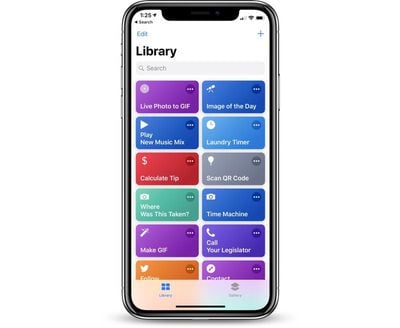
Alongside the release of iOS 12, watchOS 5, and tvOS 12, Apple today officially launched the Shortcuts app for iOS devices.
On iPhones and iPads running iOS 12, the Shortcuts app can be used to create multi-step shortcuts using first and third-party apps that can be activated by Siri voice command.
So, for example, you can create a shortcut to do something like turn on the thermostat at home using the Nest app, text your roommate that you're on the way with Messages, and open up the Maps app with directions home all with a single "I'm going home" Siri command.
Shortcuts are deeply customizable, with third-party apps able to expose a series of quick actions to Siri that can be incorporated into your Shortcuts recipes. Starting today, thousands of apps are releasing updates with Siri Shortcuts support, giving us our first real look at all of the things that shortcuts can do. Apple's release notes for the Shortcuts app are below:
Siri Shortcuts deliver a quick way to get things done with your apps with just a tap or by asking Siri. The Shortcuts app enables you to create personal shortcuts with multiple steps from your favorite apps. Start from hundreds of examples in the Gallery or drag and drop to create your own.
Shortcuts includes over 300 built-in actions and works with many of your favorite apps including Contacts, Calendar, Maps, Music, Photos, Camera, Reminders, Safari, Health as well as any app that supports Siri Shortcuts.
Use the Shortcuts app to:
- Get directions home, send your ETA and start listening to the news, just by asking Siri
- Add a home screen icon that calls a loved one
- Make animated GIFs
- Make PDFs from Safari or any app with a share sheet
- Get directions to the nearest coffee shop in one tap
- Tweet the song you're listening to
- Get all of the images on a web page
- Send a message including the last screenshot you took
- And so much more...Shortcuts can be launched from the Today widget, from Search or by asking Siri. You can even add an app icon to your home screen for your favorite Shortcuts.
Shortcuts opens up incredible possibilities to automate things you do regularly on your iPhone and iPad.
The new Shortcuts app was based on the Workflow app that Apple acquired last year, and the Workflow app been replaced with Shortcuts. Shortcuts can be downloaded from the App Store for free starting now. [Direct Link]




















Top Rated Comments
Not much of a "it just works" mindset, imho. But I am just now looking at the app for the first time.
https://sharecuts.app/
enjoy!
This is literally something I'd love to set up a shortcut for as I own a Nest thermostat. I've been trying to do this in the app for 5 minutes. Either this is false advertising or not intuitive.
Hope my iPhone Xs will be much better as the above is just crap imo. (iP6S now).