

Hands-On With the New Depth Control Feature in iPhone XS and XS Max - MacRumorsOpen MenuShow RoundupsShow Forums menuVisit ForumsOpen Sidebar
Skip to Content

Hands-On With the New Depth Control Feature in iPhone XS and XS Max

Apple's iPhone XS, XS Max, and upcoming XR come equipped with a new Depth Control feature enabled through camera upgrades that include a new image signal processor, an improved sensor, and the A12 Bionic chip with next-generation Neural Engine.

Depth Control, which we've featured in the video below, lets you adjust the amount of blurring in the background of your Portrait Mode images, giving you more control over how your images come out.


Depth Control can be accessed after you take a Portrait Mode image by tapping on the "Edit" button of a Portrait Mode photo in the Photos app. At the bottom of the editing interface, you'll see a new Depth slider, which is what you use to adjust the blurring or depth of field of the image.
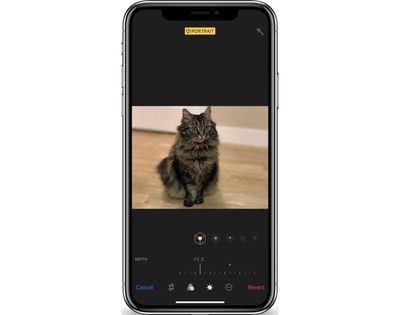
depthcontroloptions
In a traditional camera, a larger aperture means more background blur and a shallower depth of field, while a smaller aperture results in less background blurring. This system is what Apple is mimicking with Depth Control.

depthcontrolnone

No background blurring with Depth Control set at f/16

If you're new to photography, it's a bit confusing, but a larger aperture is represented by a smaller number, while a smaller aperture is represented by a larger number. So in the Depth Control slider, which ranges from f/1.4 to f/16, f/1.4 is the maximum amount of blur while f/16 essentially eliminates all background blur for an image that's sharp throughout.

depthcontroldefault

Default/medium Portrait Mode background blurring with Depth Control set at f/4.5

By default, all Portrait Mode images on iPhone XS and XS Max start at f/4.5, and from there, you can move the slider along the bottom to the left or the right to add more or less background blur. Being able to adjust the depth of field is useful because you can tweak exactly what you want blurred, and it can save some photos that otherwise would have had key details (like the edges of hair or fur) blurred out by Apple's Portrait Mode software.

depthcontrolfull

Maximum background blurring with Depth Control set at f/1.4

Depth Control is limited to Portrait Mode images taken with the front or rear-facing cameras because there needs to be blur to adjust in the image. Right now, editing the depth of a photo is limited to images that have already been captured, but starting in iOS 12.1, it will work in real time too.

In the iOS 12.1 beta, when capturing a Portrait Mode image with the front or rear facing camera, you can tap on the little "F" in the upper right hand corner of the display to access the Depth Control slider to see how more or less background blur looks in real time before taking an image. The camera app will also remember your preferred Depth Control settings from photo to photo, so you can always set it at the depth of field that you like best.
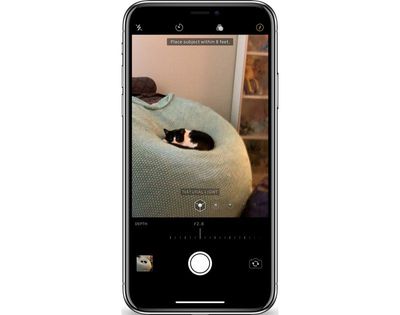
depthcontrollive
Live Depth Control lets you get the perfect angle and the perfect amount of depth for the portrait that you want to capture so you can make all of your real-time adjustments before snapping the photo.

What do you think of the Depth Control feature in the iPhone XS and XS Max? Let us know in the comments.


Related Forum: iPhone

Popular Stories

Apple Card iPhone 16 Pro Feature

Apple Card Promo to Offer Free AirPods Pro 3

Friday May 15, 2026 8:59 am PDT by
Starting as early as next week, customers who sign up for an Apple Card at Apple's retail stores in the U.S. will receive $249 cash back when they purchase AirPods Pro 3, according to Bloomberg's Mark Gurman. The promotion has yet to be officially announced by Apple, so exact terms and conditions are not available at this time. AirPods Pro 3 are priced at $249 in the U.S., so customers who...
Apple WWDC25 iOS 26 CarPlay Light mode 250609

Six Popular iPhone Apps Now Available on CarPlay

Thursday May 14, 2026 9:10 am PDT by
Apple's CarPlay system for accessing iPhone apps on a vehicle's dashboard screen has received six popular apps in recent weeks: ChatGPT, Perplexity, Grok, Google Meet, WhatsApp, and the indie artist streaming platform Audiomack. Make sure you have the latest version of each app and they will automatically appear on CarPlay. ChatGPT Starting with iOS 26.4, CarPlay supports voice-based...
ipad mini 7 blue

OLED iPad Mini: Release Date, Pricing, and What to Expect

Thursday May 14, 2026 5:08 am PDT by
According to the latest rumors, Apple is close to launching its next-generation iPad mini. So what should we expect from the successor to the iPad mini 7 that Apple released over a year ago? Read on to find out. Processor and Performance Apple is working on a next-generation version of the iPad mini (codename J510/J511) that features the A19 Pro chip, according to information found in code...

Top Rated Comments

AvisDeene Avatar
100 months ago
I want to pet that marvellously fluffy cat.
Score: 31 Votes (Like | Disagree)
FX120 Avatar
100 months ago
It looks awful.
Score: 26 Votes (Like | Disagree)
routine_analyst Avatar
100 months ago
Still looks like fake bokeh or someone with really gimp photoshop skillz.
Score: 14 Votes (Like | Disagree)
100 months ago
How is this any different from what Focos already does on the X?
Score: 14 Votes (Like | Disagree)
MacWorld78 Avatar
100 months ago
Apple, i find really hard to believe that you need to upgrad Iphone Xs or MAX in order to get this feature Depth Control, where i could do so easily using this app called "FOCOS" that will do the trick as well...

This can be done mostly software based not the hardware.
Score: 12 Votes (Like | Disagree)
100 months ago
It seems to me that the effect was done with software algorithmically after the images were capture. Look at the hair around the edges. It is not the same as true optical depth of field achieved by opening/closing the lens aperture.

If that’s the case, I consider this as a gimmick. Any serious photographer will snicker at it.
I'm a serious photographer, and I don't snicker at it. Nobody is saying it's a replacement for a nice wide lens, but it definitely does an acceptable job - and at times can look excellent.
Score: 11 Votes (Like | Disagree)















